Windows 11 has tabs in the file explorer therefore it is superior
Comfortable-Cap2284
Old is gold
DrKrFfXx
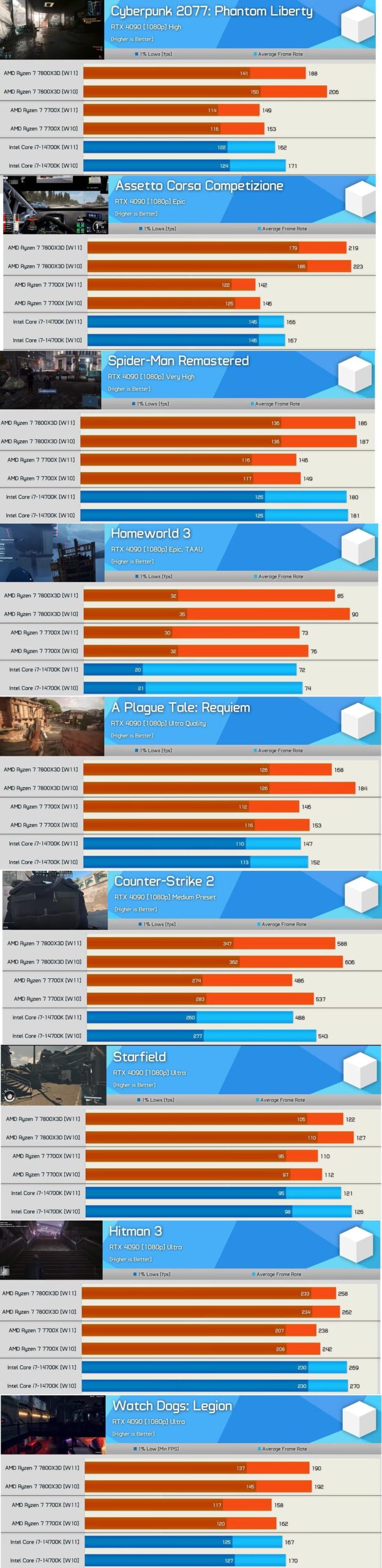
1-2 outliers, rest are statistical ties.
I would be more interested in 0.1% lows, stuttering is a more annoying issue in everything PC.
TheJellyGoo
I wouldn’t read too much into it. Quite a few variables that make this comparison just a nice but anecdotal data set.
Spazzticus
No it’s not according to graphs you’ve posted, it’s either neck and neck, within margin of error or some outliers that are closer to 10% more performant. That is NOT consistent…
Ni_Ce_
W11 eleven is fine. Just stop acting like the old one is always better.
Edgaras1103
No it’s not. Outliers don’t mean shit
jamzex
People immediately throwing these to “statistical outliers” and “margin of error” are ignoring the fact HUB does several runs of testing, these are the average results across several runs.
For better performance in W11 you can disable virtualisation tech in your BIOS iirc.
Bad_Hominid
Does this hold true at higher resolutions? I haven’t gamed at 1080p in more than a decade.
B4RLx
If you’re playing CSGO at medium settings with a 4090 then you have a lot more issues than what OS you’re using……..
El_Mariachi_Vive
What if Windows 11 is performing as I want it to? Should I switch back anyway because of this new, Earth-shattering data?
iAmGats
That’s not enough sample to make a conclusion.
Hrmerder
4090 at 1080p? C’mon OP these numbers mean jack.
Akash7713
Less Ai bullcrap = W
LJBrooker
I would just suggest that these tests were all at 1080p with a 4090.
Almost every single one is CPU limited. I’m not shocked that the “more advanced” OS uses more CPU resource.
I’d like to see the differences in GPU limited scenarios, as let’s be honest, that’s where most of us spend our time, and I’d be fairly confident the difference evaporates.
chapl66
They probably Installed w11 with no tweaks to anything or turning off bloat ware
rektwrektum
i hit update instead of shutdown one night last week and was too scared to try and abort it as i’m still learning about PC OS things and thought i could brick it,stupid of me as i had windows 11 all downloaded and ready to go for when the support for 10 ends next year and was gonna wait it out until then, but at least its done and out of the way, i’m an 11 user now and i just have to learn to live with it, so far the level of bloatware is INSANE and it kinda feels abit less snappy to use, and it deffo uses alot more system resources than 10 ever did! haven’t noticed any changes so far when i run games though, generally seems OK but i do miss the old tried and trusted 10
Cultural_Parfait7866
Meh such minimal differences that it wouldn’t really matter
Homicidal_Pingu
It’s really not enough to bother with
SunbleachedAngel
It’s one set of benchmarks from one person with 3 configurations, it’s something but it’s not some silver bullet you want it to be
Onion_Cutter_ninja
Now compare proton (SteamOS) with windows
shutdown-s
Just debloat your installs..
thisiscrazyyyyyyy
So these were to test the CPU and how many frames you can squeeze out of it compared to windows 10?
I’d honestly say it’s kind of expected given how every single update essentially ‘slows down’ your PC.
Do it with Win7, XP (probably not compatible with anything), and see what ya get instead.
I think it’s pretty agreed on that whenever u add more stuff to an OS it’s likely to slow it down just a tad bit, and this test was just testing the absolute fastest CPU times.
So in a real world case (where they don’t run lowest settings with a 4090) it practically shouldn’t be noticeable at all?
Win11 does have some pretty useful new features added to it, sure it’s a bit ehhh, but it’s going to be supported fully with the latest features and everything will just work. (even if it doesn’t an update will roll around eventually)
Lmk if I’m wrong tho, or you have different opinions on this, I’m up to hearing them! 🙂
KeycapS_
Tabs and windowed optimizations is the only reason I use 11.
d00mt0mb
Besides CS2 which you’re already getting hundreds of FPS in, the impact is like 1-2%
mpt11
So barely anything in it, nothing that you’d notice at those sort of frame rates.
dryphtyr
Oh no! Anyway…
261846
Bro just cherry picked the only times it makes a difference expecting to convince people to pick between two near identical OS’s
BagelMaster4107
These are outliers. W11 is generally the same in terms of performance. Also, don’t say “consistently” and then show 3 examples out of hundreds.
ACrucialTech
That’s all the analytics and spying programs running in the background bogging it down.
Morall_tach
There’s not enough data here to draw conclusions. How were these tests run? Clean OS? Are these the average of multiple runs or just single runs? What’s the margin of error on these runs? Were temperatures consistent across all of these runs?
ThisIsNotMyPornVideo
Im all for shitting on win 11, but outside of 1 or 2 examples here, everything is in the margin of error.
also assuming these two are also basic installs, you can get win 11 the same, if not more performance since win 11 is by default a lot more bloated.
And while win 11 is more annoying to use by default there are more than enough tools available to make it similar to older windows version


32 Comments
Windows 11 has tabs in the file explorer therefore it is superior
Old is gold
1-2 outliers, rest are statistical ties.
I would be more interested in 0.1% lows, stuttering is a more annoying issue in everything PC.
I wouldn’t read too much into it. Quite a few variables that make this comparison just a nice but anecdotal data set.
No it’s not according to graphs you’ve posted, it’s either neck and neck, within margin of error or some outliers that are closer to 10% more performant. That is NOT consistent…
W11 eleven is fine. Just stop acting like the old one is always better.
No it’s not. Outliers don’t mean shit
People immediately throwing these to “statistical outliers” and “margin of error” are ignoring the fact HUB does several runs of testing, these are the average results across several runs.
For better performance in W11 you can disable virtualisation tech in your BIOS iirc.
Does this hold true at higher resolutions? I haven’t gamed at 1080p in more than a decade.
If you’re playing CSGO at medium settings with a 4090 then you have a lot more issues than what OS you’re using……..
What if Windows 11 is performing as I want it to? Should I switch back anyway because of this new, Earth-shattering data?
That’s not enough sample to make a conclusion.
4090 at 1080p? C’mon OP these numbers mean jack.
Less Ai bullcrap = W
I would just suggest that these tests were all at 1080p with a 4090.
Almost every single one is CPU limited. I’m not shocked that the “more advanced” OS uses more CPU resource.
I’d like to see the differences in GPU limited scenarios, as let’s be honest, that’s where most of us spend our time, and I’d be fairly confident the difference evaporates.
They probably Installed w11 with no tweaks to anything or turning off bloat ware
i hit update instead of shutdown one night last week and was too scared to try and abort it as i’m still learning about PC OS things and thought i could brick it,stupid of me as i had windows 11 all downloaded and ready to go for when the support for 10 ends next year and was gonna wait it out until then, but at least its done and out of the way, i’m an 11 user now and i just have to learn to live with it, so far the level of bloatware is INSANE and it kinda feels abit less snappy to use, and it deffo uses alot more system resources than 10 ever did! haven’t noticed any changes so far when i run games though, generally seems OK but i do miss the old tried and trusted 10
Meh such minimal differences that it wouldn’t really matter
It’s really not enough to bother with
It’s one set of benchmarks from one person with 3 configurations, it’s something but it’s not some silver bullet you want it to be
Now compare proton (SteamOS) with windows
Just debloat your installs..
So these were to test the CPU and how many frames you can squeeze out of it compared to windows 10?
I’d honestly say it’s kind of expected given how every single update essentially ‘slows down’ your PC.
Do it with Win7, XP (probably not compatible with anything), and see what ya get instead.
I think it’s pretty agreed on that whenever u add more stuff to an OS it’s likely to slow it down just a tad bit, and this test was just testing the absolute fastest CPU times.
So in a real world case (where they don’t run lowest settings with a 4090) it practically shouldn’t be noticeable at all?
Win11 does have some pretty useful new features added to it, sure it’s a bit ehhh, but it’s going to be supported fully with the latest features and everything will just work. (even if it doesn’t an update will roll around eventually)
Lmk if I’m wrong tho, or you have different opinions on this, I’m up to hearing them! 🙂
Tabs and windowed optimizations is the only reason I use 11.
Besides CS2 which you’re already getting hundreds of FPS in, the impact is like 1-2%
So barely anything in it, nothing that you’d notice at those sort of frame rates.
Oh no! Anyway…
Bro just cherry picked the only times it makes a difference expecting to convince people to pick between two near identical OS’s
These are outliers. W11 is generally the same in terms of performance. Also, don’t say “consistently” and then show 3 examples out of hundreds.
That’s all the analytics and spying programs running in the background bogging it down.
There’s not enough data here to draw conclusions. How were these tests run? Clean OS? Are these the average of multiple runs or just single runs? What’s the margin of error on these runs? Were temperatures consistent across all of these runs?
Im all for shitting on win 11, but outside of 1 or 2 examples here, everything is in the margin of error.
also assuming these two are also basic installs, you can get win 11 the same, if not more performance since win 11 is by default a lot more bloated.
And while win 11 is more annoying to use by default there are more than enough tools available to make it similar to older windows version