Original post linked [here](https://www.reddit.com/r/pcmasterrace/comments/tof74j/dual_75_4k_tv_floor_computing/). I wasn’t sure it’s different enough to warrant another post so I just haven’t, but my original photo seems to be making the rounds again and recently a few people have asked me for an update so figured may as well I guess.
Between then and now, because of all the discourse on the floor ergonomics/practicality I figured I may as well just give it a go again, so for about a year I actually changed this setup to a normal muggle height chair and raised everything else accordingly. Did a lot of tuning/tweaking during this period but in the end it reminded/confirmed for me all the reasons I do actually just prefer the floor and so took it all back down end of last year.
I’ve now learned from last time that people actually want setup details, so here are the the main changes from last time:
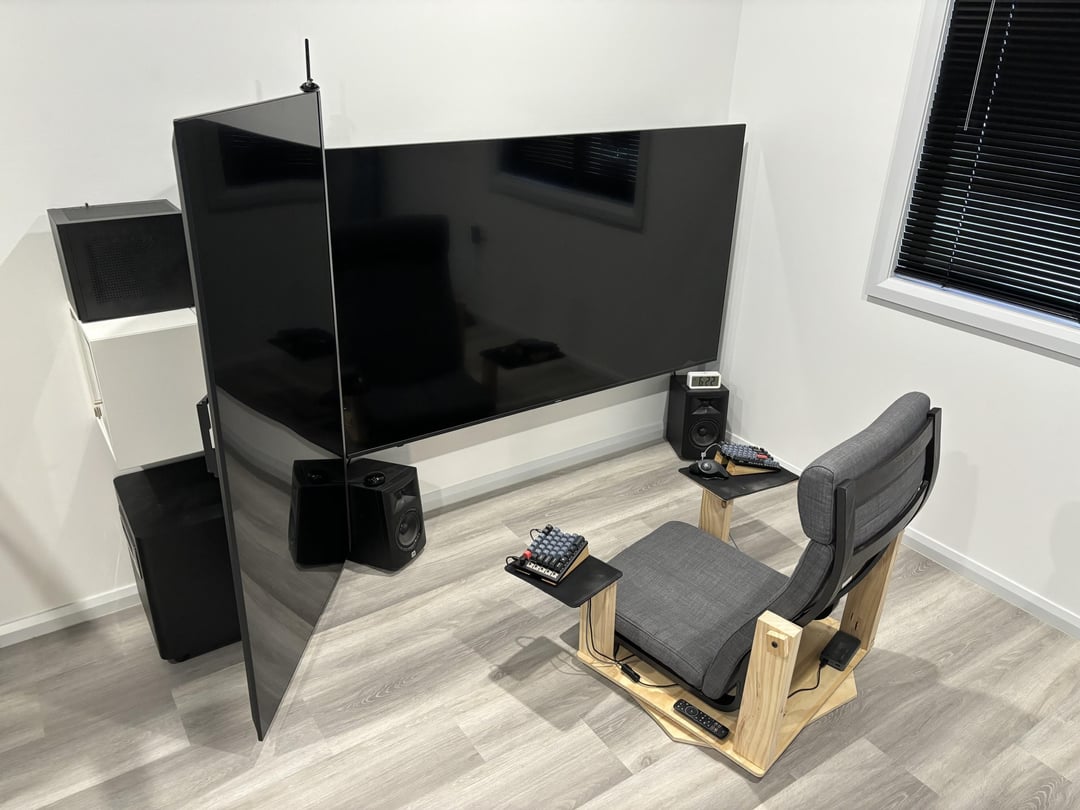
* Chair: Ikea Poang with a frame I made to be floor level and with a swivel. For the muggle height period this is the chair I went with because its construction was such that I could easily modify it how I needed, ie with side tables and a swivel base. I found it comfortable so I just repurposed it. I originally also had armrests that went the full length like when it was normal height, but turns out I actually find them to just be in the way and prefer having no obstruction there.
* Wall mounted. This is really the biggest change I like most. Having the floor clear, rather than the bases of the stands in the way is great for my QoL (I have a big thing about clear (and clean) floors without obstructions). Didn’t buy new brackets I just repurposed the relevant parts from the floor stands and wall mounted them. For the portrait screen I had to make my own thing out of steel brackets to be cantilevered off the wall, because I couldn’t find anything COTS with the required amount of extension off the wall but also actually looked solid enough at that amount of arm extension that I’d feel safe. Also I could then mount a little cabinet to it to contain all the cabling/accoutrement and to put the PC on top of.
* Keyboard: Keychron Q11. Pretty basic bitch option among the ergo landscape, but I’m not in the hobby and not really interested in making it a hobby, so just to try out the split form-factor I wasn’t really invested in doing a custom build or learning a new layout like most people in that scene. Since I took that photo at the start of this year I’ve done away with the tenting. I tried it for a while when I first got the keyboard just because it seems to be the thing everyone does with splits, but turns out I find it more comfortable to just have them flat. Plus it gets in the way of transitioning from the mouse because I have it in the middle rather than on the outside. Those wedges are now underneath the speakers to angle them up a little better.
* Bluetooth adapter: Handheld Scientific BT-500. The keyboard isn’t wireless so I have to use a device-side bluetooth adapter with a power bank so I can have clear space all around the chair with no cable to get in the way or trip on. This was actually kind of hard to find, where this seems to be the only COTS product that exists with this specific capability, and you can only special order directly from them as it’s not sold retail anywhere else.
* TVs/speakers/PC/mouse unchanged. Although I guess one thing worth mentioning is I added some smart switches and IR transmitter, so when the PC turns on/off it automatically turns the TVs and speakers on/off with it. There’s just an inline power meter on the PC plug where going above/below a threshold of Wattage triggers everything else.
If people want more pictures of specific stuff I can’t right now as I’m currently overseas (I really only spend about half the year here, which is also partly why not that much has changed about this setup). These photos are just what I happened to already have in my phone from when I sometimes take a photo to show a friend something in particular. The main photo of this post is actually from back in January.
Zatoichi80
Bonkers but in a fantatsic way!!
Apprehensive_Row_161
This would be a console gamers endgame setup
Special-Trouble8658
That looks nice
S4nctuary_
I am quite certain I saw a meme version of your setup or something very similar a day or two ago.
IfarmExpIRL
porn must be pretty damn intense.
reallyryan-1899
My eyes hurt just looking at it, I have a single 4K 144Hz Corsair monitor I couldn’t use anything bigger.
dmaxzach

Yurgin
Nice set up damn man. The only thing i dislike is the split keyboard but in this situation it works i guess
AVP2306
I too use poang. On the last picture, what kind of side arms are those for keyword and mouse, is it something custom that you built or are those available online somewhere?
GrimPieter
The amount of light would 100% rob me of my sleep if I’d use this before going to bed.
Ordinary_Character87
W movie
Ambitious_Jello
Way too much light to be practical. And if i have to move my neck to look from one end to the other then it’s too big
Slazagna
Man, you are gonna fuck your back up.
theSkareqro
Must be crossed eyed af looking at this. I mean it’s okay if you’re sitting a couple more ft back
zXerge
What was your previous set up? Or did you go straight to the end game?
frogmicky
So this is what the Matrix looks like irl.
f8Negative
Why u sit so close. The wall mount is sketchy.
TheRealJellona
Is that scene on the last pic from Aliens?
Juunlar
Definitely too close
Delicious-Disaster
This qualifies for r/malelivingspace
destronger
You have 2x 75” screens and you make the wall mount? I don’t trust the wood wall mount. Please get a legit extended arm wall mount.
nmiller248
Nice, and you have the best movie of all time playing. Thumbs up
bobalazs69
guy has too much $
GuildWars2Ftw
This is insane haha
RareSiren292
75″ and 4k is so low ppi. It’s fine for watching TV from 10 feet back but not for a computer monitor. It makes a 32″ 1080p monitor look good in comparison. If the tvs were 8k that would be fine because it would be like 117 ppi. Which is more then a 27″ 1440p monitor.
de4thqu3st
Is that actually how close you sit to those massive TVs? damn, I am having phantom neck and back pain

27 Comments
Original post linked [here](https://www.reddit.com/r/pcmasterrace/comments/tof74j/dual_75_4k_tv_floor_computing/). I wasn’t sure it’s different enough to warrant another post so I just haven’t, but my original photo seems to be making the rounds again and recently a few people have asked me for an update so figured may as well I guess.
Between then and now, because of all the discourse on the floor ergonomics/practicality I figured I may as well just give it a go again, so for about a year I actually changed this setup to a normal muggle height chair and raised everything else accordingly. Did a lot of tuning/tweaking during this period but in the end it reminded/confirmed for me all the reasons I do actually just prefer the floor and so took it all back down end of last year.
I’ve now learned from last time that people actually want setup details, so here are the the main changes from last time:
* Chair: Ikea Poang with a frame I made to be floor level and with a swivel. For the muggle height period this is the chair I went with because its construction was such that I could easily modify it how I needed, ie with side tables and a swivel base. I found it comfortable so I just repurposed it. I originally also had armrests that went the full length like when it was normal height, but turns out I actually find them to just be in the way and prefer having no obstruction there.
* Wall mounted. This is really the biggest change I like most. Having the floor clear, rather than the bases of the stands in the way is great for my QoL (I have a big thing about clear (and clean) floors without obstructions). Didn’t buy new brackets I just repurposed the relevant parts from the floor stands and wall mounted them. For the portrait screen I had to make my own thing out of steel brackets to be cantilevered off the wall, because I couldn’t find anything COTS with the required amount of extension off the wall but also actually looked solid enough at that amount of arm extension that I’d feel safe. Also I could then mount a little cabinet to it to contain all the cabling/accoutrement and to put the PC on top of.
* Keyboard: Keychron Q11. Pretty basic bitch option among the ergo landscape, but I’m not in the hobby and not really interested in making it a hobby, so just to try out the split form-factor I wasn’t really invested in doing a custom build or learning a new layout like most people in that scene. Since I took that photo at the start of this year I’ve done away with the tenting. I tried it for a while when I first got the keyboard just because it seems to be the thing everyone does with splits, but turns out I find it more comfortable to just have them flat. Plus it gets in the way of transitioning from the mouse because I have it in the middle rather than on the outside. Those wedges are now underneath the speakers to angle them up a little better.
* Bluetooth adapter: Handheld Scientific BT-500. The keyboard isn’t wireless so I have to use a device-side bluetooth adapter with a power bank so I can have clear space all around the chair with no cable to get in the way or trip on. This was actually kind of hard to find, where this seems to be the only COTS product that exists with this specific capability, and you can only special order directly from them as it’s not sold retail anywhere else.
* TVs/speakers/PC/mouse unchanged. Although I guess one thing worth mentioning is I added some smart switches and IR transmitter, so when the PC turns on/off it automatically turns the TVs and speakers on/off with it. There’s just an inline power meter on the PC plug where going above/below a threshold of Wattage triggers everything else.
If people want more pictures of specific stuff I can’t right now as I’m currently overseas (I really only spend about half the year here, which is also partly why not that much has changed about this setup). These photos are just what I happened to already have in my phone from when I sometimes take a photo to show a friend something in particular. The main photo of this post is actually from back in January.
Bonkers but in a fantatsic way!!
This would be a console gamers endgame setup
That looks nice
I am quite certain I saw a meme version of your setup or something very similar a day or two ago.
porn must be pretty damn intense.
My eyes hurt just looking at it, I have a single 4K 144Hz Corsair monitor I couldn’t use anything bigger.

Nice set up damn man. The only thing i dislike is the split keyboard but in this situation it works i guess
I too use poang. On the last picture, what kind of side arms are those for keyword and mouse, is it something custom that you built or are those available online somewhere?
The amount of light would 100% rob me of my sleep if I’d use this before going to bed.
W movie
Way too much light to be practical. And if i have to move my neck to look from one end to the other then it’s too big
Man, you are gonna fuck your back up.
Must be crossed eyed af looking at this. I mean it’s okay if you’re sitting a couple more ft back
What was your previous set up? Or did you go straight to the end game?
So this is what the Matrix looks like irl.
Why u sit so close. The wall mount is sketchy.
Is that scene on the last pic from Aliens?
Definitely too close
This qualifies for r/malelivingspace
You have 2x 75” screens and you make the wall mount? I don’t trust the wood wall mount. Please get a legit extended arm wall mount.
Nice, and you have the best movie of all time playing. Thumbs up
guy has too much $
This is insane haha
75″ and 4k is so low ppi. It’s fine for watching TV from 10 feet back but not for a computer monitor. It makes a 32″ 1080p monitor look good in comparison. If the tvs were 8k that would be fine because it would be like 117 ppi. Which is more then a 27″ 1440p monitor.
Is that actually how close you sit to those massive TVs? damn, I am having phantom neck and back pain