
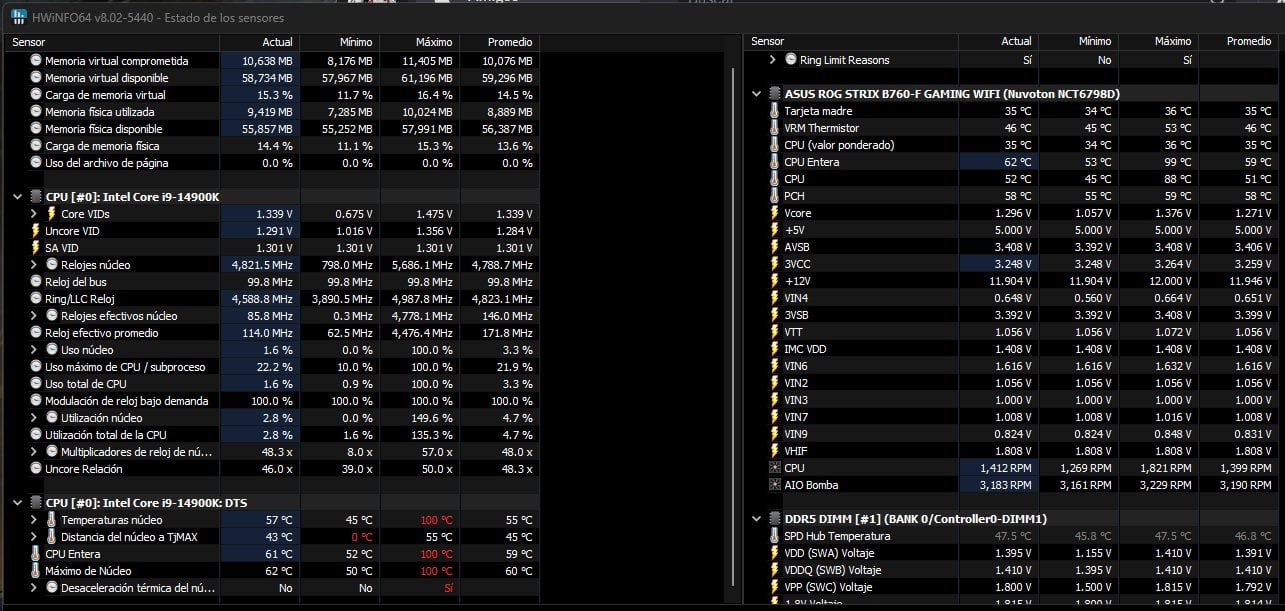
Hello! I'm right now using my 2nd 14900k after I RMA'ed the first one (got extremely degraded after using it for 6 months, BIOS was not updated and I didn't know anything about voltaging and stuff, so the chip ran wild and died :c )
I don't want the same to happen to the second one, and I've been trying to learn how to tune it properly until the microcode patch drops mid august since I need my PC for work! I've been searching and searching for solutions, but sadly I've not been able to fix it…
Here's the current build:
- MOBO: ASUS ROG STRIX B760-F
- CPU: i9 14900K
- GPU: RTX 2070 Super (next thing to upgrade…) -> Fans NOT pointing towards CPU
- AIO: Forgeon Azoth 360 -> Sucking air into the case
- RAM: 2 x Corsair DDR5 6400 32GB
- Fans: 3x front panel sucking air + 1 back fan pumping air out
Thing is that I've been trying to control the CPU temps with no results… Here's some HWInfo on IDLE https://ibb.co/4tf4g3v So yeah, 60º average, too wild imo, even knowing that this chip runs hot af. Here's an MSI afterburner graph on idle: https://ibb.co/Dpcnyzc. Also, here's power consumption during idle: https://ibb.co/BGfXSrN
I've also been using R23 to test things. Rn I'm getting around 35k. Temps go up until 100ºC. Here's some Hwinfo during test (BIOS config at the end of the post): https://ibb.co/hX2PQjk Rn system SEEMS stable, I've not been getting crashes nor BSOD with the current config. Here's power consumption during R23 test: https://ibb.co/QJdyFdh During gaming, temps tend to go between 75-80º, but it varies a lot depending on the game. RN my AIO Pump is set to max the whole time via Armoury Crate. Current ambient tempt is 38-39º, maybe 40º sometimes ? Playing around with some configs, the best idle tempt I've reached is 52º or so, but lost a lot of performance (even managed to get 20k on R23 LOL). Just in case, when I say Idle, I mean desktop with only test programs running.
Current config on bios:
- PL1 + PL2: 253W, ICCMax 307A
- XMP II enabled
- All Pcores sync to x57
- LL level 4 + ACLL and DCLL on AUTO
- ASUS ME Off
- Voltage offset -0,050V
- CEP off
- Bios updated!
I'm fairly new to all of this, I've always run PCs on stock settings, so I'm sorry if my config or settings are fked up or something, but I'm willing to learn! Thank you so much for the help in advance!
Things I've tried:
- Reinstalling AIO and repasting, didn't change tempts at all
- Making sure protective plastic of AIO was properly retired
- Checking the AIO pump was properly working (checked HwInfo and felt the heat inside one of the tubes)
- Bought a new thermal paste, thermal grizzly Kryonaut, arrives tomorrow…
- Played around with AC and DC loadlines, it was cool getting more points on R23 but honestly didn't change tempts at all and ended up staying with an offset, and don't have that much time to test hundreds of configs, tho LL4 + DCLL 1.02 + ACLL 0.12 seemed to be the best option for me
- Reducing PL to 180, only lost R23 points without better tempts
- Making sure no dust was blocking airflow, took off lateral panel to check if was an airflow problem, didn't help
Update: Changed W11 Power Plan to Balanced, changed Idle temperatures to 49-50º on idle https://ibb.co/3p4VfBv but R23 keeps hitting 100ºC, scoring 33k rn https://ibb.co/607tsYq
Edits: Typos and added info
5 Comments
I’m seeing 1.475 VIDs. That’s not good.
Use a good safe all core OC with far lower voltages.
Looks like you need a better AIO. It appears to be thermal throttling at 200w.
Otherwise all you can do is lower clocks which will lower voltage and power draw. You’ll probably need to go down quite a lot though (maybe 500 mhz) to get under 200w in R23.
Update: Changed W11 Power Plan to Balanced, changed Idle temperatures to 49-50º on idle [https://ibb.co/3p4VfBv](https://ibb.co/3p4VfBv) but R23 keeps hitting 100ºC, scoring 33k rn [https://ibb.co/607tsYq](https://ibb.co/607tsYq)
Edit: Wrong screenshot
https://youtu.be/B3EW5lRIZYc?si=LSgz1cxtmB4uSP7N
Cooling is definitely an issue. A 360mm AIO should keep 200W well away from thermal throttling at 100c.