From my experience, its because you dont have the original pic on your pc anymore
Font: Formatted my pc and then logged in with microsoft account. They will put everything back from before formatting, except wallpapers
Remmes-
Happens when the file is gone/missing.
rober9999
That happened to me for a really long time and never knew why until I updated to Windows 11
Throwaway_Mania8975
Common Windows bug. Just reapply the wallpaper and make sure you don’t delete it
collinbrison
The what the fuck at the top is a kicker 🤣
moon__lander
Haven’t seen windows do something like that since the XP
Left-oven47
Last time my wallpaper shat itself restarting DWM fixed it.
m270ras
no but that’s cool how do I replicate
blazblu82
Re-apply the wallpaper. Something about its location has changed and Windows doesn’t quite know what to do about it.
Mamichula56
You deleted the original image
jzemeocala
Herpes my friend……your computer has herpes.
Lucky for you it’s completely treatable now.
KKSFS1110
at least yours is smooth. i remember an old pc i had did the same, but got stuck too.
elletwerkfree
I had this problem for a few days and the solution was to reset my wallpaper settings to the default.
Cpt_Soaps
Honeslty that seems somewhat cool, anyway to replicate it?
Flo_oid
Don’t have the og pic anymore, or you moved where the pic was.
supertek
Waat
_Blue_Wall_
Your wallpaper file is probably missing
HankThrill69420
lol the pan out to the whole screen made me ugly laugh
sogwatchman
WAAT?
omnomnilikescandy
does your system crash shortly afterwards? This happened to me when the ssd wasnt connected properly
StuarPrincess9
Words at the top, Lol
chip_break
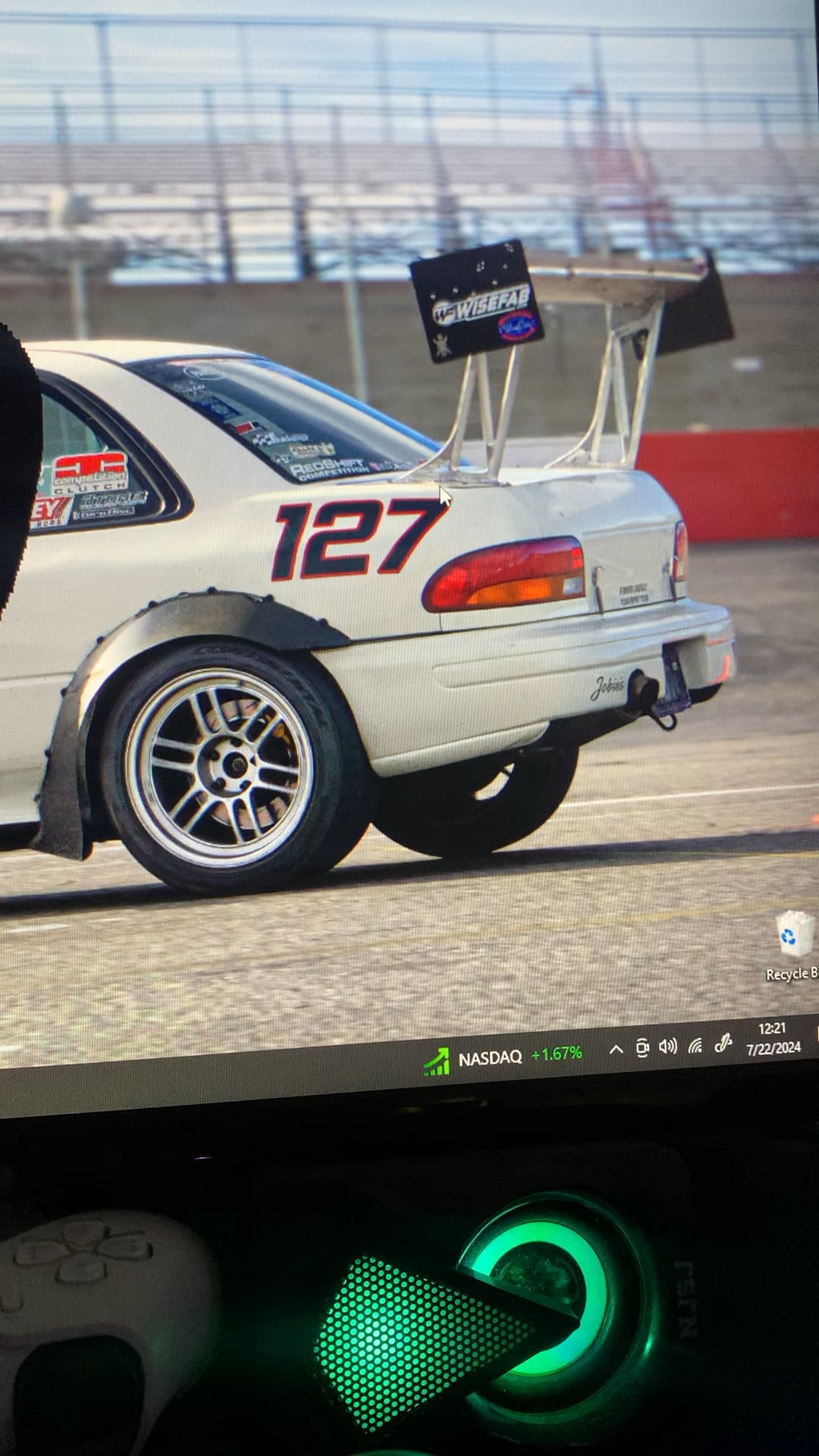
That GC subie is beautiful
UberChief90
Windows forgot where the pic was stored. So go into settings and set the pic again as your wallpaper to fix it.
skrena
Man I haven’t seen this happen since windows XP as a kid
CheshireTheLiar
I was told this is possibly a memory leak a while back.
It started after I installed Start11v2, but I think it was just the timing of it since I did a fresh format. I no longer have the issue, though.
On top of installing any O/S and driver updates, I did this:
1. Ran Windows Memory Diagnostic & restarted to check for issues.
2. Next, ran a DISM scan from Admin CMD Prompt:
dism /online /cleanup-image /restorehealth
3. Then, ran an SFC scan Admin CMD Prompt:
sfc /scannow
Edit: Reading other people’s comments, I’m curious if it is a missing file since I change my wallpaper frequently. I saw the one commented got down voted for saying they restarted Explorer.exe, which does help, but is only a temporary fix.
Unim8
I experienced something similar in the past. It might be because that your explorer exe might be corrupted or damaged. If this keeps happening, you problably should format your pc.
MysteryMilo
You can also fix this quickly by restarting explorer.exe in Task Manager.
Open File Explorer
Open Task Manager
In Task Manager, right-click File Explorer and choose Restart.
Your screen may turn black for a second while Explorer restarts.
zelmazam1
You have it saved as a .PMG instead of . PNG
Tank_610
Interactive wallpaper.
CordialChip86
peeling of the GPU from the textolite
TheRealMan150
The “What the fuck?” made me laugh lmao
osamaleo26
Live photoshop
chybapolewacy
10/10 post, no fix tho (have you tried updating drivers?)

35 Comments
From my experience, its because you dont have the original pic on your pc anymore
Font: Formatted my pc and then logged in with microsoft account. They will put everything back from before formatting, except wallpapers
Happens when the file is gone/missing.
That happened to me for a really long time and never knew why until I updated to Windows 11
Common Windows bug. Just reapply the wallpaper and make sure you don’t delete it
The what the fuck at the top is a kicker 🤣
Haven’t seen windows do something like that since the XP
Last time my wallpaper shat itself restarting DWM fixed it.
no but that’s cool how do I replicate
Re-apply the wallpaper. Something about its location has changed and Windows doesn’t quite know what to do about it.
You deleted the original image
Herpes my friend……your computer has herpes.
Lucky for you it’s completely treatable now.
at least yours is smooth. i remember an old pc i had did the same, but got stuck too.
I had this problem for a few days and the solution was to reset my wallpaper settings to the default.
Honeslty that seems somewhat cool, anyway to replicate it?
Don’t have the og pic anymore, or you moved where the pic was.
Waat
Your wallpaper file is probably missing
lol the pan out to the whole screen made me ugly laugh
WAAT?
does your system crash shortly afterwards? This happened to me when the ssd wasnt connected properly
Words at the top, Lol
That GC subie is beautiful
Windows forgot where the pic was stored. So go into settings and set the pic again as your wallpaper to fix it.
Man I haven’t seen this happen since windows XP as a kid
I was told this is possibly a memory leak a while back.
It started after I installed Start11v2, but I think it was just the timing of it since I did a fresh format. I no longer have the issue, though.
On top of installing any O/S and driver updates, I did this:
1. Ran Windows Memory Diagnostic & restarted to check for issues.
2. Next, ran a DISM scan from Admin CMD Prompt:
dism /online /cleanup-image /restorehealth
3. Then, ran an SFC scan Admin CMD Prompt:
sfc /scannow
Edit: Reading other people’s comments, I’m curious if it is a missing file since I change my wallpaper frequently. I saw the one commented got down voted for saying they restarted Explorer.exe, which does help, but is only a temporary fix.
I experienced something similar in the past. It might be because that your explorer exe might be corrupted or damaged. If this keeps happening, you problably should format your pc.
You can also fix this quickly by restarting explorer.exe in Task Manager.
Open File Explorer
Open Task Manager
In Task Manager, right-click File Explorer and choose Restart.
Your screen may turn black for a second while Explorer restarts.
You have it saved as a .PMG instead of . PNG
Interactive wallpaper.
peeling of the GPU from the textolite
The “What the fuck?” made me laugh lmao
Live photoshop
10/10 post, no fix tho (have you tried updating drivers?)
thats a nice impreza tho
I miss my GC subie.