I equate tweakers on computers to tuners for cars.
Always trying to get that lest little bit outta it.
For some people it is the thrill of the chase.
Bloved-Madman
Agree with the first sentence, the second sentence I don’t care much for, if you want to see your FPS and temps, that’s fine.
Old_Pension1785
Nah, I like my FPS counter
xxFaytus
I like to have them up so if something goes wrong, I can see what’s happening and that will help me troubleshoot the issue. I also like to monitor temps because I don’t want anything getting out of hand. To each their own, but having my fps and temps displayed during games don’t distract. It gives me peace of mind that mind complements are fine. Else I would stress about it.
To each their own.
Future-Bed-8521
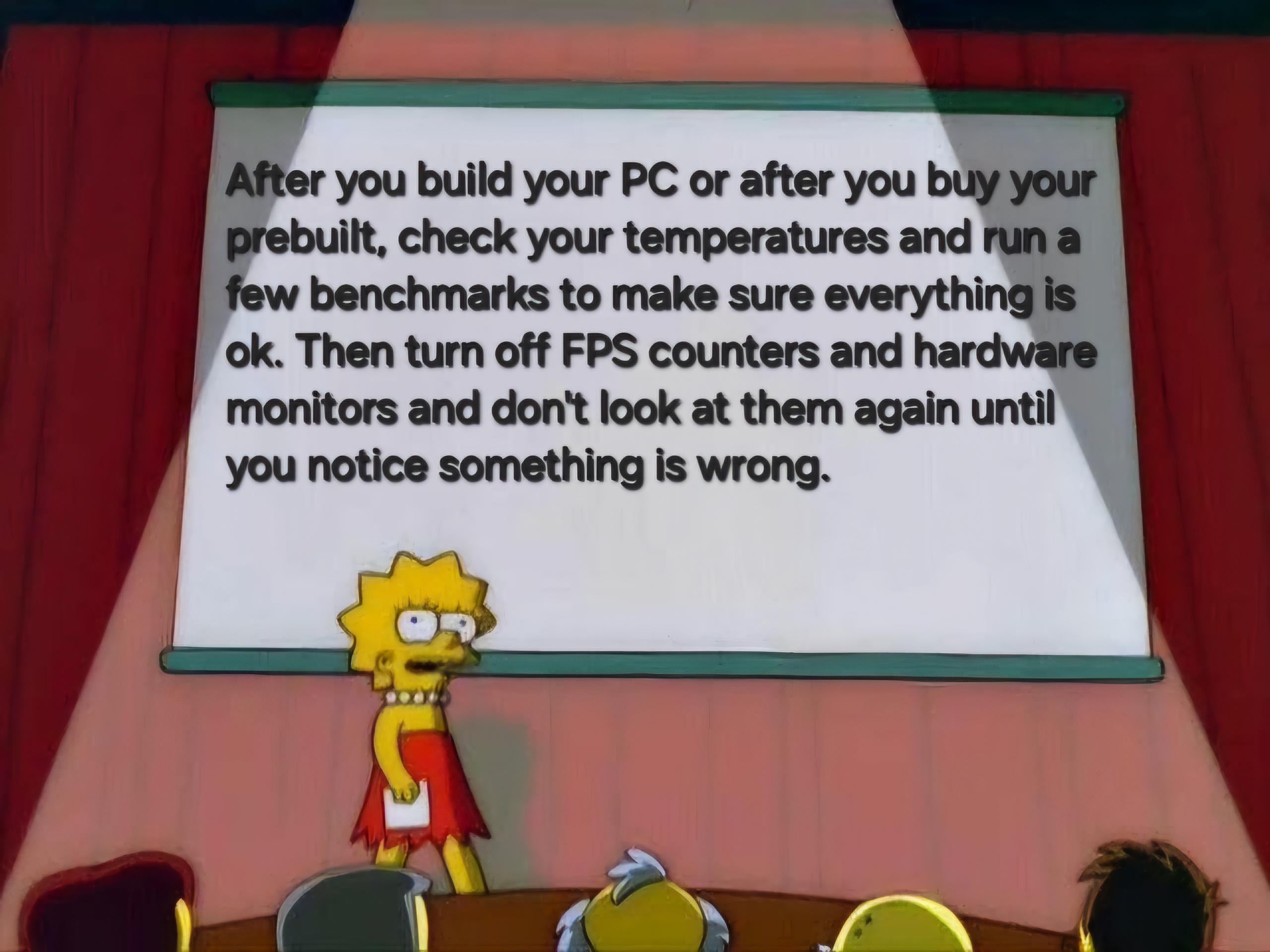
Useful tip
Material_Tax_4158
To be honest, gaming has been much better since i turned off my performance overlay and stopped worrying about everything
LSD_Ninja
I hardly even bother adjusting settings anymore. A game either runs well without my intervention, or it’s not worth my time.
Gexm13
Who says that the people that care about their fps aren’t enjoying their games?
Buzstringer
Meme is at 1FPS, Unreadable
No-Thanks-8822
Why should i ? If i turn that off, how am i supposed to know if something is wrong?
ISPY4ever
I’ve HWiNFO64 on my second screen to check power consumption & temps of CPU/GPU all the time.
Don’t tell me what to do😬
zirky
or don’t. enjoy the thing you spent money on in the fashion that makes you smile
CanadianNic
I like monitoring them, I have a solid card so I just put every game to max settings and then cap at 90fps and then if my GPU usage is around 90% I’ll turn on DLSS/frame gen etc.
I mainly use it once I start a new game so I can get a baseline of how it performs and then usually turn it off. I like seeing the temps on my cooler but they’re quite solid so never have to worry about it.
Everyone has different preferences and opinions. Telling people to not do things that you don’t like usually doesn’t help anyone.
Expensive_Product_27
It’s an addiction I can’t stop!! There’s something about seeing a consistent frame rate in numbers that makes my games feel buttery smooth😂
It’s like getting a second opinion from a doctor, game feels smooth…FPS counter says game should be smooth…game is smooth🫡
Denaviro
You mean to tell me I DONT need to get an exact 165 FPS purely because my monitor is advertised at 165Hz?? I can have lower frames and still enjoy a game??
You’re crazy!
lepobz
Honestly I prefer to see my GPU and cpu aren’t being stretched. I don’t want a space heater, so I have a profile for each game and set fps limits accordingly. All games are now perfectly playable with good fps and my pc isn’t a space heater, win win. And this does take a bit of setup per game and temp monitoring but imo it’s well worth it.
Sixteen_Wings
I keep most of singleplayer games locked to 60fps lol
Martnoderyo
tf y you telling me what to do.
Let me obsess over numbers.
Numbers going high makes me happy.
El_Mariachi_Vive
Dude I love tweaking. I love monitoring things, just seeing it all work. My love of technology itself is why I do all this. It’s not an obsession so much as it’s just what I happen to enjoy doing. We’re all different, my friend.
IamHereForThaiThai
Only fps counter that’s all
SloppyMeathole
I like keeping the FPS number on screen. If I feel some slow down or hitching it lets me know whether it’s frame time issues or shader compilation vs my settings being too aggressive.
zgrad2
I use my fps counter to find bases in dayz
fightin_blue_hens
I do check like once a month during a game to make sure the temps aren’t ridiculous.
DynamicHunter
This can change from game to game or even parts of games and I will alter graphics settings until the framerate/visuals are consistent enough for my liking. But yes it’s good to not hyperfocus on it during 99% of gameplay.
This is why every game needs a basic built-in benchmark so we don’t have to benchmark it ourselves (god forbid the most demanding scenes be 2/3 of the way into the game, making early graphics settings obsolete if you tested them in beginning areas).
Pimpwerx
Fuck that. Steam FPS counter stays active in the top-left. Why? There have been a couple instances where I saw some frame pacing, eventhough I run 4k60 with vsync. Turns out I needed DLSS on for a couple games. Not every game has a benchmark utility, and many benchmarks are not representative of in-game. So, having a frame counter in-game can tip you off to issues better than trusting your eyes.
As for HWinfo and full-blown RivaTuner, I don’t think those are necessary unless you’re troubleshooting. Star Citizen runs with an unstable framerate, no matter what settings I use. I had to turn on the utilities to investigate. Turned them off when I realized Star Engine is gonna do whatever it feels like, and I just have to live with it.
Bradur-iwnl-
If i dont see the fps of the game i play i feel like im missing a feature
Cheefnuggs
Tbh I don’t even run benchmarks. I check temps and voltage first thing and then run some games to make sure everything is stable. If my PC crashes or there’s some other issue then I make an adjustment. Took about 3 tries last time to get the overclock stable the first day and I haven’t fucked with anything since.
op4arcticfox
You run performance monitoring software to make sure initial setup is acceptable.
I run performance monitoring software because I like to see the little graphs go up and down.
We are not the same.
NotADamsel
I like having the fps number up in the corner of my screen. Without it, when a game starts to lag my IT brain kicks in and I begin compulsively troubleshooting. Really helps me stay in the game if I can tell my internal troubleshooter “it’s okay, take this data point lil fella, just be calm until we get a few more”.
_anurag_singh
do what makes you happy 👍
Deepspacecow12
Screwing with the computer is more fun, running games on it is just a fun secondary benefit.
meteorprime
Oh yeah, this is a way better use of time
Moscato359
I keep my fps counter on, because I want to see if the game I’m currently in is having problems
But I only care if I drop below 30fps
Educational_Duck3393
No, I need the visual confirmation that I’m nailing it.
Queasy_Profit_9246
M wife to me and my son yesterday: “Are you playing the options screen or are you actually going to play the games”.
Me: “It’s a new game, you gotta dial in those settings”
monkapunch2000
Yeah… then when you start to notice performance drops, you realize it has high temps requiring repaste since weeks ago killing some life to the rig. Or some random driver timeout that may default your tunings such as some overclock+undervolt and dont notice the temperature rise.
One glimpse every few hours to base metrics doesnt hurt.
Blubasur
As a game developer, I don’t think this applies to me.
12amoore
Eh… I keep my fps counter teeny tiny in the upper left corner of all games. It’s nice to know what fps I’m hitting
MotorPace2637
I never turn off steams because I shoot for either 60 or 120 depending on the game. And updates to the games that I play at 120 are frequent, because those are usually multiplayer shooters.
ActuallyRick
I always enable the FPS counter when I am launching a game for the first time so I can set the settings for best performance with best looking graphics.
MrInitialY
The only three programs I look at metrics are League (CPU/GPU utilisation) because of occasional massive drops to determine their origin, Valorant (Ping) to tell if that’s me being slow or I’m just getting 150-180ms instead of normal 35-40 and OBS (framedrops & bitrate) to be sure my stream/recording is fine
J1618
Yeah, I hadn’t played god of war, elden ring, dark souls 3, RDR2 and other games because the GPU fans ramping up makes me nervous. I started playing them this year and most of the time I don’t even notice the fans.
Also I had one of the case fans in the wrong direction, so maybe it was even louder.
BonkgoBrrrr
I mean I can turn off the fps counter but I’ll still feel it if it drops from 80 to 70. And especially if it drops from 240 to 180 ish.
Legionofgo
Wait, you guys actually play the games ?
Ok-disaster2022
The FPS counter is useful in Arma 3 to see when my friend’s custom missions have loaded in more enemies.
Opposite_Seaweed1778
I run benchmarks like I go to the doctor. Once a year for a check up, or when something seems wrong.
arsonist_firefighter
Man, I hate people who thinks they know better. Let people do whatever they want to.
Lajak_Anni
I followed a build guide from linus tech tips. I’m a craftsman, not a techie. So I can use task manager to monitor things, but thats where my skill set ends.

48 Comments
I equate tweakers on computers to tuners for cars.
Always trying to get that lest little bit outta it.
For some people it is the thrill of the chase.
Agree with the first sentence, the second sentence I don’t care much for, if you want to see your FPS and temps, that’s fine.
Nah, I like my FPS counter
I like to have them up so if something goes wrong, I can see what’s happening and that will help me troubleshoot the issue. I also like to monitor temps because I don’t want anything getting out of hand. To each their own, but having my fps and temps displayed during games don’t distract. It gives me peace of mind that mind complements are fine. Else I would stress about it.
To each their own.
Useful tip
To be honest, gaming has been much better since i turned off my performance overlay and stopped worrying about everything
I hardly even bother adjusting settings anymore. A game either runs well without my intervention, or it’s not worth my time.
Who says that the people that care about their fps aren’t enjoying their games?
Meme is at 1FPS, Unreadable
Why should i ? If i turn that off, how am i supposed to know if something is wrong?
I’ve HWiNFO64 on my second screen to check power consumption & temps of CPU/GPU all the time.
Don’t tell me what to do😬
or don’t. enjoy the thing you spent money on in the fashion that makes you smile
I like monitoring them, I have a solid card so I just put every game to max settings and then cap at 90fps and then if my GPU usage is around 90% I’ll turn on DLSS/frame gen etc.
I mainly use it once I start a new game so I can get a baseline of how it performs and then usually turn it off. I like seeing the temps on my cooler but they’re quite solid so never have to worry about it.
Everyone has different preferences and opinions. Telling people to not do things that you don’t like usually doesn’t help anyone.
It’s an addiction I can’t stop!! There’s something about seeing a consistent frame rate in numbers that makes my games feel buttery smooth😂
It’s like getting a second opinion from a doctor, game feels smooth…FPS counter says game should be smooth…game is smooth🫡
You mean to tell me I DONT need to get an exact 165 FPS purely because my monitor is advertised at 165Hz?? I can have lower frames and still enjoy a game??
You’re crazy!
Honestly I prefer to see my GPU and cpu aren’t being stretched. I don’t want a space heater, so I have a profile for each game and set fps limits accordingly. All games are now perfectly playable with good fps and my pc isn’t a space heater, win win. And this does take a bit of setup per game and temp monitoring but imo it’s well worth it.
I keep most of singleplayer games locked to 60fps lol
tf y you telling me what to do.
Let me obsess over numbers.
Numbers going high makes me happy.
Dude I love tweaking. I love monitoring things, just seeing it all work. My love of technology itself is why I do all this. It’s not an obsession so much as it’s just what I happen to enjoy doing. We’re all different, my friend.
Only fps counter that’s all
I like keeping the FPS number on screen. If I feel some slow down or hitching it lets me know whether it’s frame time issues or shader compilation vs my settings being too aggressive.
I use my fps counter to find bases in dayz
I do check like once a month during a game to make sure the temps aren’t ridiculous.
This can change from game to game or even parts of games and I will alter graphics settings until the framerate/visuals are consistent enough for my liking. But yes it’s good to not hyperfocus on it during 99% of gameplay.
This is why every game needs a basic built-in benchmark so we don’t have to benchmark it ourselves (god forbid the most demanding scenes be 2/3 of the way into the game, making early graphics settings obsolete if you tested them in beginning areas).
Fuck that. Steam FPS counter stays active in the top-left. Why? There have been a couple instances where I saw some frame pacing, eventhough I run 4k60 with vsync. Turns out I needed DLSS on for a couple games. Not every game has a benchmark utility, and many benchmarks are not representative of in-game. So, having a frame counter in-game can tip you off to issues better than trusting your eyes.
As for HWinfo and full-blown RivaTuner, I don’t think those are necessary unless you’re troubleshooting. Star Citizen runs with an unstable framerate, no matter what settings I use. I had to turn on the utilities to investigate. Turned them off when I realized Star Engine is gonna do whatever it feels like, and I just have to live with it.
If i dont see the fps of the game i play i feel like im missing a feature
Tbh I don’t even run benchmarks. I check temps and voltage first thing and then run some games to make sure everything is stable. If my PC crashes or there’s some other issue then I make an adjustment. Took about 3 tries last time to get the overclock stable the first day and I haven’t fucked with anything since.
You run performance monitoring software to make sure initial setup is acceptable.
I run performance monitoring software because I like to see the little graphs go up and down.
We are not the same.
I like having the fps number up in the corner of my screen. Without it, when a game starts to lag my IT brain kicks in and I begin compulsively troubleshooting. Really helps me stay in the game if I can tell my internal troubleshooter “it’s okay, take this data point lil fella, just be calm until we get a few more”.
do what makes you happy 👍
Screwing with the computer is more fun, running games on it is just a fun secondary benefit.
Oh yeah, this is a way better use of time
I keep my fps counter on, because I want to see if the game I’m currently in is having problems
But I only care if I drop below 30fps
No, I need the visual confirmation that I’m nailing it.
M wife to me and my son yesterday: “Are you playing the options screen or are you actually going to play the games”.
Me: “It’s a new game, you gotta dial in those settings”
Yeah… then when you start to notice performance drops, you realize it has high temps requiring repaste since weeks ago killing some life to the rig. Or some random driver timeout that may default your tunings such as some overclock+undervolt and dont notice the temperature rise.
One glimpse every few hours to base metrics doesnt hurt.
As a game developer, I don’t think this applies to me.
Eh… I keep my fps counter teeny tiny in the upper left corner of all games. It’s nice to know what fps I’m hitting
I never turn off steams because I shoot for either 60 or 120 depending on the game. And updates to the games that I play at 120 are frequent, because those are usually multiplayer shooters.
I always enable the FPS counter when I am launching a game for the first time so I can set the settings for best performance with best looking graphics.
The only three programs I look at metrics are League (CPU/GPU utilisation) because of occasional massive drops to determine their origin, Valorant (Ping) to tell if that’s me being slow or I’m just getting 150-180ms instead of normal 35-40 and OBS (framedrops & bitrate) to be sure my stream/recording is fine
Yeah, I hadn’t played god of war, elden ring, dark souls 3, RDR2 and other games because the GPU fans ramping up makes me nervous. I started playing them this year and most of the time I don’t even notice the fans.
Also I had one of the case fans in the wrong direction, so maybe it was even louder.
I mean I can turn off the fps counter but I’ll still feel it if it drops from 80 to 70. And especially if it drops from 240 to 180 ish.
Wait, you guys actually play the games ?
The FPS counter is useful in Arma 3 to see when my friend’s custom missions have loaded in more enemies.
I run benchmarks like I go to the doctor. Once a year for a check up, or when something seems wrong.
Man, I hate people who thinks they know better. Let people do whatever they want to.
I followed a build guide from linus tech tips. I’m a craftsman, not a techie. So I can use task manager to monitor things, but thats where my skill set ends.
What are these magical tools of wich you speak?