
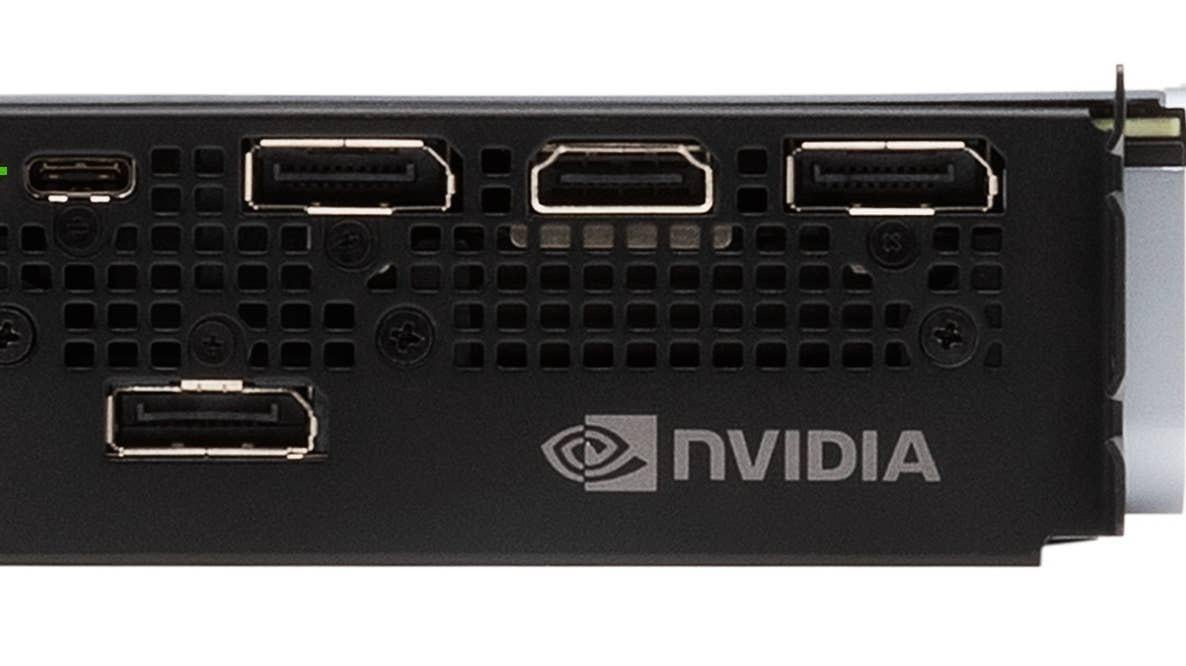
So as some of you may know most of the NVIDIA RTX 20-series and higher-end Radeon RX 6000/7000-series GPUS’s often came with USB-C mainly VR use.
However im more interested in the niche use of Samsung Dex on my Samsung phone in being able to quickly switch my keyboard, mouse, headset and monitor through a USB-C hub.
Although i am a bit concerned about latency
issues regarding all these different devices being on one single port especially during gaming.
The australian youtuber TechYesCity did a video on this: “https://youtu.be/pWjo5oCTlaw?si=ls0osj6Pn2CVa2VP”(2:55).
And found that there was 11ms input latency through USB-C hub vs 8ms directly through the motherboard.
How would i go about eliminating this latency?
11 Comments
I’m gonna be real with you, the idea *anyone* could notice a 3ms input latency difference is insane to me. That’s 3/1000 of a second. That’s less than a tenth of the time it takes you to blink. I physically cannot conceive of noticing that tiny of a difference. Maybe I’m the odd one out here, but working so hard to eliminate a 3ms latency is wild to me.
I use the VirtualLink port on my 2080Ti for VR (Quest 2) and I can say the 11ms latency isn’t noticeable at all compared to my motherboard. Can’t imagine it being a problem with using DEX.
I think you meant to say
>And found that there was 11ms input latency through external USB-C hub vs 8ms through the hub on the motherboard.
3ms is about 1/5th of a frame at 60fps. 3.3ms is the default Linux kernel tick time which is intended to not be noticeable to the user.
>How would i go about eliminating this latency?
You only have unreasonably impractical solutions to this.
* Reduce the PCI bus usage so the USB controller can send a message earlier.
* Modify the cards firmware to raise the arbitration priority of the USB controller for the bus.
* Implement your own interrupt controller attached to the #INTB pin with a lower latency than PCIs MSI.
* Write you own highly optimized driver utilizing polling instead of interrupts to read data as soon as it becomes available.
* Use a time machine.
I am going to be honest here. Touch screens have more latency than the 3ms difference.
If you are truly playing a latency sensitive game (fps shooter or rythm game), just install it directly on your computer if you have a gpu high-end enough to have an usb c port on it.
You will get better framerate and less latency.
Unless you’re the Flash, 3ms will not make a difference for you. In addition, every device in between your monitor and your PC will add latency, including your hub.
Easiest way is to just use DeX on windows through the usb cable, and don’t connect it direct to the phone.
3 ms is well within the margin of error. It takes 13 ms for the signals from your retina to even reach your brain.
Damn, 3ms? Literally unusable!
deal with it plus your connection to a server adds latency
Now I gotta go check and see if my Nitro+ 7900xtx even has USB C. I didn’t think it did.
I have a remote mounted computer with a 50ft active usb 3 cable that connects to a usb hub for all my peripherals. I have zero perceptible lag with my set up, and I play many fps games at decently enough high level. Also running 1440p 120Hz on a similar length active DisplayPort cable with no issues. Both mine and my wife’s computer are set up like this.