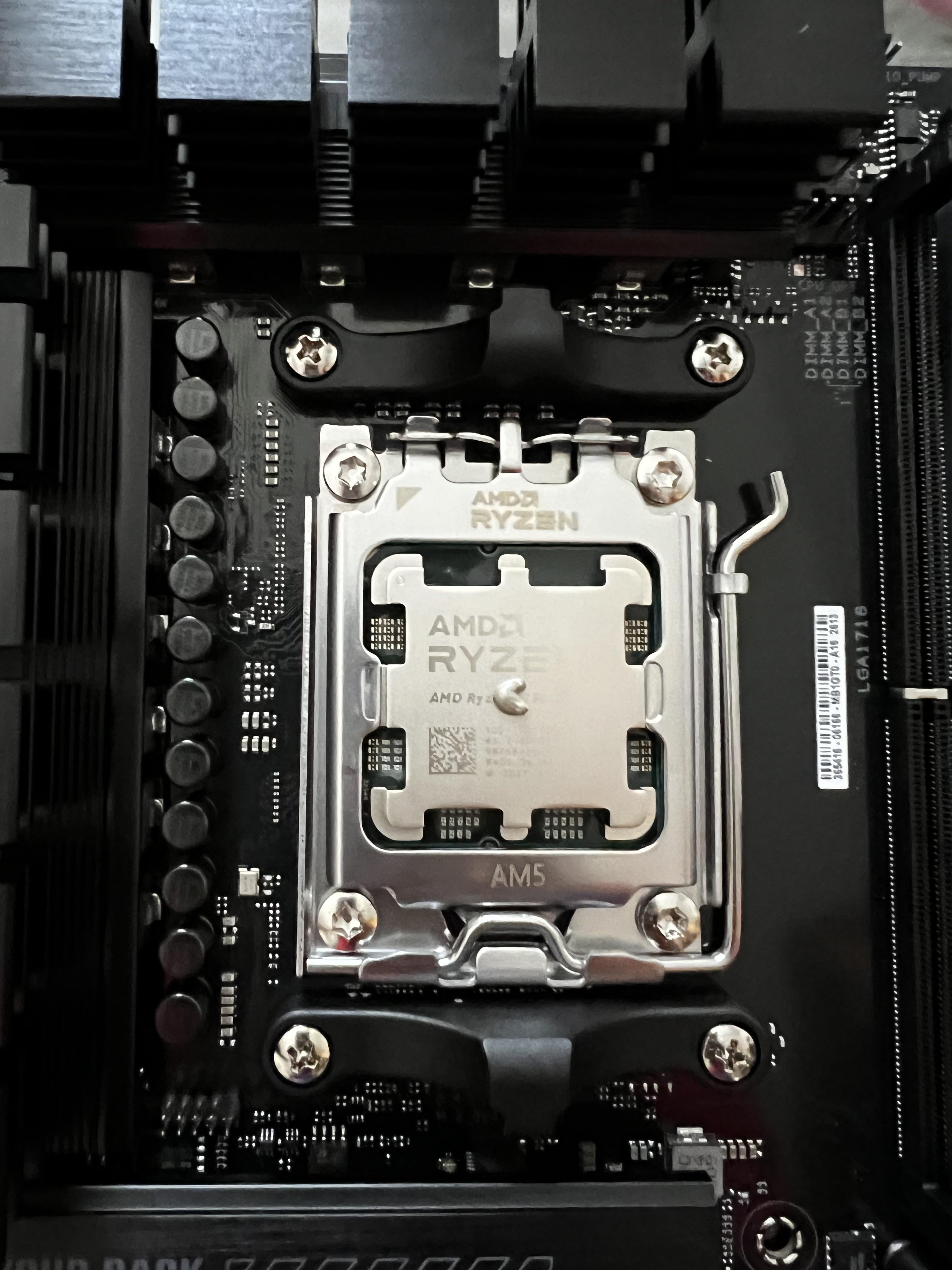
Its like when you poop so hard then only this tiny amount just comes out
hauntedyew
I go with the X method these days.
SaintBahamut
As much as the diametr of a capacitor to the left
iron_girl222
make a X just x2.5 the amount here
F4t-Jok3r
Double it
Noob4Head
Much more, like double the amount.
Bear_of_dispair
Spread it in a thin even layer with a plastic card.
AllusionToConclusion
X
Michaeli_Starky
Too little
n674u
It’s not enough.
T-REX-780
Put more in the middle and small dots near corners (half way between center and edge)
Jakunobi
This is like half of what you should put
coffeejn
Not enough in my book, if your worried, spread it with a CC.
Oseirus
Check your cooler’s manual. Sometimes they list the recommended thermal past amounts and patterns, though this might not always be the case. My Noctua suggested one small dot (pretty much the same size as what you have now) in each of the four corners, plus one slightly larger gob in the middle of the lid.
Remote-Ad7693
No you’ll need more
Electrical_Humor8834
There is no “too much” thermal paste, there is only not enough. This is about 3 times less than needed
lt_catscratch
That looks like perfect amount to me. With the thermal paste, you always wanna have the thought “did i put too little?” instead of “frak i put too much”
phero1190
I do the 5 dot method like Noctua suggests.
Big dot in the middle. Smaller dot in each corner.
EIiteJT
Too little imo. Also, I prefer the spread method, but each their own.
Flinty984
only one way to find out. put ur cooler on and see the thermals in bios on idle. more than 30ish C and you didn’t put enough but if you’re in Arizona then 40c is fine
Cheap_Specific9878
The best method is just spreading it very thinly all across the surface. X with dots is good but spreading it is cleaner
ptapobane

You want this kind of coverage
Financial-Doctor-354
Just use one of those paste squeegees and distribute it thinly but evenly so you don’t have to worry about if it’s evenly distributed.
friblehurn
Honestly you can’t over do it. Most thermal paste is safe to be on the board, and cleans up easily, so it’s better to do too much and let it squish out the sides than too little and have overheating.
But to answer your question, that seems like too little, you wont get full coverage.
lazyghostradio
I just make it like a peanut butter sandwich and keep it off the sides a little so it doesn’t squirt out completely.
Spompoflex
use a bit more.
or use super thin X method
DyscreetBoy
I’d rather frost a damn cake than put too little.
Djghost1133
It’s very simple, put the heatsink on, then take it off. Look at the evenness of the spread. Adjust as needed
Sgt_Tibbs_
Just spread it manually and cover the whole IHS🤷🏼♂️
Drenlin
Ryzen CPUs want a bit more because they’re a chiplet design, so there’s not a single die right in the middle.
ghx1910
For peace of mind, use the cross technique
Z_Wild
Good, now add 4 more just like it.
aberroco
What, did you spend all the money on upgrade, so you can only afford one drop of thermal paste?
Jack23rd
yes one motherboard is enought for one cpu
jabbrwock1
AMD CPUs have multiple chiplets under the cap. They aren’t necessarily in the center of cap.
Spread a thin layer of paste all over the cap just to be sure. A credit card or similar thin stiff bit of plastic helps.
AvoidInsight932
You can’t put too much
xWickedx420
Tf is that bro, lol
No-Estate-1
Karma farmer 😭🤦♂️
JaggedMetalOs
Get a little piece of plastic and spread a thin layer over the whole top surface. That way you make sure you’re not using too little and missing spots (bad for thermals) while also not using “too much” (thermals would be fine but you’ll have mess to clean up in the future).
It doesn’t take long and future you will be grateful.
rollerblading1994
Use more. Even better. Spread it out with a plastic spatula / credit card or something.
MeWantZugZug
A dab will do ya, about a pea size. It’s what works for me, but others might have better alternatives. The idea is to fill in the voids (human eye can’t see) to allow a full seat/fill, which allows better heat transfer.

45 Comments
I would put twice the amount.
Nah, too less
I’d say twice that and you should be good
I would put at least double that amount.
Its like when you poop so hard then only this tiny amount just comes out
I go with the X method these days.
As much as the diametr of a capacitor to the left
make a X just x2.5 the amount here
Double it
Much more, like double the amount.
Spread it in a thin even layer with a plastic card.
X
Too little
It’s not enough.
Put more in the middle and small dots near corners (half way between center and edge)
This is like half of what you should put
Not enough in my book, if your worried, spread it with a CC.
Check your cooler’s manual. Sometimes they list the recommended thermal past amounts and patterns, though this might not always be the case. My Noctua suggested one small dot (pretty much the same size as what you have now) in each of the four corners, plus one slightly larger gob in the middle of the lid.
No you’ll need more
There is no “too much” thermal paste, there is only not enough. This is about 3 times less than needed
That looks like perfect amount to me. With the thermal paste, you always wanna have the thought “did i put too little?” instead of “frak i put too much”
I do the 5 dot method like Noctua suggests.
Big dot in the middle. Smaller dot in each corner.
Too little imo. Also, I prefer the spread method, but each their own.
only one way to find out. put ur cooler on and see the thermals in bios on idle. more than 30ish C and you didn’t put enough but if you’re in Arizona then 40c is fine
The best method is just spreading it very thinly all across the surface. X with dots is good but spreading it is cleaner

You want this kind of coverage
Just use one of those paste squeegees and distribute it thinly but evenly so you don’t have to worry about if it’s evenly distributed.
Honestly you can’t over do it. Most thermal paste is safe to be on the board, and cleans up easily, so it’s better to do too much and let it squish out the sides than too little and have overheating.
But to answer your question, that seems like too little, you wont get full coverage.
I just make it like a peanut butter sandwich and keep it off the sides a little so it doesn’t squirt out completely.
use a bit more.
or use super thin X method
I’d rather frost a damn cake than put too little.
It’s very simple, put the heatsink on, then take it off. Look at the evenness of the spread. Adjust as needed
Just spread it manually and cover the whole IHS🤷🏼♂️
Ryzen CPUs want a bit more because they’re a chiplet design, so there’s not a single die right in the middle.
For peace of mind, use the cross technique
Good, now add 4 more just like it.
What, did you spend all the money on upgrade, so you can only afford one drop of thermal paste?
yes one motherboard is enought for one cpu
AMD CPUs have multiple chiplets under the cap. They aren’t necessarily in the center of cap.
Spread a thin layer of paste all over the cap just to be sure. A credit card or similar thin stiff bit of plastic helps.
You can’t put too much
Tf is that bro, lol
Karma farmer 😭🤦♂️
Get a little piece of plastic and spread a thin layer over the whole top surface. That way you make sure you’re not using too little and missing spots (bad for thermals) while also not using “too much” (thermals would be fine but you’ll have mess to clean up in the future).
It doesn’t take long and future you will be grateful.
Use more. Even better. Spread it out with a plastic spatula / credit card or something.
A dab will do ya, about a pea size. It’s what works for me, but others might have better alternatives. The idea is to fill in the voids (human eye can’t see) to allow a full seat/fill, which allows better heat transfer.
