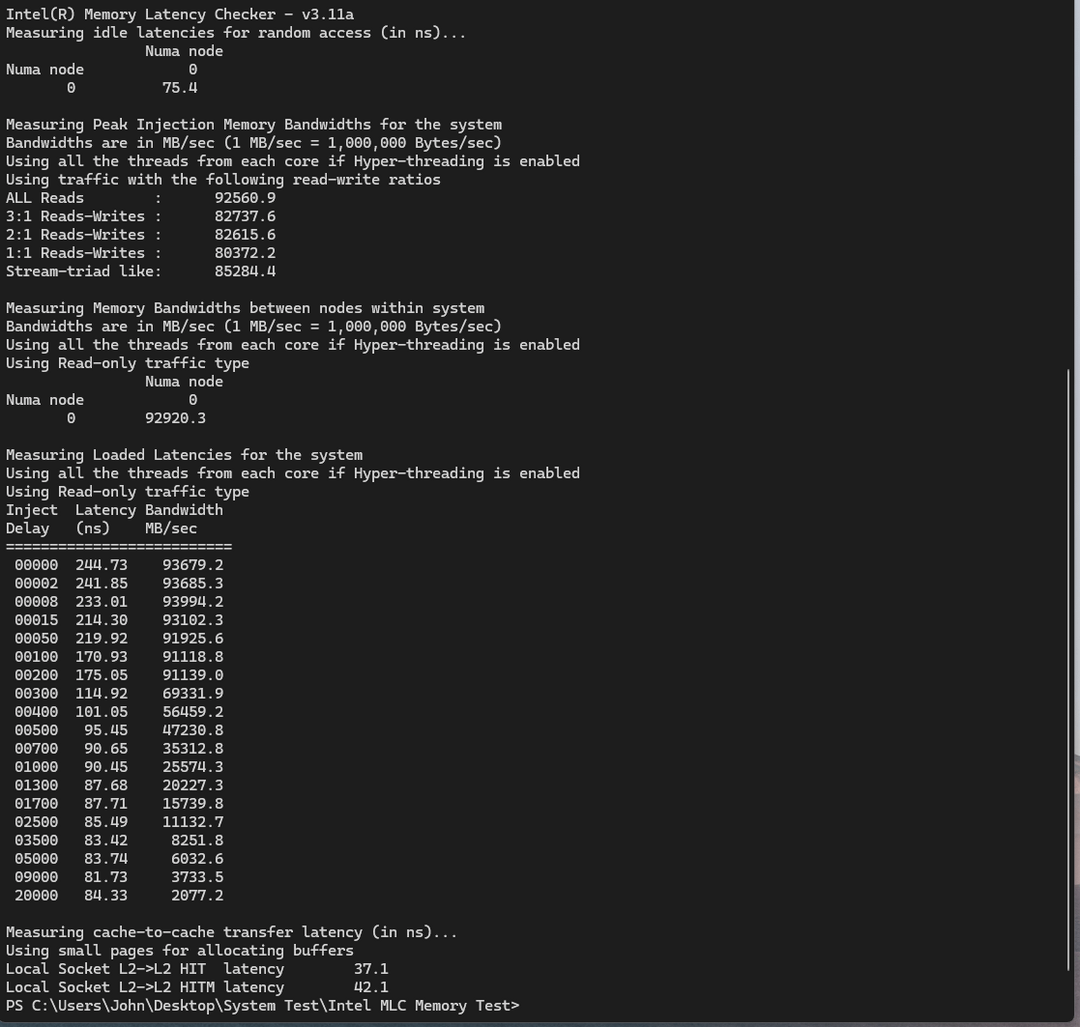
So recently I decided to fiddle around with my memory. My main question comes to the form of why is 7000 40-52-52-114 having a lower latency than with 6400 36-38-38-104 despite latency calculators say that 7000 should have higher latency. The first screenshot is the memory using XMP profile 6400 CL36 (Micron B-Die DDR5). The second screenshot is 7000 CL40. Both benchmarks are using intel Memory Latency Checker. I have to admit, I am a total noob at overclocking Memory but experienced enough in overclocking CPU and GPU. I have only touched the primary timings so far. Even my mouse feels more responsive to the screen to this stable overclock (fully tested with Memtest86).
By using latency calculators, the 6400 CL36 should have latency of 11.25, while 7000 CL40 should have a higher latency at 11.429. But despite multiple tests, the tests seem accurate to represent that the 7000 CL40 is faster and has lower latency. Is my testing methodology / software flawed? Also are there faster/tighter primary timing overclocks for a Micron B-Die?
C_Miex
The reason is that you only look at your primary timings. If you left your secondary and tertiary timings on auto, they most likely were the same for both speeds.
same timing at higher speed = lower latency
RedditAdminsLoveDong
Most of your performance comes from tightening secondary and tertiary timing’s, primaries don’t matter as much especially on ddr5. Idk what they sub timings autoed to but generally xmp doesn’t touch them so The the micron kit that’s running at 7000MT/s also has memory controller clocked higher. Also idk what method you used but ran the numbers using 2 crude methods and the 7000MT/s is the better binn and less latent. Also what the first comment said is correct. contrary to what most people think and getting so HUNG UP on CL just because it has latency in the name of the timing it has nothing to do with overall latency and that timming is measured in clock cycles ex 40 cycles before it can activate a read command

3 Comments
So recently I decided to fiddle around with my memory. My main question comes to the form of why is 7000 40-52-52-114 having a lower latency than with 6400 36-38-38-104 despite latency calculators say that 7000 should have higher latency. The first screenshot is the memory using XMP profile 6400 CL36 (Micron B-Die DDR5). The second screenshot is 7000 CL40. Both benchmarks are using intel Memory Latency Checker. I have to admit, I am a total noob at overclocking Memory but experienced enough in overclocking CPU and GPU. I have only touched the primary timings so far. Even my mouse feels more responsive to the screen to this stable overclock (fully tested with Memtest86).
By using latency calculators, the 6400 CL36 should have latency of 11.25, while 7000 CL40 should have a higher latency at 11.429. But despite multiple tests, the tests seem accurate to represent that the 7000 CL40 is faster and has lower latency. Is my testing methodology / software flawed? Also are there faster/tighter primary timing overclocks for a Micron B-Die?
The reason is that you only look at your primary timings. If you left your secondary and tertiary timings on auto, they most likely were the same for both speeds.
same timing at higher speed = lower latency
Most of your performance comes from tightening secondary and tertiary timing’s, primaries don’t matter as much especially on ddr5. Idk what they sub timings autoed to but generally xmp doesn’t touch them so The the micron kit that’s running at 7000MT/s also has memory controller clocked higher. Also idk what method you used but ran the numbers using 2 crude methods and the 7000MT/s is the better binn and less latent. Also what the first comment said is correct. contrary to what most people think and getting so HUNG UP on CL just because it has latency in the name of the timing it has nothing to do with overall latency and that timming is measured in clock cycles ex 40 cycles before it can activate a read command