It’s the same with my monitors. I have two different monitors though, so the colors are bound to be different. One monitor I have is slightly cheaper, so the color quality isn’t as great, so you can see a slight difference.
SaviorSixtySix
Wild assumption, but do you have windows HDR on?
lxnch50
The monitors are likely not calibrated. If they are different models, it might not be possible to get them to match up perfectly.
32Ferreira
One of the monitors is with HDR On or has an ICC profile applied.
[deleted]
[deleted]
Far_Treacle5870
Local dimming zones probably
Kinzuko
calibrate your colors. even 2 identical monitors bought at the same time from the same place can have wildly different colors. there are several tools online to help you do it manually or you can buy a used monitor calibrator on ebay for like $50.
unless your doing work that requires color accuracy you don’t really need to worry about it.
BitswitchRadioactive
Not all monitors are created equal.
Miau_1337
Looks like some kind of driver feature/optimization? Often called something like “improve clarity” or “picture boost”. I think intel does this a lot on their iGPUs?
Could also be caused by the monitor/panel/backlight technology, or even the monitor does it own software optimization to improve picture quality – try another picture or another background. (For example: My Samsung hates gray backgrounds. If there is too much gray present, the whole screen will change its color profile.)
Negitive545
If the monitors aren’t the same model, then it’s probably just a quality difference.
My main monitor has WAYYYYY more vibrant than my secondary, older, monitor, so when I move windows between them the color difference is very noticeable.
If they ARE the same model, then one of them has different color settings than the other, either based in your OS software (Check windows settings), or your monitors on-board software/settings.
BigZaber
looks like monitor settings on the actual monitor are different. Press the monitor menu button and make sure they’re both similar
djmakk
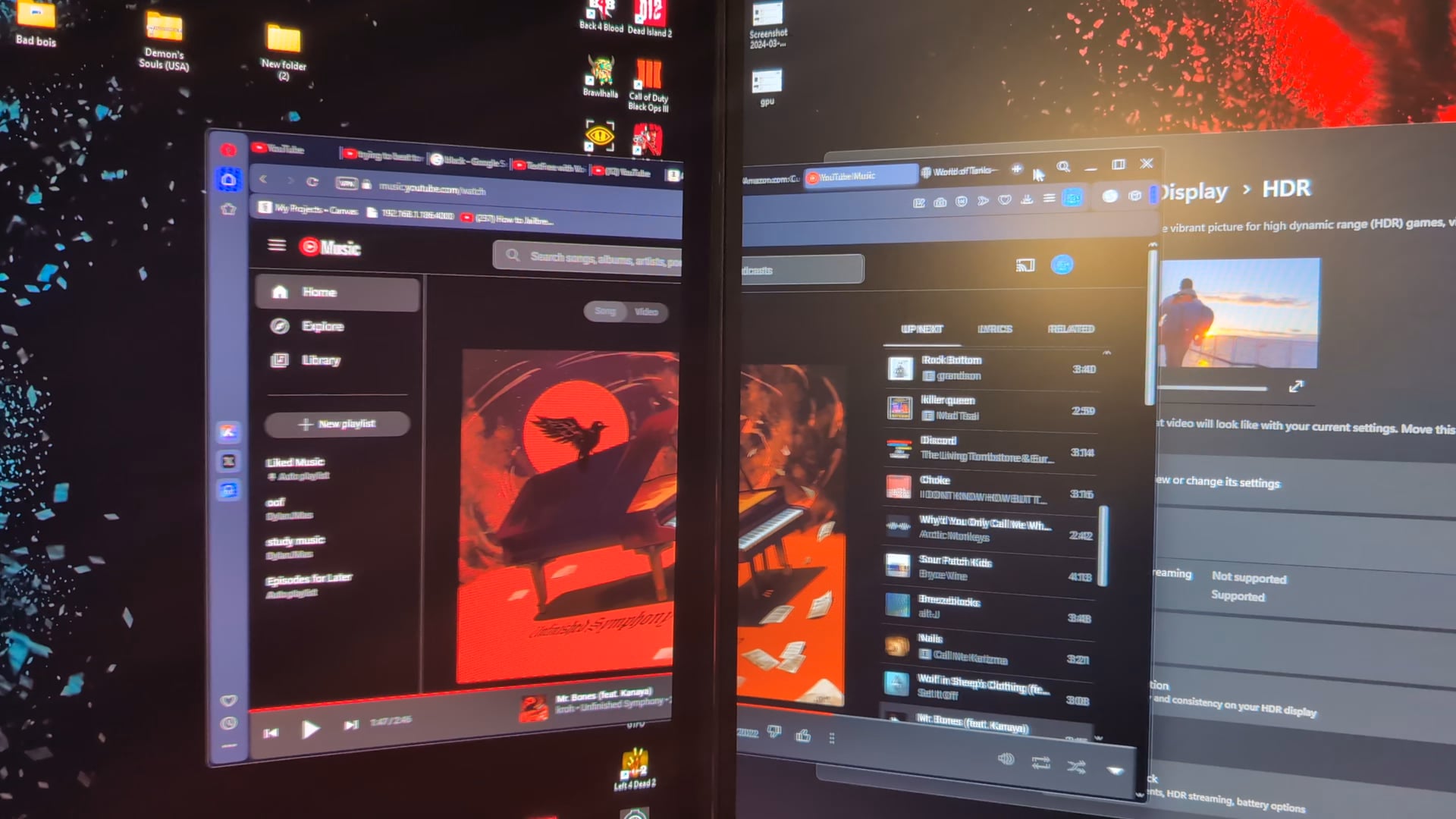
BTW all we see is two monitors with different color profiles.
Jbphilo50
Oh wow I actually know this one! It’s your ICC Profiles for your monitors!
Got to color “management” and check them out. If you don’t like one you can delete it reboot your machine and check again.
-UwUWUwU-
Dunno if this affects the active window on screen, if using Nvidia, check the Nvidia Control Panel & make sure under Adjust Desktop Color, Adjust Video Color, & Adjust Video Image settings are mirrored per se for all monitors & adjust the monitor settings to get an equal result if not doing art, ect. In the Video Image settings, you can also turn on RTX Video Super Resolution & adjust if you want, works great with stuff like older anime.
As for AMD, no clue where the color stuff would be.
[deleted]
[deleted]
Shades228
Youtube has hdr issues in chromium
Gigglecreams
Bump for solution.
I just got a new monitor. I have always had three monitors each with their own ICC profiles applied through Datacolor. This just started happening all of a sudden, not when I swapped the new monitor in initially but just recently.
It maybe a hdr calibration profile issue since it didnt start this until I maybe after I messed with HDR but I do not use HDR but could be a residual from this.
Did you download that hdr calibration utility at any point?
EDIT: Actually it is not doing it anymore, which I find weird and go downvote the ICC people because I have three separate profiles active and its not doing this and never has done this because of that.
Acharyn
You don’t show us the window fully on either of the monitors.

18 Comments
It’s the same with my monitors. I have two different monitors though, so the colors are bound to be different. One monitor I have is slightly cheaper, so the color quality isn’t as great, so you can see a slight difference.
Wild assumption, but do you have windows HDR on?
The monitors are likely not calibrated. If they are different models, it might not be possible to get them to match up perfectly.
One of the monitors is with HDR On or has an ICC profile applied.
[deleted]
Local dimming zones probably
calibrate your colors. even 2 identical monitors bought at the same time from the same place can have wildly different colors. there are several tools online to help you do it manually or you can buy a used monitor calibrator on ebay for like $50.
unless your doing work that requires color accuracy you don’t really need to worry about it.
Not all monitors are created equal.
Looks like some kind of driver feature/optimization? Often called something like “improve clarity” or “picture boost”. I think intel does this a lot on their iGPUs?
Could also be caused by the monitor/panel/backlight technology, or even the monitor does it own software optimization to improve picture quality – try another picture or another background. (For example: My Samsung hates gray backgrounds. If there is too much gray present, the whole screen will change its color profile.)
If the monitors aren’t the same model, then it’s probably just a quality difference.
My main monitor has WAYYYYY more vibrant than my secondary, older, monitor, so when I move windows between them the color difference is very noticeable.
If they ARE the same model, then one of them has different color settings than the other, either based in your OS software (Check windows settings), or your monitors on-board software/settings.
looks like monitor settings on the actual monitor are different. Press the monitor menu button and make sure they’re both similar
BTW all we see is two monitors with different color profiles.
Oh wow I actually know this one! It’s your ICC Profiles for your monitors!
Got to color “management” and check them out. If you don’t like one you can delete it reboot your machine and check again.
Dunno if this affects the active window on screen, if using Nvidia, check the Nvidia Control Panel & make sure under Adjust Desktop Color, Adjust Video Color, & Adjust Video Image settings are mirrored per se for all monitors & adjust the monitor settings to get an equal result if not doing art, ect. In the Video Image settings, you can also turn on RTX Video Super Resolution & adjust if you want, works great with stuff like older anime.
As for AMD, no clue where the color stuff would be.
[deleted]
Youtube has hdr issues in chromium
Bump for solution.
I just got a new monitor. I have always had three monitors each with their own ICC profiles applied through Datacolor. This just started happening all of a sudden, not when I swapped the new monitor in initially but just recently.
It maybe a hdr calibration profile issue since it didnt start this until I maybe after I messed with HDR but I do not use HDR but could be a residual from this.
Did you download that hdr calibration utility at any point?
EDIT: Actually it is not doing it anymore, which I find weird and go downvote the ICC people because I have three separate profiles active and its not doing this and never has done this because of that.
You don’t show us the window fully on either of the monitors.