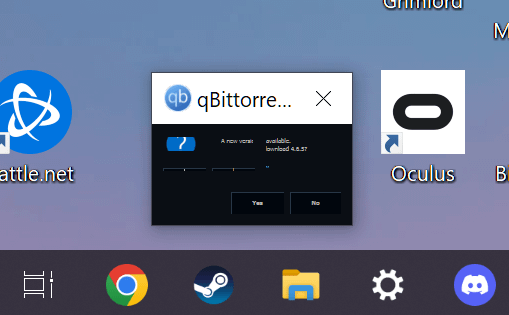
My two monitors are two different resolutions. How can I stop some programs/text from formatting so ridiculously like this?

My two monitors are two different resolutions. How can I stop some programs/text from formatting so ridiculously like this?
20 Comments
Up to the devs to support DPI scaling properly. Doesn’t help Windows sucks at it too.
For qBit you could use the web UI in a browser. https://github.com/VueTorrent/VueTorrent
[removed]
It’s the neat part, you can’t stop that
Gotta match DPI as far as I know to avoid weirdness
Make sure both monitors have the same zoom levels, and if an app shows up like this, focus it, then press winkey + arrow up to maximize it.
Scaling is handled so much better in Windows 11
Is scaling not set separately per monitor? I’ve never seen that happen.
you dont, i have been battleing this for years
Many windows applications save their position and size on exit, and maximizing a window seems to be handled differently in this regard.
So, the fix is to rescale and reposition the window manually (e.g., drag the edges to a reasonable size, rather than maximizing), then exit the app, then in theory that should be the new “remembered” size and position.
This can break if the app crashes on exit (before it saves the window size and position), and sometimes it isn’t even implemented correctly, and multiple screens of different resolutions seem to trigger this more frequently, but I’ve had success with all but a couple of apps I’ve come across.
Whats this a Qbittorrent for ant!?! The text has to be atleast three times this size.
Do you frequently turn off one of your monitors by chance? I always had this issue when I would turn off a display and the windows would shift over to the remaining active display and the scaling would go to shit.
I would just set the display to still be active even when its off so the windows would remain on the screen thats powered off so you wouldnt have to manually resize the windows back to normal.
Also windows 11 is a much better experience and ironically enough since I switched from a 3070 to a 7900xt the AMD drivers seem to handle windows a lot better for some reason. I used to have really funky issues when turning monitors off flickering and all kinds of annoying bullshit.
Its also worth noting that scaling can be application specific, some apps just scale like shit.
Make sure the % in the screen settings are equal (100% or whatever you like but the same)
I gave up and sold my second display
It may be a bit overkill but set up a VM to run torrents on

Have you tried setting the UI scale for each of the monitors individually?
I always have the same problem with Qbitorrent switching between my ultra wide and 4k tv, dragging the active window back and forth inbetween the screen corrects the display.
Yes
The answer, that I have found after feeling the pain of having monitors with different resolutions is:
You only have monitors with the same resolution.
There is no answer. Windows and many programs just suck ass with variable DPI/scaling.
nope this is from the dev side to make it work. run 3 screen with different size all day, this is a normal occurrence for me.