
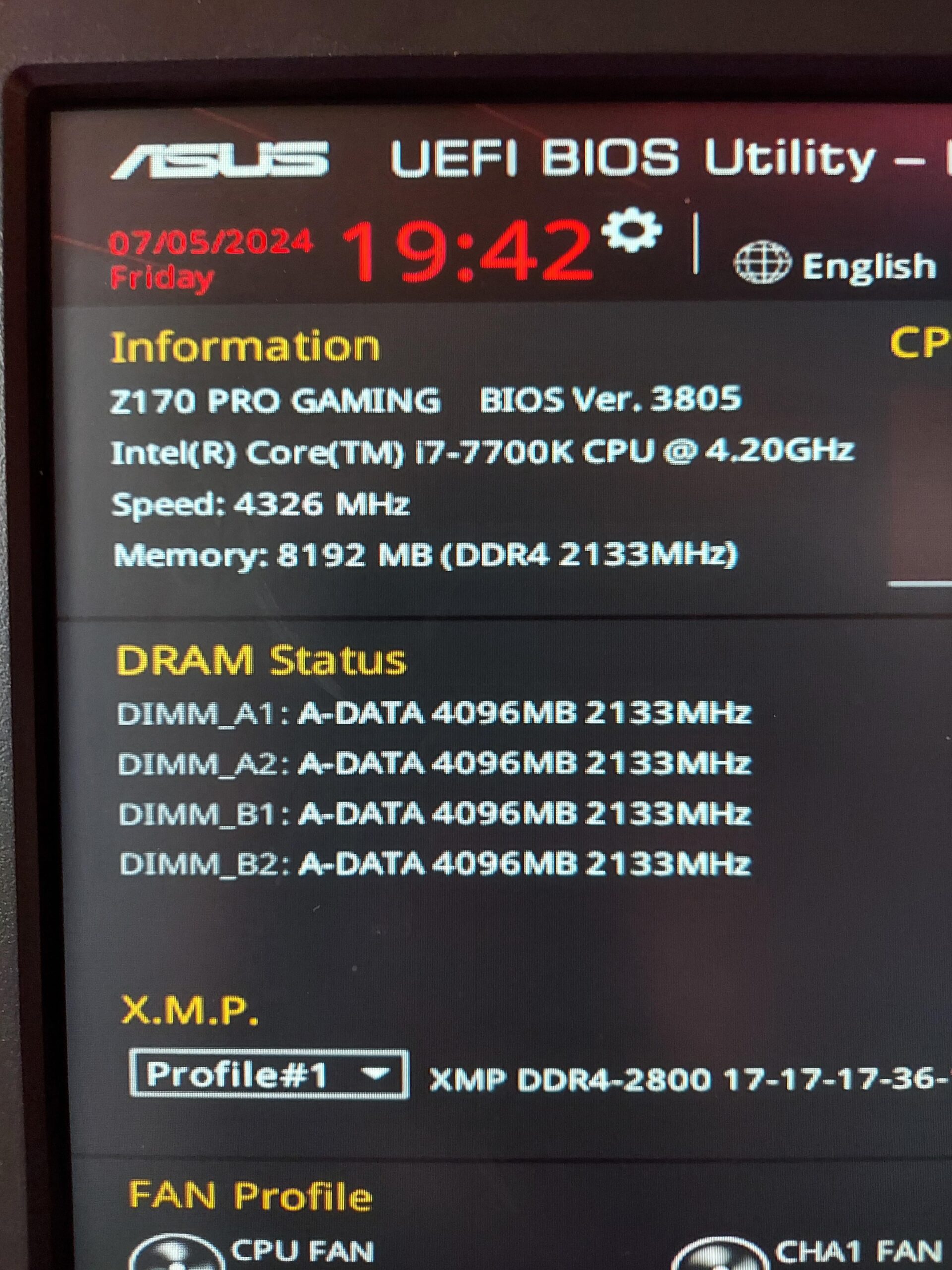
I've just made a quick upgrade to my pc going from an i5-6600K to i7-7700K. Install went fine but my RAM has just been slashed in half. I reseated the CPU and RAM cards with no luck. Ran a Windows Memory Diagnostic with no issues. Totally out of ideas. Does anyone have experience with this? Thanks!
Specs:
Asus Z170 Pro Gaming Motherboard
i7-7700K 4.20GHz chip
4x A-DATA 4Gb 2.1GHz
GeForce GTX 1070 FTW
8 Comments
Have you tried resetting the CMOS?
Or have you updated the bios
Check the CPU socket pins on your motherboard, you may have a couple bent pins not making contact, or a flakey memory controller on your new CPU possibly?
What happens if you put your 6600K back in, does all the RAM show up? If so, the 7700K may have a bad memory controller.
I used to have this problem with an i7 870. Both windows and BIOS would show all 12GB in my case but only use 6 GB. Swapping around the RAM chips periodically solved it.
Is it within the return period? if so get a new one
Did you upgrade the BIOS?
Try changing what ram sticks are in which slot if you haven’t, had this problem where windows just pretended half my memory wasn’t there and that fixed it for me.