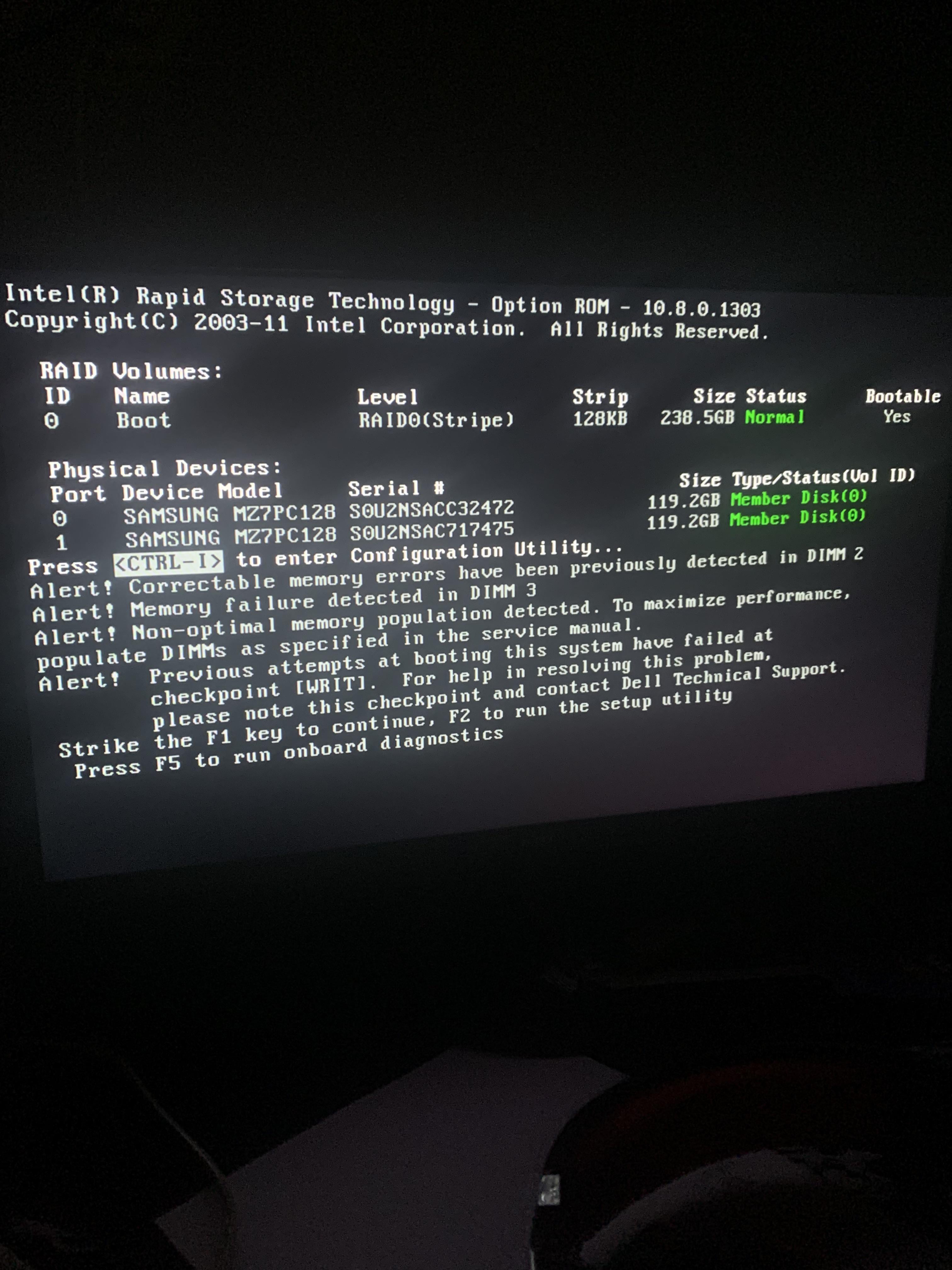
There are issues with memory modules. Take them out and go one by one.
Agnt_DRKbootie
Turn off PC
open and remove RAM STICKS, check for things like dust clogs or heat stress, then blow out dimm slots and check for bent pins, reseat the RAM carefully.
Turn on PC, if problem persists, you need new RAM STICKS.
If problem continues after new sticks, clear CMOS/BIOS memory.
If problem continues, you may need a new motherboard.
Suikerspin_Ei
Memory issue in DIMM 2 and DIMM 3. Shut PC down and reseat them. If you have only two RAM sticks, place it in A2 slot and B2 slot (unless the manual of your motherboard says different). If that doesn’t work, buy new ram kit.
TravelingGonad
Did you put your SSD in RAID on purpose??
WhistlingKyte
FOR ALL THOSE WHO ARE GOING TO MENTION THE ERRORS:
That is a false code, DIMM 1-6 are very much still active and it’s been around for a while.
As for the other, yeah that’s fine ig.
l0wskilled
Really great error display
icedcoffeeblast
RAID-0? Big oof
dontchewspagetti
I’m hoping this is an actual tower and not a laptop…
But yeah, it’s a hardware issue with your ram.
joshuajjb2
Your computer forgot you
Angalourne
The memory errors appear to be on the storage controller itself – not system memory. It likely wouldn’t post if there were system memory errors.
EDIT: on second thought maybe not. I’d pull all the DIMMs except one to see if the errors drop to verify. If it’s system memory then my suspicion is mismatched/failing DIMMs. If the errors don’t clear with just one DIMM then it’s either the controller or the motherboard.
The_Pacific_gamer
Please make frequent backups.
Gardakkan
Is there a question here?
xdforcezz
How did you come back to life?
DanTheMan827
SATA SSDs in raid-0. I see you like to live dangerously.
A single NVME drive would still be faster if you can boot from them.
Mr_Pink_Gold
Cyber Jesus christ… On the 3rd day it came back to life. One of your memory modules is likely Judas. You now have to install temple OS. It is mandatory.
Alternative-Doubt452
Was it on during a thunderstorm and not plugged into a ups?
Harry_Flowers
RAM given issues. It’s either the Mobo sockets or the actual RAM sticks.
You can isolate it by trying each RAM stick in the respective slots one by one.
If none of your RAM sticks boot properly in either of the slots meant for single stick setups, it’s likely the mobo.
You can do I final troubleshoot with new set of RAM sticks before investing in a new motherboard.

19 Comments
Reseat your memory and see if the error returns
You were dead for 4 days?
There are issues with memory modules. Take them out and go one by one.
Turn off PC
open and remove RAM STICKS, check for things like dust clogs or heat stress, then blow out dimm slots and check for bent pins, reseat the RAM carefully.
Turn on PC, if problem persists, you need new RAM STICKS.
If problem continues after new sticks, clear CMOS/BIOS memory.
If problem continues, you may need a new motherboard.
Memory issue in DIMM 2 and DIMM 3. Shut PC down and reseat them. If you have only two RAM sticks, place it in A2 slot and B2 slot (unless the manual of your motherboard says different). If that doesn’t work, buy new ram kit.
Did you put your SSD in RAID on purpose??
FOR ALL THOSE WHO ARE GOING TO MENTION THE ERRORS:
That is a false code, DIMM 1-6 are very much still active and it’s been around for a while.
As for the other, yeah that’s fine ig.
Really great error display
RAID-0? Big oof
I’m hoping this is an actual tower and not a laptop…
But yeah, it’s a hardware issue with your ram.
Your computer forgot you
The memory errors appear to be on the storage controller itself – not system memory. It likely wouldn’t post if there were system memory errors.
EDIT: on second thought maybe not. I’d pull all the DIMMs except one to see if the errors drop to verify. If it’s system memory then my suspicion is mismatched/failing DIMMs. If the errors don’t clear with just one DIMM then it’s either the controller or the motherboard.
Please make frequent backups.
Is there a question here?
How did you come back to life?
SATA SSDs in raid-0. I see you like to live dangerously.
A single NVME drive would still be faster if you can boot from them.
Cyber Jesus christ… On the 3rd day it came back to life. One of your memory modules is likely Judas. You now have to install temple OS. It is mandatory.
Was it on during a thunderstorm and not plugged into a ups?
RAM given issues. It’s either the Mobo sockets or the actual RAM sticks.
You can isolate it by trying each RAM stick in the respective slots one by one.
If none of your RAM sticks boot properly in either of the slots meant for single stick setups, it’s likely the mobo.
You can do I final troubleshoot with new set of RAM sticks before investing in a new motherboard.