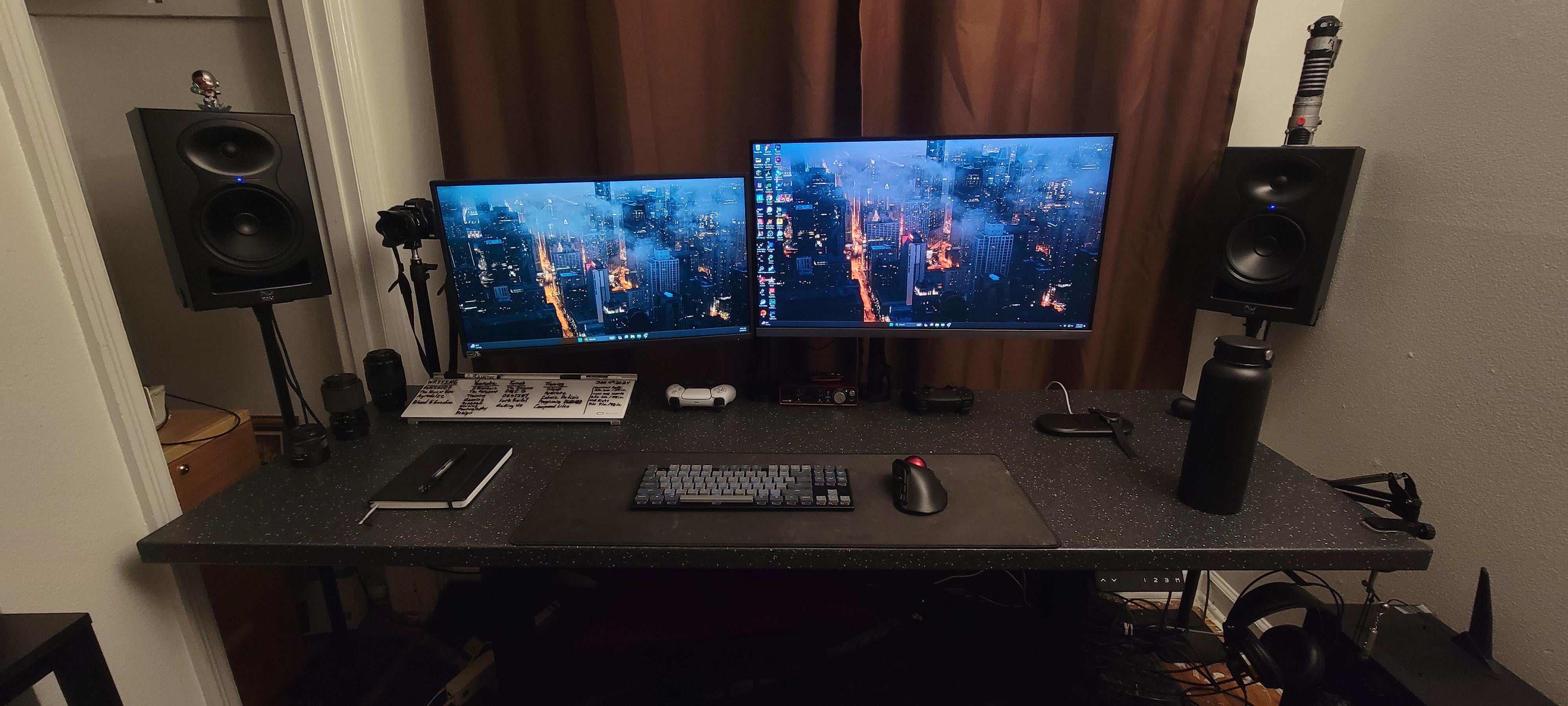
Updating my two monitor setup to a three monitor setup. Currently running a 24”, 1080p, 75hz SCEPTRE monitor (F24) I got for free. A Samsung editing monitor 28”, 4K, 60hz, I bought three years ago (UR55).
The idea is to have a gaming, editing, and entertainment setup that has a large 32 inch main Hybrid screen for work, movies, and youtube. Then flanked by two 27-28in monitors with the left being Gaming focused and the right video & photo Editing focused.
The Hybrid should game (4K fps/hz 120+) and edit (decent DCI-P3/8Bit) decently. Then a Gaming focused monitor (high fps/hz 144+) and the Editing monitor (high DCI-P3/10Bit).
Should the editing monitor have more than 60hz for editing video?
How important is 10 Bit outside of editing, for watching movies?
How good is OLED? Is it worth it?
Uses:
PS5 gaming 4K 120fps
Pc gaming 1440p 144fps
Netflix, HBO Max, Youtube watching
Day Job- Emails, Docs, Excel
Not-JustinTV
Get the same size monitors,same model if you can
RonDonVolante
What’s the need for a third monitor? Due to limited space, I’d take that smaller monitor and turn it vertical. Then I’d get the same model (or at least the same size) monitor on the right. You may have to stack those vertically due to space though.
Freeloader_
is that keychron keyboard ?
OBSDCC3
Left side monitor turned portrait orientation, stack the other two on top of each other on the right
snukbt
You could put two 27” portrait on each side of the main monitor, or stack a similar size monitor above the main and have one / two in portrait on either/both sides. That’s what my options would be
marpolo
Kali audio. I respect your taste.
Anotherday4500
What do plan on using the third monitor for?
boopkmb
Personally I don’t like stacked or portrait. I use a 32 in the center flanked by two 27


9 Comments
Updating my two monitor setup to a three monitor setup. Currently running a 24”, 1080p, 75hz SCEPTRE monitor (F24) I got for free. A Samsung editing monitor 28”, 4K, 60hz, I bought three years ago (UR55).
The idea is to have a gaming, editing, and entertainment setup that has a large 32 inch main Hybrid screen for work, movies, and youtube. Then flanked by two 27-28in monitors with the left being Gaming focused and the right video & photo Editing focused.
The Hybrid should game (4K fps/hz 120+) and edit (decent DCI-P3/8Bit) decently. Then a Gaming focused monitor (high fps/hz 144+) and the Editing monitor (high DCI-P3/10Bit).
Examples:
* LG UltraGear 32GR93U Hybrid (4K, 144hz, 90% P3, 8bit+FRC) ($600)
* (MSI G321CU [4K, 144hz, 90% P3, 8bit+FRC] downsides [curved & VA panel]) ($420)
* (MSI Optix MPG321UR-QD [4K, 144hz, 97% P3,10bit]) ($650)
* (ASUS PG32UQR [4K, 144hz, 98% P3, 10bit]) ($600)
* Gigabyte M27U Gaming (4K, HDR, 160hz, 95% P3, 8bit+FRC) ($470)
* (AOC U27G3X [4K, 160hz, 94% adobe rgb, 8bit+FRC]) ($470)
* (Gigabyte M27U 27 [4K, 160hz, 95% P3, 8bit+FRC]) ($470)
* ASUS Pro Art PA279CRV Editing (4K, 60hz, 99% P3, 10bit, Delta 2) ($445)
* (BenQ DesignVue PD2705U [4K, 60hz, 99% Rec709/srgb, 10bit, Delta 3]) ($500)
* (LG UltraFine 27UQ850V-W [4K, 60hz, 98% P3, 10bit ] ($600)
Questions:
Which Model is the best for each category?
Should I go all three 32 inch?
How important is 10 Bit and DCIP for editing?
Should the editing monitor have more than 60hz for editing video?
How important is 10 Bit outside of editing, for watching movies?
How good is OLED? Is it worth it?
Uses:
PS5 gaming 4K 120fps
Pc gaming 1440p 144fps
Netflix, HBO Max, Youtube watching
Day Job- Emails, Docs, Excel
Get the same size monitors,same model if you can
What’s the need for a third monitor? Due to limited space, I’d take that smaller monitor and turn it vertical. Then I’d get the same model (or at least the same size) monitor on the right. You may have to stack those vertically due to space though.
is that keychron keyboard ?
Left side monitor turned portrait orientation, stack the other two on top of each other on the right
You could put two 27” portrait on each side of the main monitor, or stack a similar size monitor above the main and have one / two in portrait on either/both sides. That’s what my options would be
Kali audio. I respect your taste.
What do plan on using the third monitor for?
Personally I don’t like stacked or portrait. I use a 32 in the center flanked by two 27