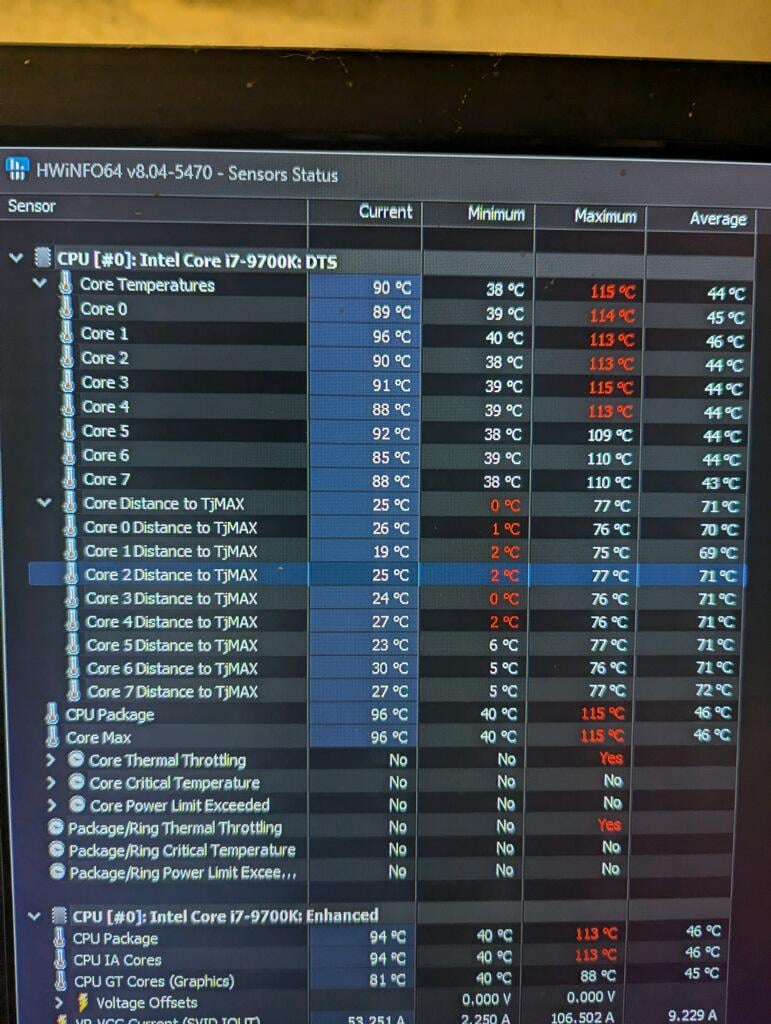
In law says his computers been shutting down, got him to run some test. His AIO’s pump died, we are going to replace it with much better, reliable air cooling.
AcademicLibrary5328
Distance to TJMaxx. 🤌
unabletocomput3
Somehow, it’s going past the standard thermal throttling temp, I’d say that’s a bit bad for the longevity of the cpu.
Illustrious-Drama213
Yikes
Uncontained_Disaater
Mmm toasty warm
tresserdaddy
Can someone explain to me why their cores say distance to tjmax?
phoenixxl
What is missing from this picture is the per-core load.
If this computer is idling gives a different answer than under full load.
Anyone claiming anything about this in a vacuum is sucking answers out of their thumb.
What was the load to get to 115C avg?
As you can see at it’s worst it was only over TJMAX about 1 C. If this is under full load. This is acceptable. For a blade server this is acceptable. For a hobbyist having been brainwashed by the water cooler sales force numbers like this will likely make him start shitting his pants.
It’s never acceptable to have a cooler wrongly installed. It’s never acceptable to have a cooler installed without paste or with it’s plastic cover still on the pre applied paste. It is however acceptable to use a stock cooler without overclocking.
Stay at or under TJMax. That is the rule, if you like it or not.
Overclock at your own risk, and buy appropriate hardware when you do, overclocking , unlike staying at TJMax will shorten the lifespan of your cpu, From nearly indefinitely when slightly underclocked to sometimes only decades. Your Batteries in case of a laptop, HDD’s PSU’s and NAND based storage are the things that will break. If you don’t do things like yank your cooler off your CPU while it’s running at full load or scrape off the decoupling capacitors while delidding your CPU will most probably outlive your MB.
Moegly47
I have that CPU, watercooled with a AIO and it has gotten quite hot.. I think my case is to blame, it’s a phanteks shift 2 that’s on its side with the CPU facing downwards… I think bubbles get into the CPU part of the loop sometimes and it takes some effort to get them back to the rad… I don’t think it’s an ideal set up lol
ASUS_USUS_WEALLSUS
I’m scared to see how much dust is in there
BionicBruv
I heard switching to Marshalls yields similar results.
GodJohnson-
Jesus god, replace the thermal paste. I just applied liquid metal, and I have yet to see the cpu go over 60c.

13 Comments
In law says his computers been shutting down, got him to run some test. His AIO’s pump died, we are going to replace it with much better, reliable air cooling.
Distance to TJMaxx. 🤌
Somehow, it’s going past the standard thermal throttling temp, I’d say that’s a bit bad for the longevity of the cpu.
Yikes
Mmm toasty warm
Can someone explain to me why their cores say distance to tjmax?
What is missing from this picture is the per-core load.
If this computer is idling gives a different answer than under full load.
Anyone claiming anything about this in a vacuum is sucking answers out of their thumb.
What was the load to get to 115C avg?
As you can see at it’s worst it was only over TJMAX about 1 C. If this is under full load. This is acceptable. For a blade server this is acceptable. For a hobbyist having been brainwashed by the water cooler sales force numbers like this will likely make him start shitting his pants.
It’s never acceptable to have a cooler wrongly installed. It’s never acceptable to have a cooler installed without paste or with it’s plastic cover still on the pre applied paste. It is however acceptable to use a stock cooler without overclocking.
Stay at or under TJMax. That is the rule, if you like it or not.
Overclock at your own risk, and buy appropriate hardware when you do, overclocking , unlike staying at TJMax will shorten the lifespan of your cpu, From nearly indefinitely when slightly underclocked to sometimes only decades. Your Batteries in case of a laptop, HDD’s PSU’s and NAND based storage are the things that will break. If you don’t do things like yank your cooler off your CPU while it’s running at full load or scrape off the decoupling capacitors while delidding your CPU will most probably outlive your MB.
I have that CPU, watercooled with a AIO and it has gotten quite hot.. I think my case is to blame, it’s a phanteks shift 2 that’s on its side with the CPU facing downwards… I think bubbles get into the CPU part of the loop sometimes and it takes some effort to get them back to the rad… I don’t think it’s an ideal set up lol
I’m scared to see how much dust is in there
I heard switching to Marshalls yields similar results.
Jesus god, replace the thermal paste. I just applied liquid metal, and I have yet to see the cpu go over 60c.
How do I check this on my pc.
Well he would be correct