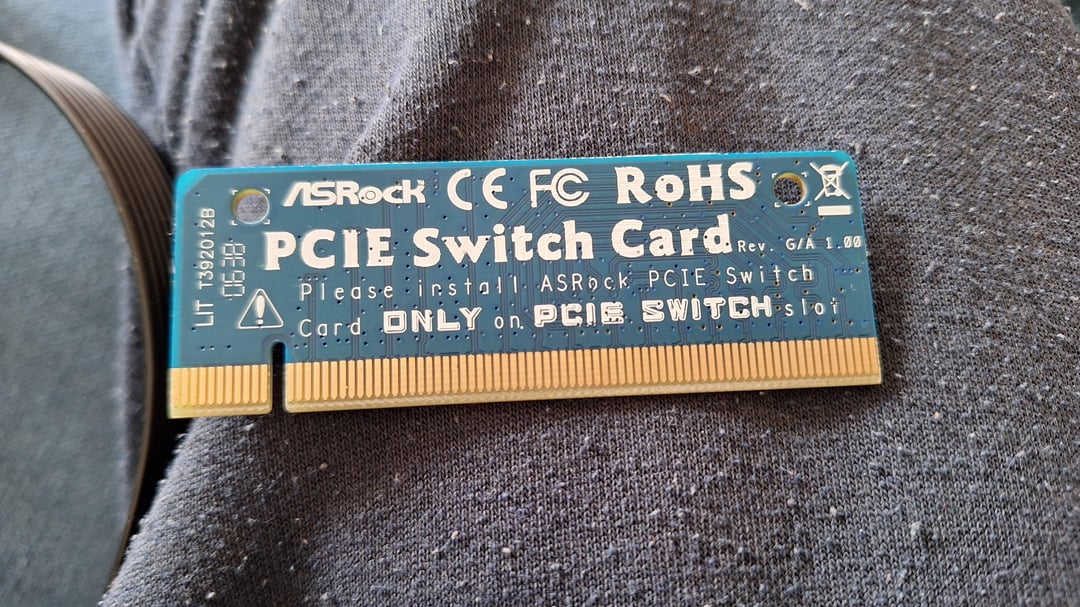
According to a comment here, it was used in the second pcie x16 slot to terminate it.
By default 8 lanes were sent to slot 1, and 8 lanes were sent to slot 2. The card when put into slot 2 terminates that connector and sends all 16 lanes to slot 1.
It’s something that the chipset and cpu can do automatically nowdays which is why we don’t see these anymore.
Jimmy-Ballz
It is used for PCIE bifurcation, which means it divides a single PCIe slot into multiple branches or chunks. This allows for more flexibility in how the PCIe lanes are allocated on a motherboard. So like, a PCIe x16 slot can be bifurcated into four x4 slots or two x8 slots. This is particularly useful when you want to install multiple PCIe devices, such as NVMe drives, and when the CPU doesn’t have enough lanes to support all the devices directly.
wildman1024
Old school way to SLI/crossfire
disgruntledempanada
For a second I thought this was for the old AMD board that could switch from PCIE to AGP but I think that used a ton of individual bridges. Loved that motherboard. I had an All in Wonder 9800 Pro but knew I’d eventually want a PCIE card down the line, perfect board for that transition.
i_enjoy_silence
It’s a PCIE Switch Card.
CoreyClutch31
Let me google that for you, one sec
quinto6
Allows you to play your Nintendo Switch on the computer /s
disposable_account01
Double your GPU performance with this one simple trick!
Xcissors280
It’s a switch card like the migswitch
This post has nothing to with Nintendo so please don’t sue me

10 Comments
If I remember correctly, this was used to deactivate the pcie Lanes for the slot, so the other slots would get the full bandwith.
[https://forums.hexus.net/pc-hardware-components/166938-what-pci-e-switch-card-used.html](https://forums.hexus.net/pc-hardware-components/166938-what-pci-e-switch-card-used.html)
According to a comment here, it was used in the second pcie x16 slot to terminate it.
By default 8 lanes were sent to slot 1, and 8 lanes were sent to slot 2. The card when put into slot 2 terminates that connector and sends all 16 lanes to slot 1.
It’s something that the chipset and cpu can do automatically nowdays which is why we don’t see these anymore.
It is used for PCIE bifurcation, which means it divides a single PCIe slot into multiple branches or chunks. This allows for more flexibility in how the PCIe lanes are allocated on a motherboard. So like, a PCIe x16 slot can be bifurcated into four x4 slots or two x8 slots. This is particularly useful when you want to install multiple PCIe devices, such as NVMe drives, and when the CPU doesn’t have enough lanes to support all the devices directly.
Old school way to SLI/crossfire
For a second I thought this was for the old AMD board that could switch from PCIE to AGP but I think that used a ton of individual bridges. Loved that motherboard. I had an All in Wonder 9800 Pro but knew I’d eventually want a PCIE card down the line, perfect board for that transition.
It’s a PCIE Switch Card.
Let me google that for you, one sec
Allows you to play your Nintendo Switch on the computer /s
Double your GPU performance with this one simple trick!
It’s a switch card like the migswitch
This post has nothing to with Nintendo so please don’t sue me