
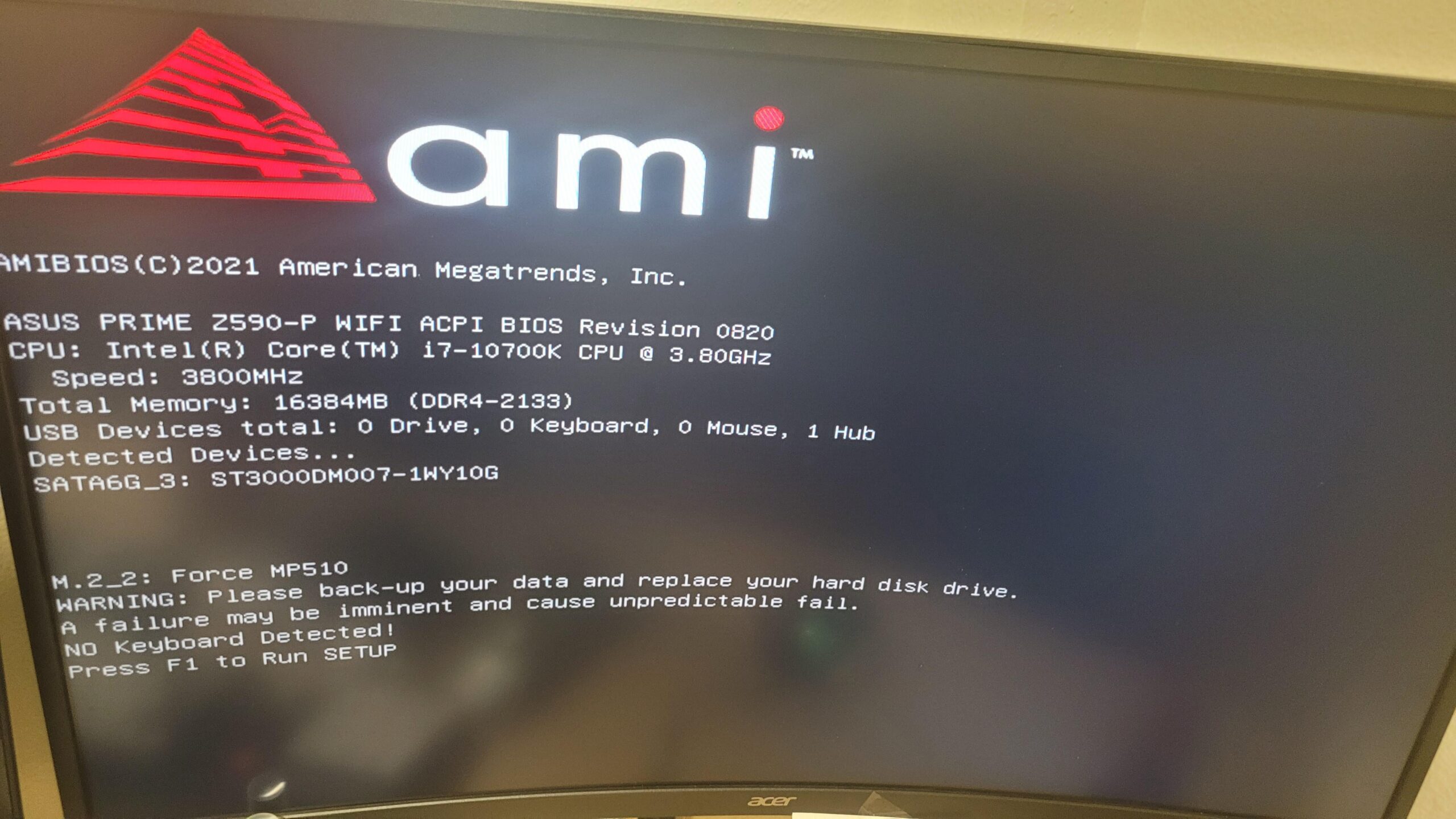
My pc has 2 m.2 drives. My motherboard has 3 pcie sockets so I know I can install another drive. Recently my computer crashed so hard I had to hard restart it and when it booted up it gave me the image above. I have another m.2 in the mail rn.
Currently, my pc won't boot to windows, it will only boot to the bios. Is there a way I can clone my m.2 drive with my windows image on it through bios or am I just cooked?
15 Comments
there is a way. but probably not easy for you. best buy geeksquad would boot outside of windows and use acronis to clone drives. this was their custom solution, im sure someone could do the same but you probably dont have the knowledge to do so.
acronis might ofter a solution that does the same but wont be free
If it won’t even boot, it’s already dead. While you can try a clone, it’s not recommended to do so as it can speed up the failure process. Your best option is to get a new drive, reinstall your OS and copy over small bits of data at a time
I think there are small Linux distros made for this propose, you just need to flash it on a usb
You would have to take it to a computer store that could do data recovery. I would get a thumb drive or external hard drive to back up important files. Because it won’t back up games or certain programs anyway.
Medicat has a tool that allows you to clone a drive without booting from said drive, you need a pc to make the Medicat drive and it can take some time as Medicat is like 30GB or something. The cloining process can take a while, especially if the drive isn’t in good health.
You can also use Medicat to boot in a live version of Windows on which you can access the faulty drive and try to rescue the data, it can take a long time too. I had to do that a few time and it took hours for not that much data.
I would recommend install windows on new nvme and copy important files from dying SSD…
but if you really must but could give higher chance to make more corrupted data since it copy entire dying SSD. Get secound PC/Laptop, download clonezilla and make bootable USB, then if you have secound m.2 drive on your MB and from bootable clonezilla you can duplicate your dying SSD
Try Rescuezilla, it’s free.
You could use a rescue Linux distro (or any Linux distro that has a live USB for that matter) on a bootable usb to `dd` to copy the drive bit for bit.
I’m with the others that recommended a fresh install and then try to copy whatever is important. When a drive is dying, you never know how long it’s going to last and the stress of all that reading during the clone process to accelerate the failing.
Not to mention that if the boot sector is already hosed, you’re likely going to have to reinstall anyway as corrupt data will not copy correctly (if at all) so you increase your likelihood of losing data that you might otherwise have been able to retrieve.
I’ve used clonezilla in this situation, however if the drive no longer boots it may be too late.
Clonezilla can be run off a live USB stick on a non booting system.
It’s worth trying to clone it with clonezilla disk to disk clone however if there are bad sectors on the cactus drive the cloned drive might not boot into windows either. But it’s worth cloning to save what you can of your data at least.
If it dies completely, professional data recovery professionals could help recover stuff but it’s $$$pricy.
I don’t know any specific programs but I’m sure you could create a bootable USB with software capable of cloning drives. But if you already have another drive on the way, it’s probably better to install windows on that, and just copy over the important files from your current boot drive
Also, it sounds more like the windows instance got corrupted to hell, and it’s not the drive dying. But the notice on the screen says otherwise so idk.
I see alot of its toast and take it to someone and I think I can see you a few hundred bucks of useless Best Buy Geek Squad nonsense.
Does your BIOS see the drive? If yes, it may be clonable.
If no, last hope will be to use a USB nvme enclosure to backup/recover important data using another PC. But you already run a backup regularly…right?????? Right?????? And you have more than one storage disk attached to your PC right???? If not, this is why some of us frequently recommend redundant storage.
If you can find a cloning utility (a portable version) that can be run from as USB drive then you could boot to that to clone it.
To recover data you’d just need another PC you can plug the nvme enclosure into them you can transfer the files you want assuming the drive is still readable. And I have great news, you can find out for sure for 15-30 bucks by buying an nvme enclosure instead of paying best buys bull shit geek squad prices.
Samsung has a data migration in there Magician program
Did you buy an adata m.2 by any chance?
Maybe this can help https://m.youtube.com/watch?v=d-FM6dFnzs8&pp=ygUUQm9vdCBkcml2ZSAganMyY2VudHM%3D