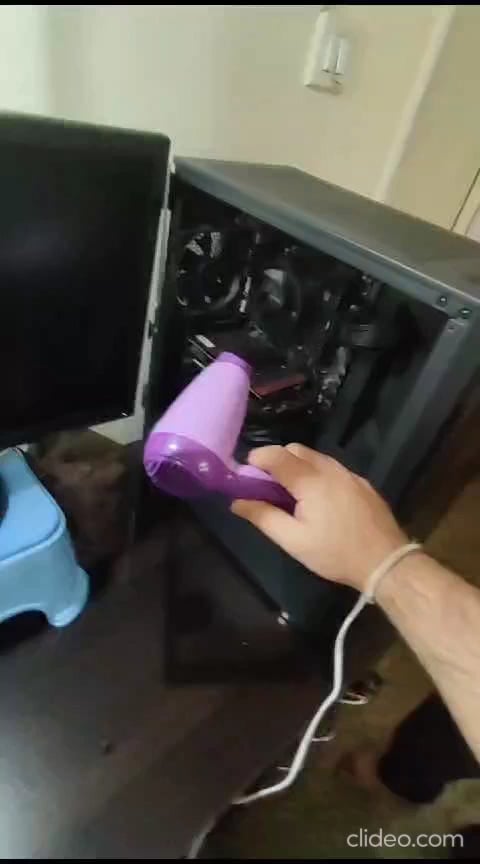
What’s wrong with this PC and how do I fix it? This usually happens when it’s rainy or too much cold. PC requires a kinda of jump start every morning during monsoon and winters using a hair dryer.

What’s wrong with this PC and how do I fix it? This usually happens when it’s rainy or too much cold. PC requires a kinda of jump start every morning during monsoon and winters using a hair dryer.
25 Comments
It’s either high humidity and you should put silica gel in your PC or one (or more)of your motherboard caps is failing.
Where are you living? Neumaeyer-Station III?
Maybe a small desktop dehumidifier near the PC
I’d move from Kamino. Try Coruscant. No real weather to deal with.
Complete shot in the dark but maybe try these things:
Try a different outlet
(If you can) Try a different mainboard and a different PSU
Check every connection and maybe press down on the ram
And this is even more of a stretch: check if it’s really the heat helping or maybe the fans spinning a little that’s actually fixing your problem.
Sorry I can’t help you more than this, good luck!
Is it your sitting chair from the childhood under the monitor?
whats the ambient humidity % ?
How long has this been going on? It sounds like a couple years at least and only cold/wet days? As one of the other folks has said, it may be some thing loose in there. Carefully make sure all cables are properly pushed in, same for the gpu and ram.
If it still happens, swap out the PSU as that is the main cause for this sort of thing. Especially if it’s getting old or is low power.
I’d try swapping out the psu, perhaps it has some bad caps.
get silica gel and an old sock, fill that sock up real good and put it inside the computer, that’ll suck up moisture real good. My gf’s car use to fog up like crazy, got a sock full of silica gell under the drivers seat, never fogged up again. Change it every few months or so. Other wise, get a dehumidifier for your room. Had a few problems at the office because the humidity was ruining PLA filament like crazy, I spread silica gel bags every where and a sock next to the place where we store PLA and no longer had a problem
is it carburated?
Whats funny is that I have the same hair dryer in my home (My sister’s)
This is common on AMD motherboards. This occurs because the crystal on the motherboard is defective, it is a well-known problem. If I have someone I know who works with microwelding, He can change this easily.
If you live in a place with monsoons “cold” is something that most likely do not exist when it gets to computers.
Moisture is the problem. And maybe sub 0 temps
how did you ever figure out that this would work?
Now im wondering how tf did u figure out that it needs an jump start with hair drier like did u just see ur pc not starting and was like hell lemme try heating it up a bit lol
what the actual fuck
Get a dehumidifier in that room and run it 24/7 on settings that are optimal for your and your machines.
try rice
Bro got his monitor on a squatty potty
Just dont turn it off
Get the latest Nvidia airports and move into a different climate
I had a similar problem on my old computer, the problem was fixed when the swollen capacitors on the motherboard were replaced, check your motherboard and if there are swollen or leaking capacitors, this may be your problem.
Sorry no cold starts on this PC electricity freezes up :3
It’s probably high humidity.
Solution: Get a dehumidifier and put it near your PC.