No one can say. You have to start from the very ground floor basics and test your way up till you are stable.
Rettila
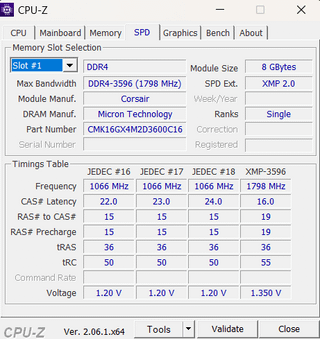
I upgraded my PC to 32GB of RAM and I bought a second kit of 2x8GB DDR4 3600MHz CL16 RAM but when I apply the XMP profile the PC crashes as soon as I boot. I suspected the subtimings are the issue so I tried some loose timings and the PC didn’t crash again.
Are these subtimings good? if not then how do I set the subtimings so that I don’t lose performance while also staying stable?
LargeMerican
yeah let us know; it usually doesn’t work at all.
probably won’t here either.
RustHero
Good luck, they say Ram sticks that are the exact same model but made weeks or months apart might not even work together. I’ve made this work however with mismatched sets, but it ran at the lowest speed that matched up and I think it was luck more the anything. There’s just no way to tell

4 Comments
No one can say. You have to start from the very ground floor basics and test your way up till you are stable.
I upgraded my PC to 32GB of RAM and I bought a second kit of 2x8GB DDR4 3600MHz CL16 RAM but when I apply the XMP profile the PC crashes as soon as I boot. I suspected the subtimings are the issue so I tried some loose timings and the PC didn’t crash again.
I set in BIOS:
Frequency: 3600MHz
CL:16
RAS to CAS: 20
tRAS: 38
tRC: 58
Are these subtimings good? if not then how do I set the subtimings so that I don’t lose performance while also staying stable?
yeah let us know; it usually doesn’t work at all.
probably won’t here either.
Good luck, they say Ram sticks that are the exact same model but made weeks or months apart might not even work together. I’ve made this work however with mismatched sets, but it ran at the lowest speed that matched up and I think it was luck more the anything. There’s just no way to tell