
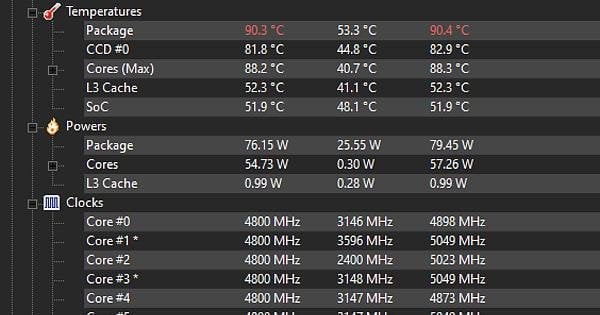
I build my new pc two months ago and enjoying it until i did a Cinebench test.
As soon as i start the test it instantly reaches 89-90c. Idles at 48-55, gaming 65-77 (sometimes hit 89c).
I got a NZXT Kraken 360 AIO and B650 Tomahawk mobo. Checked AIO mount few times (no cover on it), checked all fans directions, applied thermal paste many times. Airflow is also good. Tried PBO curve -30 (C23 Score 18380). All chipset drivers are up to date. Bios is the latest.
Tried setting radiator pump, AIO fans and case fans to full speed, still no difference.
Last week i tried with AK400 plus and exactly same results.
No matter what it reaches in Cinebench to 90c instantly (except lowering PPT). Is this normal ?
I know X3D chips and AM5 runs hot but many people never reaches tjmax on this. Not trying to get a high score on Cinebench just worried reaching to thermal throttling level so quickly.
- EXPO – Enabled
- Memory Context Restore – Enabled
- Power Down – Enabled
- Integrated Graphics – Disabled
You can have a look for values of during C23 test;
-30 curve with no PPT limit; https://imgur.com/atyPzCD
-30 curve with 70watt PPT limit; https://imgur.com/2JKM27j
Default (PBO Auto); https://imgur.com/TriUttg
8 Comments
Temps look a bit high for 70w tdp to me. Maybe the mounting pressure isn’t so great.
Same here let me know if you fixed it 😜 probably mounting / coolpaste issue
You have a cooling issue if you’re thermal throttling at 75W. A 360mm AIO should be able to handle roughly 250W and keep it below 90c.
Are you tightening the screws correctly? They should be tightened evenly in a star pattern, otherwise it will mount crooked. It’s clearly not the AIO itself, as you’ve tried several.
I would expect about 5 degrees lower across the board on low fan speeds with a 360 AIO. So the temperatures aren’t insane but they should be much more under control.
Keep memory context restore disabled while you are changing stuff in the bios(has caused me several both os and bios crashes having it enabled while fiddling with settings in bios). There’s also no point in having power down mode enabled. Google it.
On topic. Cinebench won’t push my CPU above 85 degrees with fabric settings. With co -27 it won’t pass 80, and limiting power will only decrease temps even more(but also decrease score ofc). I’ve still limited ppt to 70W as it should never use that much while gaming anyway, and the few times it does go higher while starting up the game or other things, it’ll keep the temps below 72 with a minimal impact on performance during that short window of several cores being active.
While gaming, temps hover around 59 +/- 2 degrees.
I’ve got a noctua twin tower air cooler. 3 intake fans in the front and two exhausts in the upper back corner. Have configured all fans with fancontrol so they rarely go above 30-35% utilisation at the temps my computer operate at while gaming.
Specs:
Msi b650 tomahawk
Kingston fuey beast 2x16gb 6000mhz 30cl
Rtx 3080
7800X3D
2x 1tb nvme
Make sure you do the changes in bios under system > advanced > amd overclocking(a popup will show which you click accept on) > pbo (and not the overclocking part of the bios that doesn’t give you a warning). Make sure you se all the chances you’ve dons in the other overclocking part of the motherbord back to its original before you begin overclocking in the next step.
While doing changes here, it won’t show up when you choose “save and exit”. It’ll just show “no changes we’re made”.
Setting manual ppt, edc and tdc is in milliwatts/-ampere. So make sure your ppt for example is 70000mW edc 7500, TDC TO 150000Ma. Also try llc mode 4 or 5(according to a few videos and comments, these setting work best on msi boards). Iirc llc nodes are found under the normal overclocking section in the bios, under power mamagent.
You can also try and set a thermal limit on the CPU to 80 or even 85 and see how it reacts to that on the tests.
I’ve also limited my gpu to 70% power and use a memory try it! profile for my memory that has similar timings but a lower voltage compared to the 6000mhz expo profile. Shouldn’t be any difference to your temps though.
I also would t worry too mucb about temps while running a multithread test, unless it’s to optimize cooling in general. Touy won’t reach those temps doing pretty much anything else the chip is designed for, which is gaming. If temps consistantly are around 75-85 it’s fine, but less would be better of course.
Did a few tests with different settings:
Test 1: ppt max 80W, co -28, llc mode 6. Results:
17800 score, avg 4780mhz avg. on all cores. Temp 76 degrees. 1700 single head score
Test 2: ppt max 85W, co – 30, llc mode 6. Results:
18100 score, avg 4815mhz all cores, temp at) 82 degrees, 1800 single thread score.
What program do you to measure temps and power?
d15 w/7800x3d @ 88w with -7 allcore pbo (2 cores need -7) 86.5c max temp in r23 almost instantly 82-85c average
idle 44c
apex legends – 80c max
cs2/other games 65-72c
48-55c at idle is crazy warm. Something isn’t installed correctly or your voltage is high AF. Sounds like you left the plastic tab on the coolers