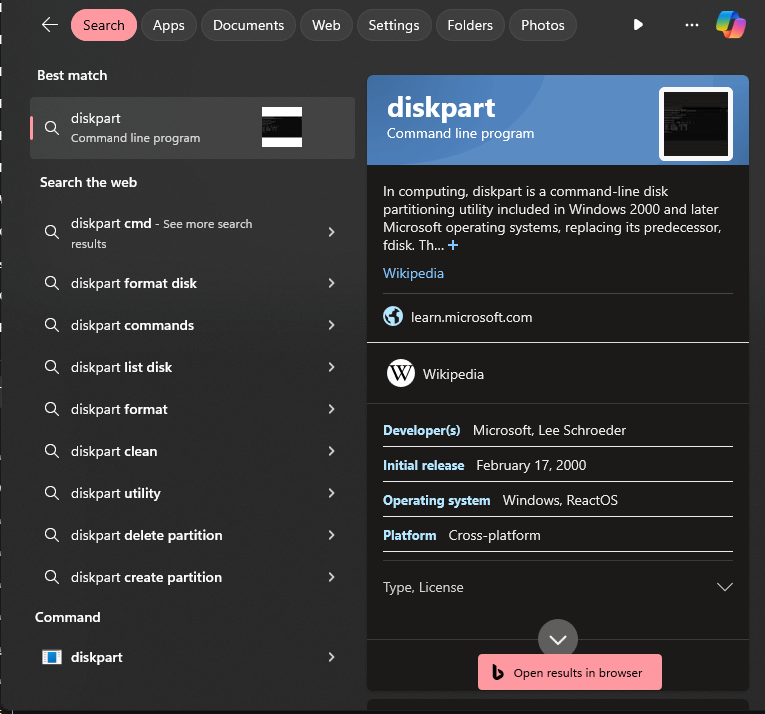
Anytime someone tries to defend Windows remind them that searching for software installed on your machine (and in the standard path even) will *only* show up at the bottom after 9 “related web search” suggestions, an index definition, and a copilot link to bing linking to edge linking to “learn.microsoft” linking to wikipedia that references ReactOS
iamstumpeded
Just so everyone knows, you can tweak the registry to remove the web results. I used an app to do it, but this site has a guide: [https://winaero.com/disable-web-search-in-windows-10-taskbar/](https://winaero.com/disable-web-search-in-windows-10-taskbar/)
Blacksad9999
Turn the toggle in seach settings to only for the files on your PC.
Riding_The_Bi-Cycle
I just use power toys run. It is SO MUCH better. Try it if you haven’t already op.
I use open shell menu to bring back the windows 7 menu
ashwin_1928
Flow launcher + Everything. I have never looked back. Not even power toys comes this close to being the greatest search tool.
Blunt552
While you can easily improve it by changing settings to not include web results, search being poopoo on windows has always been a thing, not sure why microsoft struggles at making a proper search engine for their OS.
Legitimate-Animal461
If you misspell it shows correctly on the web results but not for the actual app, that’s just dumb.
Medwynd
I cant remember the last time i had to search. How do you forget where your things are?
I have never had all that “web result” crap show up. Maybe because i by default deny anything and everything related to sending data when setting up my PC and toggle off “windows content suggestions” in the search settings.
Rafael3110
Its a setting
Azhrei
[Everything](https://www.voidtools.com/) is the superior by far replacement. People make me laugh when they lament about how good Windows Search *used* to be, because next to Everything it was always complete dogshit. Everything runs unobtrusively in the background, takes up almost no system resources and gives you pertinent search results the second you start typing letters into it.
trekxtrider
I always open diskpart by typing that in a CMD window.
dan_bodine
Funny that search works perfectly on linux.
AejiGamez
switched to mac recently, and damn spotlight is SO MUCH BETTER

18 Comments
Anytime someone tries to defend Windows remind them that searching for software installed on your machine (and in the standard path even) will *only* show up at the bottom after 9 “related web search” suggestions, an index definition, and a copilot link to bing linking to edge linking to “learn.microsoft” linking to wikipedia that references ReactOS
Just so everyone knows, you can tweak the registry to remove the web results. I used an app to do it, but this site has a guide: [https://winaero.com/disable-web-search-in-windows-10-taskbar/](https://winaero.com/disable-web-search-in-windows-10-taskbar/)
Turn the toggle in seach settings to only for the files on your PC.
I just use power toys run. It is SO MUCH better. Try it if you haven’t already op.
Works fine [here](https://ibb.co/RgGWHDs) [here](https://ibb.co/Zxt0S6q).
I use open shell menu to bring back the windows 7 menu
Flow launcher + Everything. I have never looked back. Not even power toys comes this close to being the greatest search tool.
While you can easily improve it by changing settings to not include web results, search being poopoo on windows has always been a thing, not sure why microsoft struggles at making a proper search engine for their OS.
If you misspell it shows correctly on the web results but not for the actual app, that’s just dumb.
I cant remember the last time i had to search. How do you forget where your things are?
https://preview.redd.it/zr0mjweecw5d1.png?width=950&format=png&auto=webp&s=e6217003be22868ab91baba1b89e7ffaa157a187
I have never had all that “web result” crap show up. Maybe because i by default deny anything and everything related to sending data when setting up my PC and toggle off “windows content suggestions” in the search settings.
Its a setting
[Everything](https://www.voidtools.com/) is the superior by far replacement. People make me laugh when they lament about how good Windows Search *used* to be, because next to Everything it was always complete dogshit. Everything runs unobtrusively in the background, takes up almost no system resources and gives you pertinent search results the second you start typing letters into it.
I always open diskpart by typing that in a CMD window.
Funny that search works perfectly on linux.
switched to mac recently, and damn spotlight is SO MUCH BETTER
You need to try literally everything.
[https://www.voidtools.com/](https://www.voidtools.com/)
Everything is free.
Use PowerToys Run. Works like Spotlight on Mac, and is actually useful.