
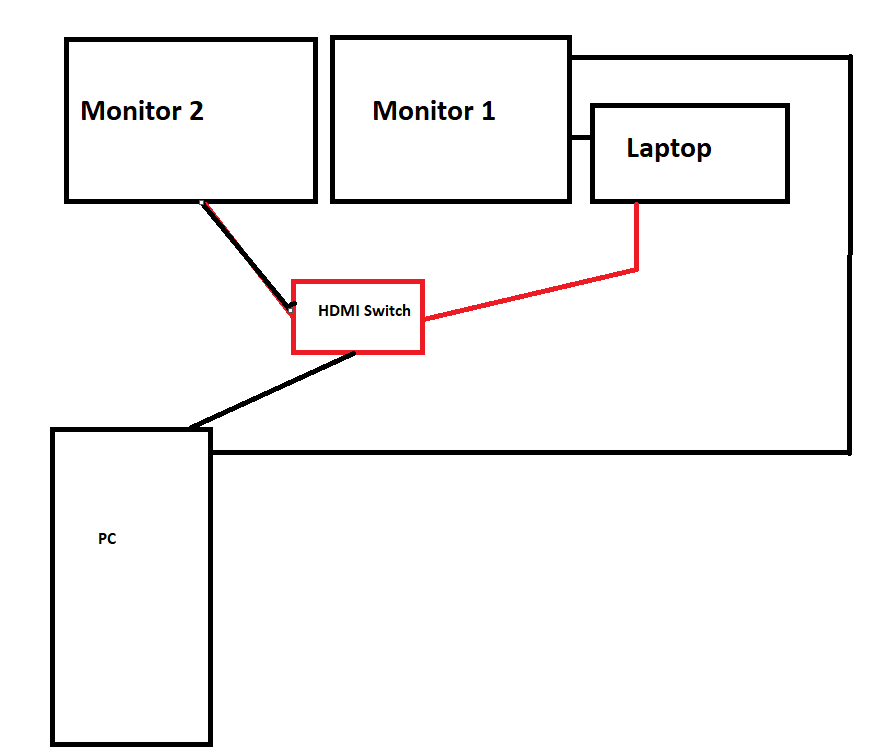
Picture is my setup for home use and working(via laptop)
Laptop is connected to monitor 1 via hdmi, pc is connected to monitor 1 via DP, no issues here.
Monitor 2 only has 1 single hdmi port, so both pc and laptop are connected to an HDMI switch that connects to the monitor. Problem is after 3-4 months, something stops working and each time I've had to replace either the HDMI switch or the usb C-hdmi cable from the laptop to the switch. What is the issue here? I've gone through 5 switches and 4 cables with this setup so far.
21 Comments
There’s a lot of junk HDMI switchers out there… Might be worth investing in a decent HDMI switcher or KVM.
The hdmi switch is likely garbage, most of them are especially if they’re less than 100 bucks.
How much do you spend on a switch and which brand
I use Synergy to control my 2 monitor windows workstation, a 3rd monitor linux pc and a chromebook. You setup your layout in the software and when your mouse moves to the edge of the screen on one device it moves to the next, turn scroll lock on to stop your mouse moving to another screen during gaming.
[https://symless.com/synergy](https://symless.com/synergy)
I’m almost wondering if power may be the issue. Like others have said, maybe the switches are junky brands.
Is your laptop on the charger when you’re using it?
Is the switch and monitors, PC, or laptop on the same outlet?
I work in my company’s IT department and we often have people renting out some of our rooms for meetings. One of the rooms has a ceiling mounted projector, screen, speakers, and an AV rack with a video switcher in it. We also have 2 AV wallplates next to each other, one with HDMI, one with VGA and 3.5mm for audio. There is an outlet on the same wall that people plug their laptop into.
When they plug in their laptop and connect either 3.5mm audio or HDMI, they get a ground loop. The outlet the laptop is plugged in to is on the same electrical circuit that the audio rack is plugged in to. Ground loops can cause damage to components if left long term.
So I’m wondering, if your stuff is on the same outlet or the same circuit, maybe it’s getting electrical feedback? If so, using an extension cord to plug the switch in to a different outlet may break the loop and help. If it does, you may look at purchasing a surge supressor or power conditioner?
Ground loop causing resistance inside the HDMI switch and breaking it’s internal circuits. The power delivery circuits can only handle it for so long before it fails
Your ground loop MAY actually be in the way the devices are plugged into the wall, and if your using a modified extension cord or power brick with the grounding rod removed this can cause this as well. It takes months to manifest so its hard to diagnose.
The HDMI protocol doesn’t use high enough voltages to fry components, but a bad ground loop can put enough rf energy into that delicate IC and switchgear to actually knock it out, given enough time.
I don’t know if this info will help your situation since I’m not sure what you’re doing when everything is working the way you want, but I was looking at switches too awhile ago. After almost spending a hundred dollars, I found a program called Mouse Without Borders, from the Microsoft Garage (yeah, the name threw me off). I can have 2 separate PC’s running and the mouse just seamlessly goes between the two screens and the keyboard works perfect too. I do have them connected directly with an ethernet cord. I am trying to figure out how to run it so that my router still works, but overall it’s amazing.
I’ve found success with an hdmi matrix instead of a dedicated switch. I have effectively the same setup as depicted here with one 4×2 matrix and have had no issues with it so far.
I found my 4k hdmi switch only works when I unplug it and plug in again. I feel like the auto switching feature is poorly designed and gets confused what to do unless I start over.
My solution to this was to use one monitor for each pc when I work using synergy software. I can move my mouse from tower pc to laptop as if they were one machines far as switching goes.. I take the old school route and switch input from monitor directly.. switchers were too expensive for its purpose
What you’re looking for is a kvm switch and any good one will be 300+
What is the point of the switch here? Each computer already has two cables going out, can you connect both computers to both monitors directly?
Switches generally suck. I would suggest upgrading to a monitor with at least two video inputs.
Sure its more annoying to change the monitor source than hitting a button on a switch. But least it won’t fail as often.
Monitors don’t have multiple inputs?
Checkout Anker. My office gave me garbage quality ones again and again. Eventually, i bought my own. Paid $50 plus but its worth it.. multiple HDMIs, usbs, and usb c ports.
Using display port would fix that problem. You can link it directly together
Buy a switch from a known brand like Anker, Ugreen etc. they are known for good quality products for a decent price
I have the exact same setup as you and I went for the laptop KVM from a company called AV Access to not have to bother with having separate switches for input and output. With this I have one usb-c cable to the laptop that handles IO and charging, the device itself is quite expensive but it works perfectly and feels really rugged. I don’t see this one breaking or me moving away from it, unless they come out with one that supports 3 monitors down the line.
This is a blessed setup. I have the same.
Lol 8gbp
Buy a switch from u green