
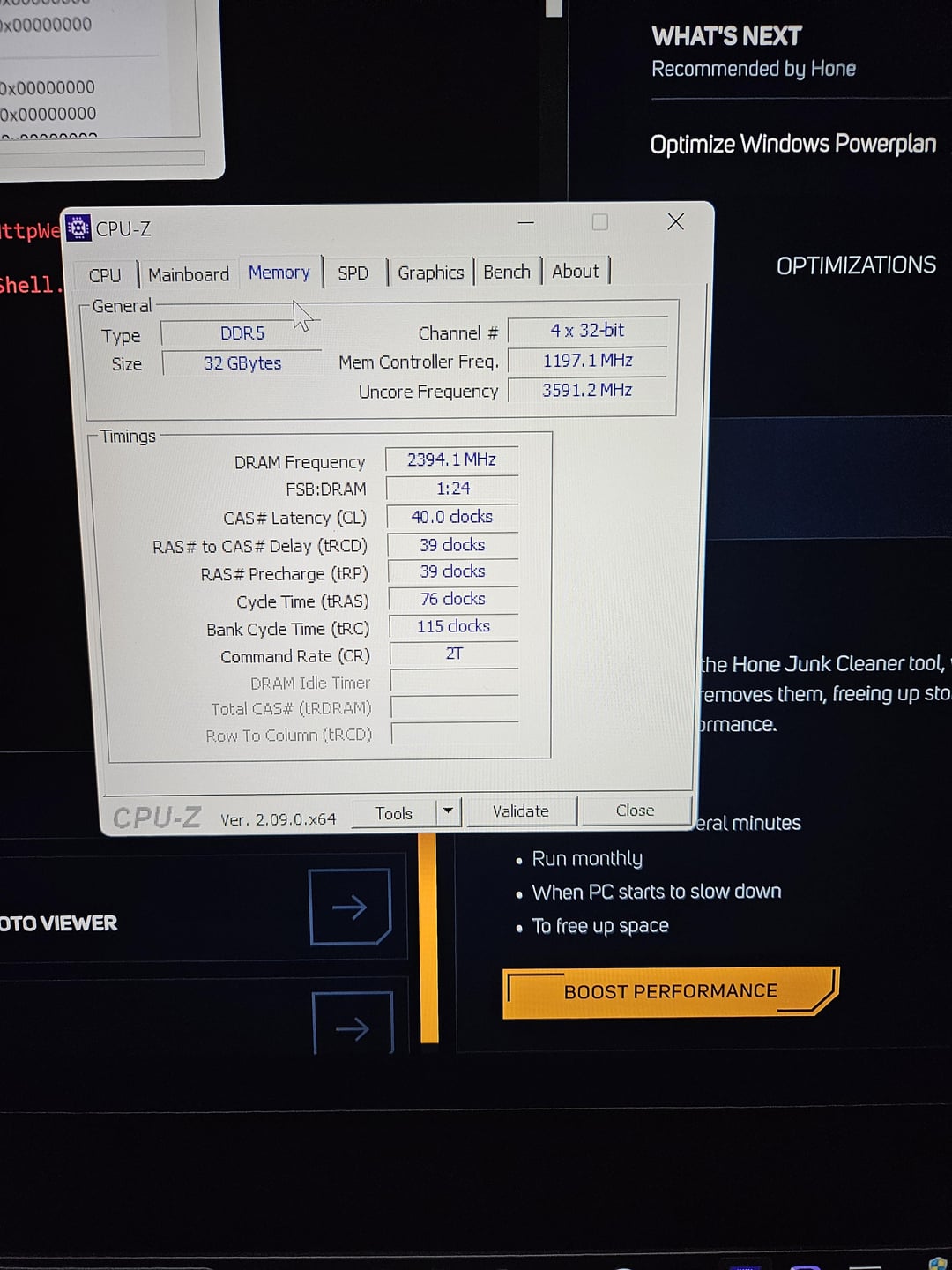
I have three RAM Sticks installed. Two Being Preinstalled "SK Hynix" and the one being the one installed "Corsair 16GB" all DDR5.
I have enabled XMP in my bios with 4800 but I'm worried it's only being used for one RAM stick and not all of them.
Can someone assist me?
7 Comments
My PC is the Legion Tower 7i
What’s the problem, they all show 4800. You’re better off with just one kit, this is horrible for your performance
Well, you’ve definitely made it a weird setup overall. 4800 is the base clock for DDR5 RAM, so it’s not surprising that it works. You do have it odd with having 3 dims rather than 2 or 4. With 3 dims, you have one set running in dual channel mode while the third dim is in single channel mode. Not sure how XMP would try to handle this, but I’m not sure XMP is enabled tbh. We would need to know more about the kits to really say anything beyond that. It looks like JEDEC profile #7 is being used but it looks like that’s the same as XMP on the one that shows an XMP profile
That 2T tho
Even tho it is 3 sticks it shows 4x 32bits
Just to explain what XMP is, it is an overclock profile with speed and timings and voltage. In your case, the XMP profile is DDR5-4800 CL40 1.1V.
All RAM sticks must run at the same speed and settings. So all three are running at that speeds and timings of the XMP profile from your Corsair stick.
The non-XMP non-overclocked speeds (many people call this “JEDEC”) for your all three of your RAM sticks go up to DDR5-4800. However, for compatibility reasons, by default your CPU and motherboard run them at a lower speed. So by enabling XMP, you are running them all at DDR5-4800. This is good.
When you mix sticks from different kits, it makes it much less likely that any XMP profile will work. DDR5-4800 is pretty slow for an XMP profile, so it happens to work in your case. Good for you!
One big mistake you’ve made is the memory slots you used. Slots #1 and #2 are one memory channel, and #3 and #4 are the second memory channel. You want to have equal capacities in each channel so the CPU can distribute and access the data efficiently and take full advantage of the two channels. Right now, you have 8GB in one and 24GB in the other, which is horribly imbalanced! Move the sticks so that you have 16GB in each.
Not sure if you were asking how to get more performance; if you were, you have two options. First option is to buy a single kit of 2x16GB DDR5-6000 and sell/return all your current RAM. That way you have 32GB total. Alternatively, do a manual overclock. Look up some DDR5 memory overclocking guides for help. You would probably get best results if you used just the two SK Hynix sticks and removed the Corsair/Micron one.
Let me know if this makes sense and if you have any questions.
The JEDEC and XMP profiles for every DIMM can be found under the SPD tab in CPU-Z. Just FYI.