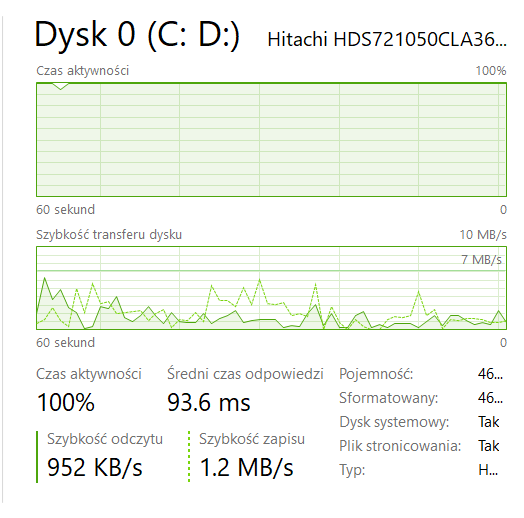
Is there any way to fix this except getting a better disc? Sometimes it stays at 100% for 5-30 minutes. (Excuse the polish lmao)

Is there any way to fix this except getting a better disc? Sometimes it stays at 100% for 5-30 minutes. (Excuse the polish lmao)
36 Comments
Not really. What you’ve got there is an old, tired HDD.
Unfortunately not. Mechanical harddrives like the one you have there are incredibly slow compared to SSDs, especially when it comes to small random reads and writes that are very common in modern systems.
So the one way to fix it is to buy some SSD and replace that thing. If the SSD is the same size or larger than the drive you can just clone everything over to it. Though i would recommend a full reinstall regardless as you can just unplug the old drive, install windows on the new one and then plug the old one back in to copy your files over. Then just format it and use it for storage/backups or something.
Never say excuse on language you speak. Theres nothing on that screenshot that should be in english.
I can’t read that but if your RAM is maxed out that could cause your drive to go into overdrive.
The Hitachi 7K1000 series wasn’t great from the beginning, so nothing much can be done. I had one, but it was 1TB and died after 4.5 years. And consumer Windows 10 works awfully slow, Id recommend installing LTSC version, as it is based on older W10 version and does not consume I/O that much
Best would to actually buy new disc.
You can buy for example samsung ssd and clone the drive.
The issues is that your HDD might die in future. So you are risking to lose your data.
I guess you can try to use scandisk and defragment to try your luck, but honestly this is a very old drive with very little cache, thing is probably exhausted at this point.
The drive is actually failing. It’s time to replace it.
Niestety, Windows 10 na HDD działa bardzo słabo… Ja bym przynajmniej kupił jakiś tani SSD SATA 256 GB i na nim zainstalował system, a resztę plików i programów trzymał na obecnym HDD.
Don’t worry about the polish, I can’t read polish or speak it, but anyone who knows windows can read this without issue.
That said, you’re due for an upgrade off of that hard drive. A sata SSD would be night and day for you.
I would run a check disk on windows.
If it is ok, then health check on that drive. There are a bunch of free tools available. I use SeaTools from Seagate.
If drive health checks ok, there is real activity that activity is the cause drive is at 100%.
It is not always a problem, regarding context in what it occurs.
It will happen when copying large files. But if that drive is storing game data, that would be a performance issue.
I had a similar problem with a mechanical. Tried many things, but nothing helped. There’s a good chance this drive is simply about to die, and you should think about a replacement.
The HDD is not at all faulty, and is showing statistics indicative of heavy use.
How much RAM does this have? This HDD is thrashing.
Kup sobie SSDka do systemu, różnica między HDD a SSD jest ogromna
It’s time my son time to but that HDD to rest and get yourself an SSD
The best thing you can do is install W10 on a cheap SSD.
If you went beyond windows 7, don’t use hard drives…
you mean other than replacing the hard drive for a ssd or moving to linux? nope, not really.
Get an ssd
Buy a cheap SSD. Even the cheapest SSD you can find will be orders of magnitude better than this donkey you’re trying to whip across the finish line.
Poor hard drive hes trying his best trying to run a modern os
Assuming it’s happening when you’re booting, disabling unnecessary start-up apps should help. If the drive is almost full clear temp files, recycle bin, ect…
Defrag the drive.
Get an SSD dude.
HDD’s are meh
Yah, I know this one. Is called Kurwa
Id be more concerned about it being called a Dysk.
If this lasts 5-30 minutes only after the system starts (my adata system ssd, less than a year old, gave speeds of up to 5 MB/s instead of 500), then one of the system files is damaged or the Windows update file is incorrectly written. I had exactly the same thing after the Windows 10 22H2 May update almost a month ago. I rolled back the updates, downloaded the new one again and verified the integrity of the system via the command line, without reinstalling the system. But you should trust the disk less and think about replacing it, I switched to a 10-year-old plextor after another loss and the inability to reinstall vcredist64 the other day.
No fix. Get SSD for sytem
Nope, win10 hates HDDs…
Below 10MB/s read and write? My guy, your drive is in hospice. Let it go already 😭
Yes. Linux distros will peg the disk far less than Windows.
Had the same problem i panicked because it was my storage and i needed it in this moment more than ever. Fixed it by unplugging it and plugging again but after my work was done i switched to new one.
💿
This kept happening to me and I could not figure out why. Tried everything on the Internet and nothing worked. Finally just reformatted my computer and it fixed everything.
Which processes are taking th3 chunk of 100%? I hav got a 5400rpm drive and whenever it happens i kill of all Non-Microsoft processes. And it returns to normal.
I’m tired boss
I will never excuse the polish. They know what they did.