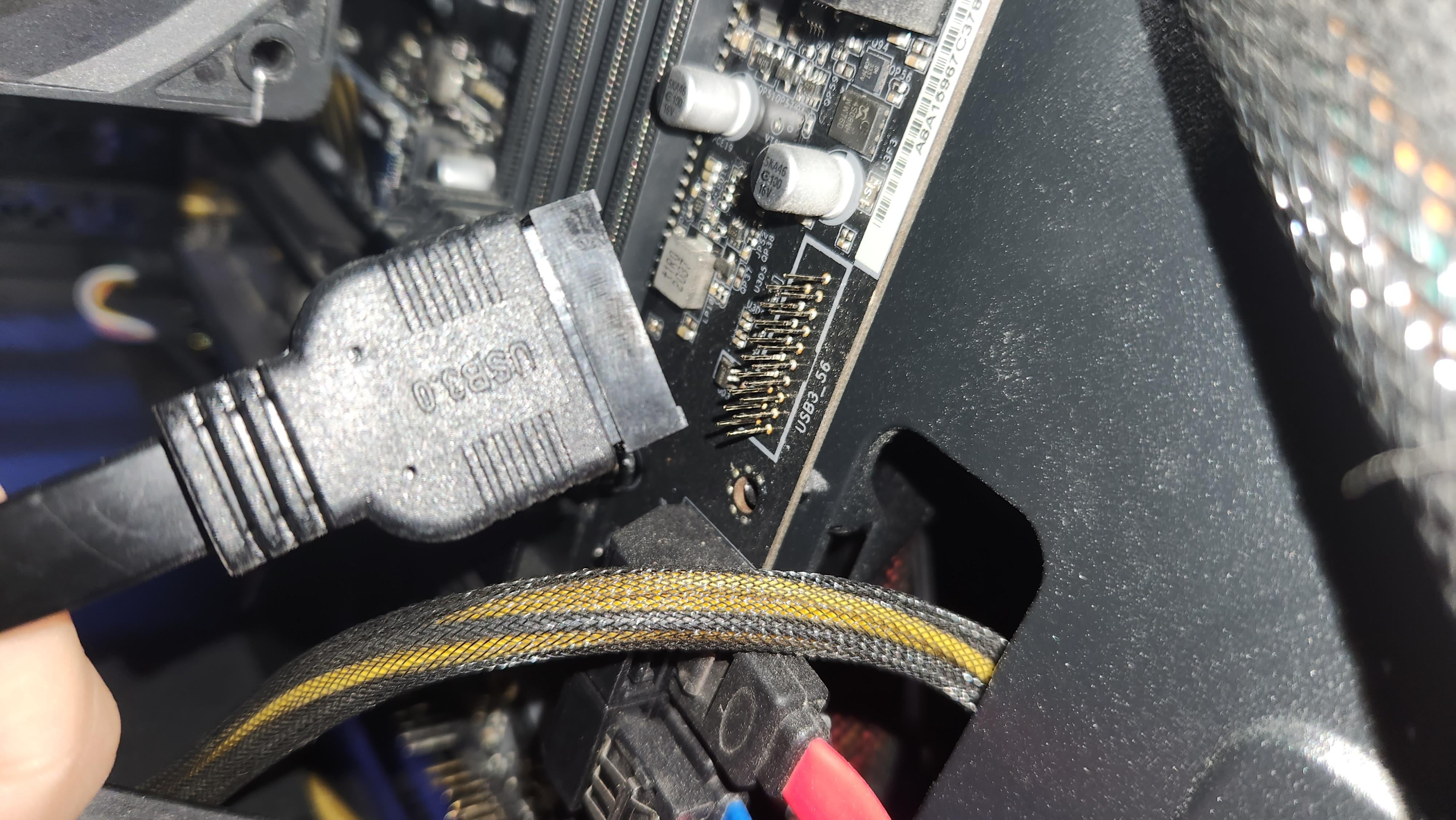
Technically no, just fit the housing back over the pins and dont wiggle it too much. Happens a lot with older sata data cables and mobo connections.
When in doubt you can put the case on its side, or pull a walmart and hotglue it back in place
mdswish
No the connector just slides over the pins on the motherboard. As long as the pins are fine you’re good.
GoatInferno
Agreeing with the others. I’ve done this myself, just carefully put it back.
USSHammond
No, just be careful and orient the pins with the holes properly and patiently and carefully push them through. Just a bad cod connector design.
fnv_fan
I fucking hate those connectors so much
Prodigy_of_Bobo
If all else fails just live without usb3 and use the usb2 ports?
smithversman
Lesson learned, always hold the plastic part when disconnecting usb3 cable, that shiz so fragile.
DR_Gabe-Itch
Looks clean. Slide back on. It’s good.
KishCore
getting a new motherboard for this is like getting a flat tire and deciding to just get a new car lol
this is the most annoying connector – i’ve bent pins on it before but worst case scenario your case’s front USB doesn’t work.
mittenkrusty
I remember in the early 2010’s breaking the sata connectors on loads of boards I owned as the connector was so tightly in it took the plastic off too, I had to gently put it back on, they still worked but each time I moved the cable the connector came off again, and eventually at least 1 pin broke.
Waylon_Gnash
whoa put it back wtf
mikeydoom
I’ve done this. I put it back on, and applied some hotglue around it to help hold it on.
awake283
Nah, if it still fits, it will still work. Just be very careful not to bend the pins from now on.
likeonions
just put it back
Archelaus_Euryalos
Two ways to fix this, one, push the whole thing back over the pins, works well if none of the pins bent. Two, remove the plug from the reciever and pish the plug over the pins, works a little better and lets you straighten the pins. There are some risks, but if your careful it shouldn’t be a problem. You could also buy a usb extender, and leave that tethered to your mobo should you ever need to do this again.
OhDiablo
One of us, one of us…..
FirmlyCrustedNut
Carefully and lightly put some epoxy super glue on the back of the mount and slide it back through the pins and wait a Day to dry
bushwickhero
If you can put it back in and it works then it’s fine.
Leader_Blaz
Guys hear me out, hot glue gun.
X-KaosMaster-X
Remove the plastic housing that goes.on the board.
CAREFULLY, push it back over the pins..
Then reseat the connector.
Several_Amount8701
That connector is the worst if you can pull the broken part out of the cable they sell a USB 3 to USB 2 cable. You would only have USB 2 speeds but It’s an option
TinglingSenses
I’ve built and repaired thousands of PCs and never have done this, but i am also very careful because of these posts lol.
LeggoTM
Happened exactly the same with my new motherboard as well. I just tried to push it back in as it was. It’s been working without issues for a year now.
funkyfritos
Me and all my homies hate USB3 mobo connector.
ElZetsu
happed with me in my first mb, just pluged it back in and it was fine
SpecialMango3384
Those things grip harder than a freaking baby grips onto your finger
ucrbuffalo
Had this happen on my mobo. My boss has had it happen to him and helped me straighten my pins (they got bent when it got ripped off) and superglued the housing on the board. Then we plugged in the cable and it was good as new. Lol
Aksds
Nah fuck it, raw dog the pins with the connector
WheredMyBrainsGo
I’ve done this before, if you’re careful you can just slide the connector back onto the pins and it will work fine.
J4KE14
Now it looks like an adapter bruh
Withdrawnauto4
Push it back on and plug in the cable and act like nothing happened
Komshiu10
what brand is yours?
mine was gigabyte and it was blue not black noticed later i had to just bend aggressively to disconnect it cause of how fluffy it is and not pull.
no issues thou went right back
Drakerss
My first pre built (we all start somewhere) had glue on the side of that connector. for what I am assuming was to prevent shipping damage. Needless to say I had the same thing happen to that connector years later.
Lanky_Information825
Carefully place it back on and reseat it, the pry it off just enough to get a bead of super glue on the inner perimeter – the seat it fully to dry – it will never come off again
Fun-Contract-2486
Plug back on.. not hard man
lostindanet
Mine lost the little plastic cover in transport, it works fine, just be careful inserting cable, its not like you will be moving it once its closed.


36 Comments
Technically no, just fit the housing back over the pins and dont wiggle it too much. Happens a lot with older sata data cables and mobo connections.
When in doubt you can put the case on its side, or pull a walmart and hotglue it back in place
No the connector just slides over the pins on the motherboard. As long as the pins are fine you’re good.
Agreeing with the others. I’ve done this myself, just carefully put it back.
No, just be careful and orient the pins with the holes properly and patiently and carefully push them through. Just a bad cod connector design.
I fucking hate those connectors so much
If all else fails just live without usb3 and use the usb2 ports?
Lesson learned, always hold the plastic part when disconnecting usb3 cable, that shiz so fragile.
Looks clean. Slide back on. It’s good.
getting a new motherboard for this is like getting a flat tire and deciding to just get a new car lol
this is the most annoying connector – i’ve bent pins on it before but worst case scenario your case’s front USB doesn’t work.
I remember in the early 2010’s breaking the sata connectors on loads of boards I owned as the connector was so tightly in it took the plastic off too, I had to gently put it back on, they still worked but each time I moved the cable the connector came off again, and eventually at least 1 pin broke.
whoa put it back wtf
I’ve done this. I put it back on, and applied some hotglue around it to help hold it on.
Nah, if it still fits, it will still work. Just be very careful not to bend the pins from now on.
just put it back
Two ways to fix this, one, push the whole thing back over the pins, works well if none of the pins bent. Two, remove the plug from the reciever and pish the plug over the pins, works a little better and lets you straighten the pins. There are some risks, but if your careful it shouldn’t be a problem. You could also buy a usb extender, and leave that tethered to your mobo should you ever need to do this again.
One of us, one of us…..
Carefully and lightly put some epoxy super glue on the back of the mount and slide it back through the pins and wait a Day to dry
If you can put it back in and it works then it’s fine.
Guys hear me out, hot glue gun.
Remove the plastic housing that goes.on the board.
CAREFULLY, push it back over the pins..
Then reseat the connector.
That connector is the worst if you can pull the broken part out of the cable they sell a USB 3 to USB 2 cable. You would only have USB 2 speeds but It’s an option
I’ve built and repaired thousands of PCs and never have done this, but i am also very careful because of these posts lol.
Happened exactly the same with my new motherboard as well. I just tried to push it back in as it was. It’s been working without issues for a year now.
Me and all my homies hate USB3 mobo connector.
happed with me in my first mb, just pluged it back in and it was fine
Those things grip harder than a freaking baby grips onto your finger
Had this happen on my mobo. My boss has had it happen to him and helped me straighten my pins (they got bent when it got ripped off) and superglued the housing on the board. Then we plugged in the cable and it was good as new. Lol
Nah fuck it, raw dog the pins with the connector
I’ve done this before, if you’re careful you can just slide the connector back onto the pins and it will work fine.
Now it looks like an adapter bruh
Push it back on and plug in the cable and act like nothing happened
what brand is yours?
mine was gigabyte and it was blue not black noticed later i had to just bend aggressively to disconnect it cause of how fluffy it is and not pull.
no issues thou went right back
My first pre built (we all start somewhere) had glue on the side of that connector. for what I am assuming was to prevent shipping damage. Needless to say I had the same thing happen to that connector years later.
Carefully place it back on and reseat it, the pry it off just enough to get a bead of super glue on the inner perimeter – the seat it fully to dry – it will never come off again
Plug back on.. not hard man
Mine lost the little plastic cover in transport, it works fine, just be careful inserting cable, its not like you will be moving it once its closed.