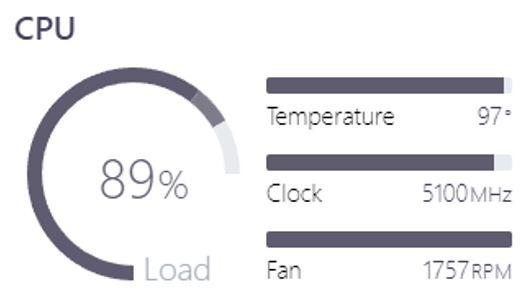
Just upgraded my pc and my new ryzen 7 770x is consistently at 95-97 degrees while gaming. Should I be worried?

Just upgraded my pc and my new ryzen 7 770x is consistently at 95-97 degrees while gaming. Should I be worried?
31 Comments
What cpu cooler?
did you use paste, did you remove the protective cover on the cooler
Case/fan setup/ambient temp/bios version?
Can you post a Hwinfo or graphs of your gaming sessions? What are the idle temps?
Did you setup fan curve?
The cpu out specs the cooler so it won’t be able to cool it properly, I’d look into a 240 mm aio and you’d be solid
Make sure your voltages are in spec because holy shit man you are killing it.
You should check the dimensions of your case and the cooler to see if it fits, but I’m using this for my 7700x: [https://noctua.at/en/nh-u12a](https://noctua.at/en/nh-u12a) and don’t have any issues with cooling. I’ve also set the CPU to run in eco mode, which thermal throttles it at 80C. I’ve found absolutely 0 performance issues in doing so.
It’s quite a chonky heatsink, so take measurements and see if it fits your case before anything.
Worried, no.
Using a 65 watt cooler on a 105 watt CPU, yeah. Why did you do that?
I would just undervolt it.
I also use a 7700X in a mini ITX. I use a Noctua NH-L12S. 60C idle temp, 80C gaming temp.
Those temps are not normal.
Edit: we have a very similar setup.
Aren’t 7k series known to run at 95°? Just go to the bios settings and set a lower temperature target or PBO or undervolt it. Performance hit should be negligible or none at all.
You can set the power limit to 70% and will get just 5% less power from it
You should change your CPU cooler. I read what you have in the comments. Get a more serious cooler.
I under volted my Ryzen 5 5600X to drop the tempratures. Even with water cooling, it was sitting @ 75-80+ degrees constantly. Under volted by a few Mhz, stable tempratures in the mid 60’s without any performance losses. EDIT: Corrected statement. UnderVolt, not underclock.
I would use the curve optimizer from AMD Ryzen software. I try that and if it’s still that high, I would maybe enable the eco modus. It only drops 5-10% performance but it uses much less power and less heat.
I sent you a chat request. Please check it and please don’t listen to the teenagers in the comments who believe everything they read on marketing pages
Yes
OP listen, just undervolt the chip, you’ll be amazed at how cooler, faster and quieter it’ll run
It’s also very easy, go in the BIOS to the curve optimizer settings and slap a – 20 all cores negative offset
-20 is rock stable on 99% of chips, you can try push it further if you want, maybe you got a lucky silicon cut
This is expected behaviour for Ryzen 7xxx series unless it’s clocking very low
If you’re limited in size. Drop pbo temp to 80 and lose a small amount of performance.
Try undervolting
ryzens are a bit crazy with temps IMHO
to get mine to not flamethrower my room i had to:
-reduce curve for all cores by 35 (that alone gave -10 or 15C)
-thermal throttle it on 65C (with rather big impact to performance on heavy loads, not really impacting gaming in my case, i would not go any lower as on 55C it was been working worse than my old i7 4790K 😛 )
-and limit it in windows for 99% max usage so its not going into turbo mode
its still getting 65C even in fallout tactics at ~1-3% utilization
also limited it to 75W but don`t think it have any impact when thermal throttle is set,
and i have 280mm AiO Oo
if you want to have any reasonable cine bench or heavy load performance you need to set it around 75-80C degree,
for me its more important to have option to breath in room without actually burning my lungs 😛
It is absolutly fine. That CPU is designed tu run on that temperature and always will try to achieve it.
More info from AMD.
[https://community.amd.com/t5/gaming/ryzen-7000-series-processors-let-s-talk-about-power-temperature/ba-p/554629](https://community.amd.com/t5/gaming/ryzen-7000-series-processors-let-s-talk-about-power-temperature/ba-p/554629)
i dont know mine does that too
While gaming? Thats pretty high. My 7800X3D is at 50-60C in gaming. But if ITX its all about compromise. Try ECO mode on.
Use a PBO tune guide on YouTube, there’s a lot of good ones now, but they all follow the same steps. Lowers your temps drastically
95-97 degrees is the new next gen.
Active the cpu eco mod in your bios or via ryzen master and it would be okay, or desactive the boost frequency in order to reduce the heat.
Get the biggest possible AIO you can stuff in it
Won’t recommend the air cooler as you told it’s an ITX build
You can limit the amount of power the CPU uses and this will lower its TDP.
Easy way:
Download & install Ryzen Master and set it to eco mode. You will get almost the same gaming performance but the cpu will run at much lower temps.
The “hard” way is called undervolting and power limiting. It’s safe, and can easily be reverted if something does go wrong. I’m going to propose a non ambitious undervolt to be on the safe side just in case.
Go into the bios. Go to Advanced CPU settings. Change “Precision Boost Overdrive” from “Auto” to “Advanced”. Go to Curve Optimizer. Set it to All Cores, change it from positive to negative, change the value from zero to 15.
Now, while still in the PBO menu, look for a list of three settings called PPT, TDC and ECD.
Set PPT Limit [mW] to 85000
Set TDC Limit [mA] to 480000
Set ECD Limit [mA] to 640000
The PPT value here is the power setting. By setting it to 85,000 you are going to limit the CPU to 85 watt. This, combined with the -15 undervolt will drastically lower your temperatures.
Enable max undervoltage from Precision Boost if this CPU supports undervoltage. That will lower your temp.
If it’s still too hot, replace cooler or reduce CPU’s power / voltage.
(Both uv and reducing max performance should be available at the same time.)
I have this CPU. 95-97 is within safe operating temperature. You can look into better cooling systems. It’s not going to hurt at all if it runs cooler. But as it is now, you are not harming it.
ETA: the absolute easiest solution would be to go into BIOS and set what’s called the thermal throttle limit (TTL) where you set a max temperaturefor the CPU to run at. Once it hits that temp it stops pushing. So you lose a bit of CPU power but depending on your use (I do 1080p and sometimes 2K gaming) it has negligible effect on the end result.