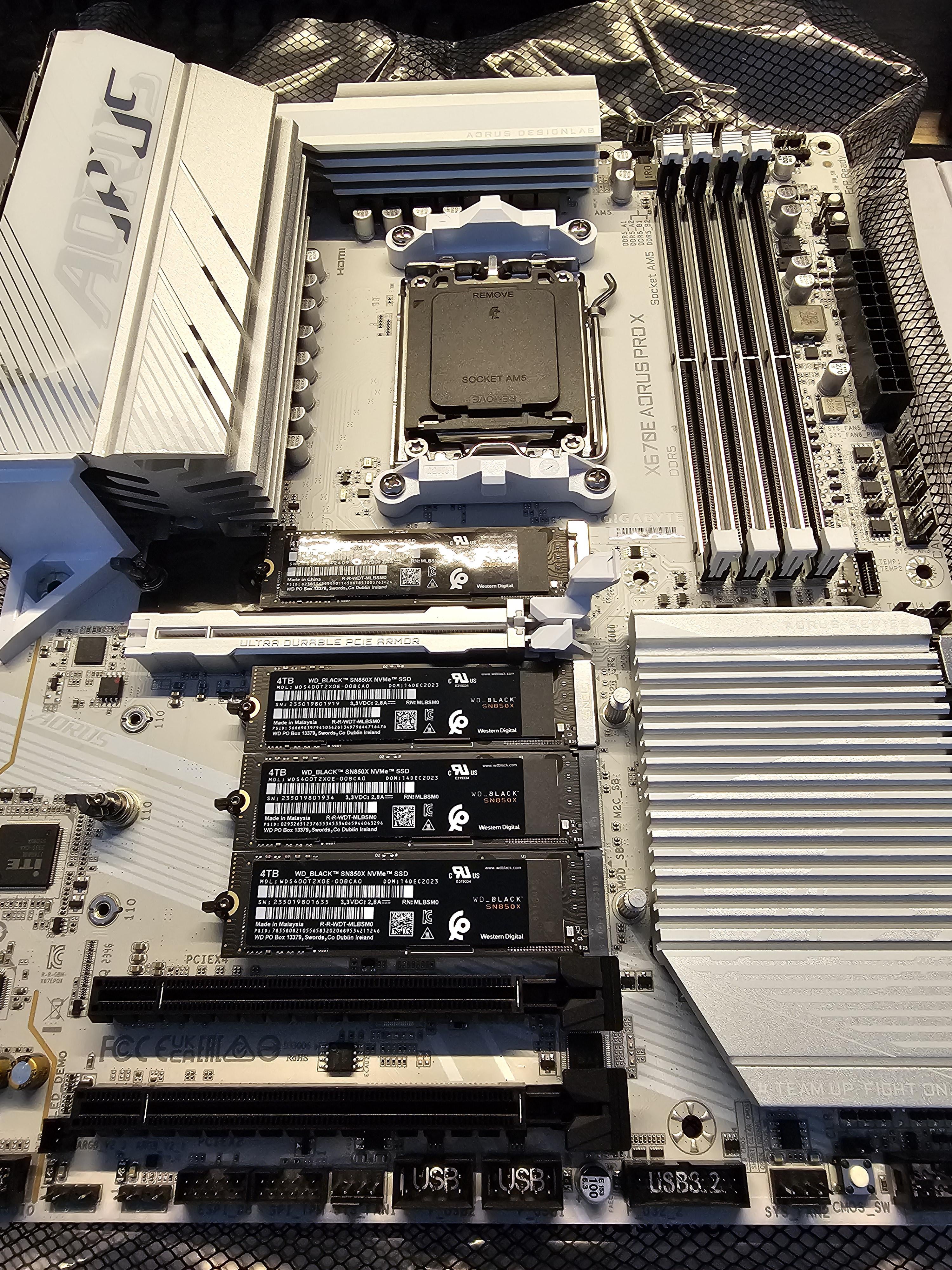
Four m.2 slots running at x4 will consume 16/24 PCIe lanes, dropping your GPU down to 8x I’m guessing
BigBadgooz
You sir may want a addin card to put those 3 into a raid and leave the boot disk to its lonesome.
dobber72
Read the manual, it will tell you all you need to know about your motherboard.
Pessimist9374
> I’m going to use all the SSD in raid 0.
For the love of God. No. Please don’t.
newaru2
What are the reasons you want to RAID 0 these SSDs?
Meln1kov
There might be some pci-ex lane splitting with one of the m.2 slot, you should read your manual to see if and where this happens.
arkane-linux
Refer to the motherboard manual. Most likely it will say this;
The top two M.2 slots have an x4 PCI-e 4.0 connection directly to the CPU.
The two M.2 slots at the bottom share bandwidth via the chipset. The chipset has an x4 PCI-e 4.0 connection with the CPU. The M.2 ports connected to it can be either 3.0 or 4.0.
The_Crimson_Hawk
Raid 0
No, at least use raid 5
Fluffy_Method9705
Raid 0 is very not recommended for permanent use. I you can set it up and benchmark it but it will have no benefits in the real world. No app or game can take advantage of it. Do you have a specific use case that needs raid 0?
Different-Produce870
I think you should avoid using RAID considering those are all 4tb drives. What purpose does having a raid array that big do.
CrazyDiamond66
I learned in this short time that Raid 0 is bad or useless for the SSDs,
and i should use Raid 5 or striping and add a Nvme expansion card?
Pimpwerx
Nice! AM5 mobos are weird, in that manus are skimping on lanes. I scoured the earth for the Gigabyte B650E mobo, because the Aorus Master is the only board I could find anywhere near its price with 4 full Gen5 slots. To do so will cut the PCIe slot for the GPU down to 8x, but it’s a Gen5 slot. 8x Gen5 is the same as 16x Gen4. And even the 4090 is still a Gen4 card.
It’s just too bad SSD prices are insane right now. I want 4x4TB NVMe, and 4x8TB SATA eventually. But not at current prices.
thenoobtanker
OP, I will lay it down simple for you.
Do you want one giant volume of 16TB that you will install the OS on and also the Steam library on? Then it is a giant no no no no. I have not touched X670 but on X570 AMD RAID is a PAIN IN THE ASS to set up. Just no, don’t do it since you WILL NOT be able to “just pop the drive over” to anyother machine unless it is also setup to use AMD RAID. So no, just don’t have a giant 16TB volume and install OS on it.
If you just want a giant Steam library then sure, you can combine the SSD in Windows storage space in stripped mode. But be warned if one drive dies you lose everything. EVERYTHING. So you should combine 3 drive into a giant steam library and the last 4TB drive you use for OS install. It is safe, just read up the motherboard block diagram to see if there is any lane sharing going on with the drives. I don’t think there is so it should be safe.
ThatOneComputerNerd
16 TB of storage and this man wants to risk having just one drive die and lose all his data lol I don’t think performance is the thing you need to worry about
caps_rockthered
RAID 10 is what you want if you want performance and redundancy.
footnote32
There will be higher latency because they most certainly connect via the chipset. But transfer rate will be wildly higher
CitySeekerTron
You should not configure these in a RAID 0 setup because you’re more likely to experience a catestrophic failure, and most RAID configurations won’t honour TRIM. Your best case scenario is tiered storage, and that requires a lot more than stock RAID setups.
To make a better suggestion, one would need to understand your use-case. For example: are you storing video data? If so, consider HDDs. You are unlikely to watch data any faster than an HDD can serve the data, so it stands to reason that even a slower HDD will do a better job, and for the cost you could go RAID 5, which would offer you more redundancy.
If you’re running games and can’t afford any delay, you might consider using Junction points . This would allow you to use the drives as folders on your filesystem without any of the overhead or compromises of RAID 0. You’d need to remember to have them installed in their appropriate locations, so for example you’d need to install to c:\prog2\gamename instead of c:\program files\gamename, but otherwise it would work like a folder. If the drive fails, the directory becomes inaccessable, but your computer continues to work as expected.
Finally, most RAID configurations are not bootable and will still require a standalone drive to boot from. On the flip side, a RAID configuration requires the entire volume set, so if you move to another device, the additional complication is the need to transfer each of the SSDs. With Junctions, this isn’t an issue.
Did you experience bending on the drives with this board? I swear mine puts such pressure on them when applying the mobo nvme heatsink
NicoleMay316
I’d limit the Raid to the 2 most performance base ones, and keep the others as individuals.
You want speed, yes? Raid 0x2 will be plenty. Especially with those capacities.
robbydf
sure, so if anyone fail all your fs will fail 🙁
DonL314
RAID 10 would be good if the drives (and bus) were of the same speed, and busses were separate. However, you should also consider the extra wear and tear on the ssd’s – by RAID’ing the drives you’d wear out your SSD’s faster since each write operation would affect all drives.
If data loss prevention is the key, I would pair the disks and do RAID1 (mirror). Your write operations would be the same speed as having 1 drive but your read operations would (in theory) be twice as fast.
Lower_Fan
use your top SSD for boot drive, then either stripe the other 3 if the data is not that important (games, movies) or use raid 5 if you can’t just re-download the data (work files)
Stilgar314
Maybe. Check your mobo manual paying special attention to which processor takes care of which M.2 slot and do the math to find out how many PCI lanes have them available for managing those drives. If you can confirm that every drive will have as many PCI lanes available as they may need, then you’re all right. Now, the raid 0 thing. Despite what you may think, the BIOS raid is not hardware managed, it’s software managed through a driver (on Windows). If you want top blazing hardware speed, you’ll need to buy a separated RAID controller card.
JDCTsunami
Are you just showing off?
belacscole
Im going to be honest, I highly reccomend against more than one or two SSDs on the motherboard, and also dont use RAID on the PC motherboard.
Often, the RAID controllers on mobos are proprietary and can be a single point of failure. If that fails and you have striping (straight RAID 0) you could just instantly lose all your data. RAID 0 itself makes it even worse, because with 4 unbackedup drives in RAID 0, if any one of them dies, your done for. This makes drive failure 4x more likely for you. Also, if your PC dies (eg dead motherboard, dead windows, etc), you wont be able to access your data unless you plug your drives in elsewhere. If they are in a complex RAID configuration you probably wont be able to do this at all. For these reasons, larger amounts of data should be backed up off of the PC, not on the PC. PC RAID is also just a pain in the ass to setup and deal with in the first place imo. Finally, unless you set it up with RAID 5, you wont have any kind of parity checking in the event of a bit flip. Lets say you have 2 drives, RAID 1. A random bit flip happens. How do you know which is the original? how do you even know it happened at all if no checks are done?
I reccomend having a single boot drive and maybe a second drive for your steam library (this can be an HDD if you want). Then, have a NAS server with a lot of drives and have a RAID or RAID-like system on that. Then take system image backups of these drives and store it on the NAS. Any large files (eg video footage) can also just get thrown on the NAS. NAS software is better designed for large RAID arrays, and you can also easily accomplish things like parity bit checking, swapping out dead drives, adding more drives, etc. Your data will then be triple or quadruple protected depending on how your backup NAS drives are setup, and booting up a new boot drive if it fails is as easy as just imaging a new one with the backed up image.
DrSmittyWerben
Jesus fucking Christ! Dont use Raid 0 ffs!
Euphoric-Let-7322
Use RAID 10
Ilijin
The eff you’re doing with 16 Tb of storage
Noxious89123
Two options here;
Either I go online, find the manual and read it and you have to wait whilst I do this.
OR
You just “read the fucking manual”.
Unless someone here has the same exact motherboard AND is doing the same thing AND has RTFM, then no one can reliably answer your question. Every model of board can be configured with different allocation of PCIe lanes, even if the PCH is the same. The PCH merely dictates what is available **overall**, not how the board manufacturer decides how to allocate those resources.
It’s also worth pointing out that RAID0 with four M.2 drives would be a bit useless, because you won’t get four times the speed by using four drives.
Only two of the four M.2 slots are connected directly to the CPU (so each of those two slots will get 4x lanes each) but the other two M.2 slots have to go through the PCH.
Each of those two drives will be able to communicate with the PCH with 4x lanes, **HOWEVER** the PCH only has a x4 lanes of PCIe through which to communicate with the CPU, so if you try to use both of those lower two M.2 slots at full speed at the same time, they’ll be bottlenecked by the limited bandwidth between the CPU and PCH.
Also worth noting that X670E is actually *two* PCH chips, and you ***don’t*** get a x4 link directly to each of them. One PCH is connected to the other PCH with a x4 link, and only one PCH is connected directly to the CPU with a x4 link.
The speed of the top two M.2 slots that are connected to the CPU directly is also dictated by which CPU you are using (and how many PCIe lanes the CPU can handle).
**This is all in the user manual. (Look at page 9).**
If you’re using a Ryzen 7000 CPU, you should have support for PCIe 5.0 x4 or x2 SSDs to the upper two M.2 slots, labelled M2A_CPU and M2B_CPU.
You’ll also have support for PCIe 4.0 x4 or x2 SSDs to the lower two M.2 slots, labelled M2C_SB and M2D_SB.
If you’re using a Ryzen 8000 CPU, the upper two M.2 slots will only operate at PCIe 4.0 instead.
IHearYouSleepTalking
Your graphics card will go Down to 8x and not run 16x. It has a very low impact (2-4%)
realrock880
read ur manual
No_Interaction_4925
Reserve the first one for windows, then RAID the other 3 as a software RAID in Windows.
Upside: Fast sequential reads
Downsides: Trim no longer functions, non-sequential read/writes still seem to suck, games won’t care at all, if 1 drive fails you lose everything.
I personally prefer 1 faster drive.
SnooSketches3386
Got any more of them pcie lanes?
West-One5944
No RAID. BUT, you can use all four at top speed. That MoBo doesn’t bifurcate the lanes. 👍🏼 I’ve been running this board with four SSDs like you have set up (no raid) with top speeds according to CrystalMark.
That said, the downside to this board is the Mediatek WiFi card. It’s garbage. Swap it out with an Intel chip while it’s out of the box. Otherwise, use Ethernet.
stowg
On a slightly different note, what are your thoughts on this motherboard overall? I am looking for a white/silver one and would love to get some thoughts
bastardoperator
Do it. I use my computer for gaming, it has nothing of value on it, if a disk goes bye bye, who cares. Use something like backblaze and stop worrying about failure.
CallEither683
Not sure why RAID 0 gets so much hate. It’s a perfectly valid solution. That’s why it exists. As long as you understand that if you lose a drive the data in the array is lost it’s fine.
I use raid 0 for my game drives. I hate having 3 different drive letters and keeping track of which drive has which game etc so I just use raid 0 for my games. Shows up as a single drive letter and it works great. Also it’s pretty fast as well. Don’t care if arrays blows up and I lose all my game data.
Anything important is sitting on my synology anyways which uses raid 5
Here is the block diagram for that mobo from the user manual. Honestly, I’m disappointed in the lack of detail in this manual with regard to PCIe lane details. That said, the Ryzen 7000 series processors have 28 total PCIe lanes. 4 lanes connect to the chipset, leaving the remaining 24 for the PCIe 5.0/4.0 bus shown in the top left of the diagram. If Gigabyte actually ran 24 lanes on the bus then the GPU could run on 16 dedicated lanes, and each m.2 slot (A & B) could run on 4 dedicated lanes. This is annotated (16/4/4). Whether or not Gigabyte actually printed that many channels in the board is unclear from their user manual. It is also possible that as a cost savings, Gigabyte only ran 20 lanes which would result in a reduced number of lanes to some components (16/2/2 or 8/4/4). If they really wanted to reduce cost and only ran 16 lanes then it would definitely result in an 8/4/4 split. Outside of running benchmarks, you probably wouldn’t notice a performance delta between a 16/4/4 and a 16/2/2, but an 8/4/4 would potentially result in lower frame rates for more demanding games at high resolution.
The only way to tell is to put in your GPU, boot it up, and look in the bios (or get a 3rd party application) to tell you how many lanes are being dedicated to each component.
Your bottom two m.2 slot have to traverse the 4 PCIe lane connection from the chipset to the cpu and those four lanes have to load balance the bandwidth of all devices connected via chipset so they have significantly less bandwidth than the top two.
As stated already, raid 0 is a bad idea from a reliability standpoint, but it also could degrade performance by spreading your data across the drives, connected to the chipset. RAID 10 would only give you half the storage but would be a better choice as it gives you two raid 0s (A+B & C+D) and mirrors them so if drive B dies, then drive D takes over until you replace drive B. That said, if you want all the storage then just don’t raid them at all. You can always mount the D, E and F drives as folders under the C drive if you don’t want the appearance of multiple letter drives in your file structure.

39 Comments
Four m.2 slots running at x4 will consume 16/24 PCIe lanes, dropping your GPU down to 8x I’m guessing
You sir may want a addin card to put those 3 into a raid and leave the boot disk to its lonesome.
Read the manual, it will tell you all you need to know about your motherboard.
> I’m going to use all the SSD in raid 0.
For the love of God. No. Please don’t.
What are the reasons you want to RAID 0 these SSDs?
There might be some pci-ex lane splitting with one of the m.2 slot, you should read your manual to see if and where this happens.
Refer to the motherboard manual. Most likely it will say this;
The top two M.2 slots have an x4 PCI-e 4.0 connection directly to the CPU.
The two M.2 slots at the bottom share bandwidth via the chipset. The chipset has an x4 PCI-e 4.0 connection with the CPU. The M.2 ports connected to it can be either 3.0 or 4.0.
Raid 0
No, at least use raid 5
Raid 0 is very not recommended for permanent use. I you can set it up and benchmark it but it will have no benefits in the real world. No app or game can take advantage of it. Do you have a specific use case that needs raid 0?
I think you should avoid using RAID considering those are all 4tb drives. What purpose does having a raid array that big do.
I learned in this short time that Raid 0 is bad or useless for the SSDs,
and i should use Raid 5 or striping and add a Nvme expansion card?
Nice! AM5 mobos are weird, in that manus are skimping on lanes. I scoured the earth for the Gigabyte B650E mobo, because the Aorus Master is the only board I could find anywhere near its price with 4 full Gen5 slots. To do so will cut the PCIe slot for the GPU down to 8x, but it’s a Gen5 slot. 8x Gen5 is the same as 16x Gen4. And even the 4090 is still a Gen4 card.
It’s just too bad SSD prices are insane right now. I want 4x4TB NVMe, and 4x8TB SATA eventually. But not at current prices.
OP, I will lay it down simple for you.
Do you want one giant volume of 16TB that you will install the OS on and also the Steam library on? Then it is a giant no no no no. I have not touched X670 but on X570 AMD RAID is a PAIN IN THE ASS to set up. Just no, don’t do it since you WILL NOT be able to “just pop the drive over” to anyother machine unless it is also setup to use AMD RAID. So no, just don’t have a giant 16TB volume and install OS on it.
If you just want a giant Steam library then sure, you can combine the SSD in Windows storage space in stripped mode. But be warned if one drive dies you lose everything. EVERYTHING. So you should combine 3 drive into a giant steam library and the last 4TB drive you use for OS install. It is safe, just read up the motherboard block diagram to see if there is any lane sharing going on with the drives. I don’t think there is so it should be safe.
16 TB of storage and this man wants to risk having just one drive die and lose all his data lol I don’t think performance is the thing you need to worry about
RAID 10 is what you want if you want performance and redundancy.
There will be higher latency because they most certainly connect via the chipset. But transfer rate will be wildly higher
You should not configure these in a RAID 0 setup because you’re more likely to experience a catestrophic failure, and most RAID configurations won’t honour TRIM. Your best case scenario is tiered storage, and that requires a lot more than stock RAID setups.
To make a better suggestion, one would need to understand your use-case. For example: are you storing video data? If so, consider HDDs. You are unlikely to watch data any faster than an HDD can serve the data, so it stands to reason that even a slower HDD will do a better job, and for the cost you could go RAID 5, which would offer you more redundancy.
If you’re running games and can’t afford any delay, you might consider using Junction points . This would allow you to use the drives as folders on your filesystem without any of the overhead or compromises of RAID 0. You’d need to remember to have them installed in their appropriate locations, so for example you’d need to install to c:\prog2\gamename instead of c:\program files\gamename, but otherwise it would work like a folder. If the drive fails, the directory becomes inaccessable, but your computer continues to work as expected.
Finally, most RAID configurations are not bootable and will still require a standalone drive to boot from. On the flip side, a RAID configuration requires the entire volume set, so if you move to another device, the additional complication is the need to transfer each of the SSDs. With Junctions, this isn’t an issue.
Here’s a [[link](https://learn.microsoft.com/en-us/sysinternals/downloads/junction)] with information about junctions. Note that you don’t need to use the linked tool; mklink is included in newer versions of Windows and does the same job.
Did you experience bending on the drives with this board? I swear mine puts such pressure on them when applying the mobo nvme heatsink
I’d limit the Raid to the 2 most performance base ones, and keep the others as individuals.
You want speed, yes? Raid 0x2 will be plenty. Especially with those capacities.
sure, so if anyone fail all your fs will fail 🙁
RAID 10 would be good if the drives (and bus) were of the same speed, and busses were separate. However, you should also consider the extra wear and tear on the ssd’s – by RAID’ing the drives you’d wear out your SSD’s faster since each write operation would affect all drives.
If data loss prevention is the key, I would pair the disks and do RAID1 (mirror). Your write operations would be the same speed as having 1 drive but your read operations would (in theory) be twice as fast.
use your top SSD for boot drive, then either stripe the other 3 if the data is not that important (games, movies) or use raid 5 if you can’t just re-download the data (work files)
Maybe. Check your mobo manual paying special attention to which processor takes care of which M.2 slot and do the math to find out how many PCI lanes have them available for managing those drives. If you can confirm that every drive will have as many PCI lanes available as they may need, then you’re all right. Now, the raid 0 thing. Despite what you may think, the BIOS raid is not hardware managed, it’s software managed through a driver (on Windows). If you want top blazing hardware speed, you’ll need to buy a separated RAID controller card.
Are you just showing off?
Im going to be honest, I highly reccomend against more than one or two SSDs on the motherboard, and also dont use RAID on the PC motherboard.
Often, the RAID controllers on mobos are proprietary and can be a single point of failure. If that fails and you have striping (straight RAID 0) you could just instantly lose all your data. RAID 0 itself makes it even worse, because with 4 unbackedup drives in RAID 0, if any one of them dies, your done for. This makes drive failure 4x more likely for you. Also, if your PC dies (eg dead motherboard, dead windows, etc), you wont be able to access your data unless you plug your drives in elsewhere. If they are in a complex RAID configuration you probably wont be able to do this at all. For these reasons, larger amounts of data should be backed up off of the PC, not on the PC. PC RAID is also just a pain in the ass to setup and deal with in the first place imo. Finally, unless you set it up with RAID 5, you wont have any kind of parity checking in the event of a bit flip. Lets say you have 2 drives, RAID 1. A random bit flip happens. How do you know which is the original? how do you even know it happened at all if no checks are done?
I reccomend having a single boot drive and maybe a second drive for your steam library (this can be an HDD if you want). Then, have a NAS server with a lot of drives and have a RAID or RAID-like system on that. Then take system image backups of these drives and store it on the NAS. Any large files (eg video footage) can also just get thrown on the NAS. NAS software is better designed for large RAID arrays, and you can also easily accomplish things like parity bit checking, swapping out dead drives, adding more drives, etc. Your data will then be triple or quadruple protected depending on how your backup NAS drives are setup, and booting up a new boot drive if it fails is as easy as just imaging a new one with the backed up image.
Jesus fucking Christ! Dont use Raid 0 ffs!
Use RAID 10
The eff you’re doing with 16 Tb of storage
Two options here;
Either I go online, find the manual and read it and you have to wait whilst I do this.
OR
You just “read the fucking manual”.
Unless someone here has the same exact motherboard AND is doing the same thing AND has RTFM, then no one can reliably answer your question. Every model of board can be configured with different allocation of PCIe lanes, even if the PCH is the same. The PCH merely dictates what is available **overall**, not how the board manufacturer decides how to allocate those resources.
It’s also worth pointing out that RAID0 with four M.2 drives would be a bit useless, because you won’t get four times the speed by using four drives.
Only two of the four M.2 slots are connected directly to the CPU (so each of those two slots will get 4x lanes each) but the other two M.2 slots have to go through the PCH.
Each of those two drives will be able to communicate with the PCH with 4x lanes, **HOWEVER** the PCH only has a x4 lanes of PCIe through which to communicate with the CPU, so if you try to use both of those lower two M.2 slots at full speed at the same time, they’ll be bottlenecked by the limited bandwidth between the CPU and PCH.
Also worth noting that X670E is actually *two* PCH chips, and you ***don’t*** get a x4 link directly to each of them. One PCH is connected to the other PCH with a x4 link, and only one PCH is connected directly to the CPU with a x4 link.
The speed of the top two M.2 slots that are connected to the CPU directly is also dictated by which CPU you are using (and how many PCIe lanes the CPU can handle).
**This is all in the user manual. (Look at page 9).**
[https://www.gigabyte.com/Motherboard/X670E-AORUS-PRO-X/support#support-manual](https://www.gigabyte.com/Motherboard/X670E-AORUS-PRO-X/support#support-manual)
If you’re using a Ryzen 7000 CPU, you should have support for PCIe 5.0 x4 or x2 SSDs to the upper two M.2 slots, labelled M2A_CPU and M2B_CPU.
You’ll also have support for PCIe 4.0 x4 or x2 SSDs to the lower two M.2 slots, labelled M2C_SB and M2D_SB.
If you’re using a Ryzen 8000 CPU, the upper two M.2 slots will only operate at PCIe 4.0 instead.
Your graphics card will go Down to 8x and not run 16x. It has a very low impact (2-4%)
read ur manual
Reserve the first one for windows, then RAID the other 3 as a software RAID in Windows.
Upside: Fast sequential reads
Downsides: Trim no longer functions, non-sequential read/writes still seem to suck, games won’t care at all, if 1 drive fails you lose everything.
I personally prefer 1 faster drive.
Got any more of them pcie lanes?
No RAID. BUT, you can use all four at top speed. That MoBo doesn’t bifurcate the lanes. 👍🏼 I’ve been running this board with four SSDs like you have set up (no raid) with top speeds according to CrystalMark.
That said, the downside to this board is the Mediatek WiFi card. It’s garbage. Swap it out with an Intel chip while it’s out of the box. Otherwise, use Ethernet.
On a slightly different note, what are your thoughts on this motherboard overall? I am looking for a white/silver one and would love to get some thoughts
Do it. I use my computer for gaming, it has nothing of value on it, if a disk goes bye bye, who cares. Use something like backblaze and stop worrying about failure.
Not sure why RAID 0 gets so much hate. It’s a perfectly valid solution. That’s why it exists. As long as you understand that if you lose a drive the data in the array is lost it’s fine.
I use raid 0 for my game drives. I hate having 3 different drive letters and keeping track of which drive has which game etc so I just use raid 0 for my games. Shows up as a single drive letter and it works great. Also it’s pretty fast as well. Don’t care if arrays blows up and I lose all my game data.
Anything important is sitting on my synology anyways which uses raid 5
Mobo manual is the key
https://preview.redd.it/y69f3bbthz2d1.jpeg?width=1290&format=pjpg&auto=webp&s=9edc7f8367b4ca07bdec3df47883208503953dc7
Here is the block diagram for that mobo from the user manual. Honestly, I’m disappointed in the lack of detail in this manual with regard to PCIe lane details. That said, the Ryzen 7000 series processors have 28 total PCIe lanes. 4 lanes connect to the chipset, leaving the remaining 24 for the PCIe 5.0/4.0 bus shown in the top left of the diagram. If Gigabyte actually ran 24 lanes on the bus then the GPU could run on 16 dedicated lanes, and each m.2 slot (A & B) could run on 4 dedicated lanes. This is annotated (16/4/4). Whether or not Gigabyte actually printed that many channels in the board is unclear from their user manual. It is also possible that as a cost savings, Gigabyte only ran 20 lanes which would result in a reduced number of lanes to some components (16/2/2 or 8/4/4). If they really wanted to reduce cost and only ran 16 lanes then it would definitely result in an 8/4/4 split. Outside of running benchmarks, you probably wouldn’t notice a performance delta between a 16/4/4 and a 16/2/2, but an 8/4/4 would potentially result in lower frame rates for more demanding games at high resolution.
The only way to tell is to put in your GPU, boot it up, and look in the bios (or get a 3rd party application) to tell you how many lanes are being dedicated to each component.
Your bottom two m.2 slot have to traverse the 4 PCIe lane connection from the chipset to the cpu and those four lanes have to load balance the bandwidth of all devices connected via chipset so they have significantly less bandwidth than the top two.
As stated already, raid 0 is a bad idea from a reliability standpoint, but it also could degrade performance by spreading your data across the drives, connected to the chipset. RAID 10 would only give you half the storage but would be a better choice as it gives you two raid 0s (A+B & C+D) and mirrors them so if drive B dies, then drive D takes over until you replace drive B. That said, if you want all the storage then just don’t raid them at all. You can always mount the D, E and F drives as folders under the C drive if you don’t want the appearance of multiple letter drives in your file structure.