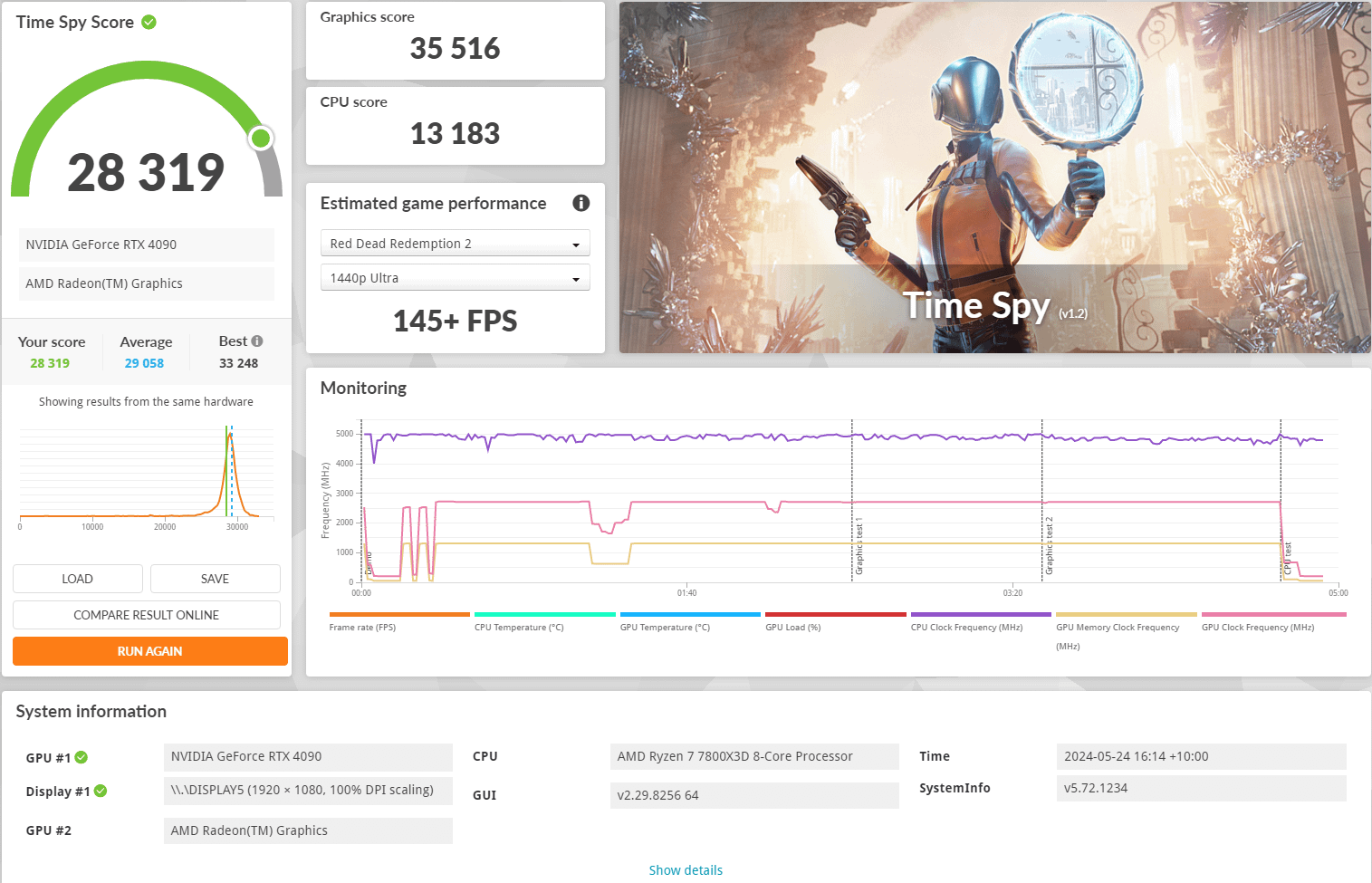
That CPU & GPU combination is one of the most competitive configurations to benchmark. People who purchase 3DMark are also more likely to overclock and fine tune their hardware.
Delicious_Sector_460
Most probably many of those users made an undervolt on the CPU and might even make some changes to the GPU. What cooling are you using? Did you run benchmark on high process priority?
You can undervolt 7800x3d to the point that it is not stable in the long run, make the benchmark score and go back to safe config. But is it really worth it? No, I don’t think so
Neither_Maybe_206
I would not use this as a sign that something is bad. It’s just that others have squeezed out some more points. I personally undervolted both gpu and cpu and get above average, but that’s not what I am looking for. I just use it as a measure tool for my undervolting
Mango952
We build 3-5 of these a week, that’s an avg score before lots of tweaking
abrahamlincoln20
Just crank up the GPU core and memory clocks and you should be above average. Also set the gpu fans manually to high rpm to increase thermal headroom. Open the case to reduce temps further. Then, if you really want to, you can do all kinds of tweaks to increase the score, such as reducing desktop resolution, disabling g-sync, killing all unnecessary processes from the background…
SherriffB
That’s overall pretty close to what I get at stock with a similar config.
Overclocking/Undervolting (whatever you want to call it) the 7800x3d and tuning the RAM can push your CPU score to ~15k points
An decent overclock on the GPU can push the GP score to ~39K points and upwards.
That would push your combined scores to around 31500K and upwards for what I’d call a decent overclock, probably score higher than average but not be near the top of leaderboards.
TheRandomClasher
Alright thanks everyone for the replies. Still pretty new to this so glad to see it’s not an issue.
cvzone
Check if VBS & HVCI are disabled in Windows (Memory Integrity)

8 Comments
That CPU & GPU combination is one of the most competitive configurations to benchmark. People who purchase 3DMark are also more likely to overclock and fine tune their hardware.
Most probably many of those users made an undervolt on the CPU and might even make some changes to the GPU. What cooling are you using? Did you run benchmark on high process priority?
You can undervolt 7800x3d to the point that it is not stable in the long run, make the benchmark score and go back to safe config. But is it really worth it? No, I don’t think so
I would not use this as a sign that something is bad. It’s just that others have squeezed out some more points. I personally undervolted both gpu and cpu and get above average, but that’s not what I am looking for. I just use it as a measure tool for my undervolting
We build 3-5 of these a week, that’s an avg score before lots of tweaking
Just crank up the GPU core and memory clocks and you should be above average. Also set the gpu fans manually to high rpm to increase thermal headroom. Open the case to reduce temps further. Then, if you really want to, you can do all kinds of tweaks to increase the score, such as reducing desktop resolution, disabling g-sync, killing all unnecessary processes from the background…
That’s overall pretty close to what I get at stock with a similar config.
Overclocking/Undervolting (whatever you want to call it) the 7800x3d and tuning the RAM can push your CPU score to ~15k points
An decent overclock on the GPU can push the GP score to ~39K points and upwards.
That would push your combined scores to around 31500K and upwards for what I’d call a decent overclock, probably score higher than average but not be near the top of leaderboards.
Alright thanks everyone for the replies. Still pretty new to this so glad to see it’s not an issue.
Check if VBS & HVCI are disabled in Windows (Memory Integrity)