
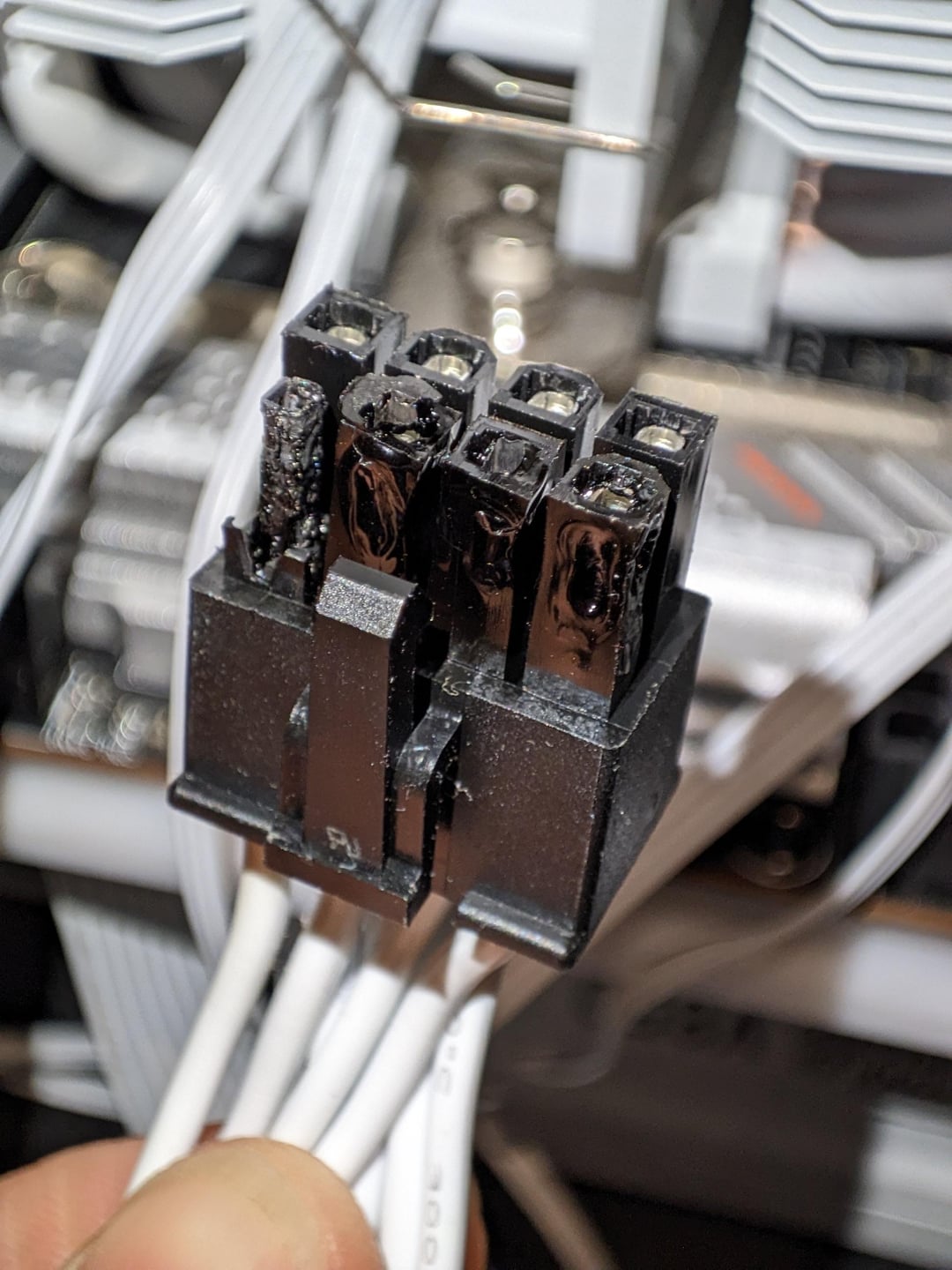
I was using the CPU for some 3D rendering, but power usage peaks at 260W according to hwmonitor. ANY IDEAS WHAT HAPPENED??
PC shut off and restarted a couple times before I realised something was burning. All other connectors seem fine.
i7 14700KF
MSI MPGZ790I mini ITX
CoolerMaster V850 gold
21 Comments
First off I don’t know why people are surprised that Intel sucks up so much juice. They’ve been using insane amounts of power for almost 10 years now.
Second, 260w isn’t enough to cook that, eps plugs arefood for 400w+.
You didn’t seat the cable down enough.
Improper seating is the number 1 cause of damage like the (which dumbasses blame on daisychain cables).
Is this a new machine or have you been using it for some time?
Are the cables attached to the power supply the factory PS cables or aftermarket?
The power consumption is crazy(i know intel normal etc).
My 7800x3d is just sipping power at 40-65 watt while gaming.
I had that happen to a 1080 that was 100% plugged in aswell not sure what it could be but its not always the user’s fault.
I took a look at the opposite end of this cable and it’s completely fine. I suppose this indicates a connection issue, but it’s weird considering I didn’t change anything about the system for this to happen. Also all the pins look like they individually melted from the inside, with one of them burning extra bad. But there was no sparks or fire or visible smoke it just got quite hot.
Just intel things
Don’t use HWmonitor, it gives very inaccurate readings. Try using HWInfo64 instead.
Possible loose terminal. Unfortunate situation. Good luck with resolution.
Is that a custom cable or is it the original cable that came with the psu?
if seated correctly, it could be as simple as a faulty cable which gave up the fight.
Loose wires cause fires
what happened is that you have an i7 12700KF CPU
Ok12
It is preferably to use CPU with 16-pin if you are using the latest Intel CPU
Use two 8 pins, my friend. If you are doing any sort of overclocking, you need to use 2 8 pins for this CPU.
https://preview.redd.it/l8gl6d2j372d1.jpeg?width=1960&format=pjpg&auto=webp&s=8b772a0e749830cc7237fce831998411e6fa9ec7
Seasonic Focus 1000 watt that I had to rma
Worth noting that if a cable isn’t completely seated and the lock clasp thing fully engaged, it can work loose over time, I think due to expansion and contraction. Also, I believe in higher power circuits the frequency of the current can also cause things to work loose but this may only be for mains power type stuff.
if it’s original PSU cable, RMA the other whole PSU ASAP.
Crispy just the way I like it. Delicious.
Huh. I didnt know Nvidia made CPU’s
/s
Maybe the cable is bad.
Damn…