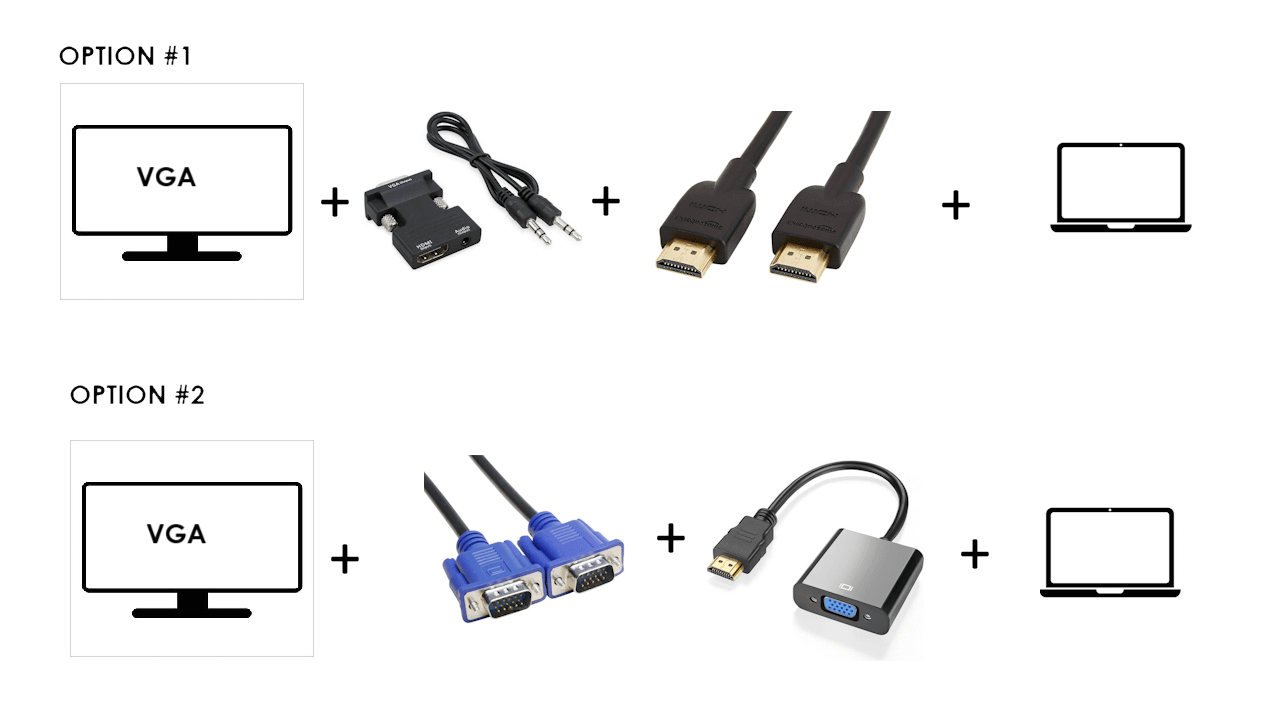
Option 1 is going to be a pain in the ass to get that extra bulky connector connected to the back of a VGA screen, and might even be too bulky to fit on some screens.
peacedetski
No.1 may give you better image quality (especially if your monitor is FHD) since you’re not running an analog signal through five feet of cheap cable. But make sure you can install that box onto the VGA connector, sometimes the space around it is quite tight.
I did a HDMI to VGA cable, no adapter needed and cheaper
quellflynn
I’ve used option 2 before and it was fine
but option 1 will be cheaper as your likely to have an hdmi cable spare
bakedbean006
Currently I use the option 2, also if your monitor has a speaker you need to look for an adapter which has 3.5M female port, the one in the image only transfers the video content
Mr_That_Guy
Option #1 is the reverse of what you want, its a VGA -> HDMI adapter (I use that exact model at work for servers).
Crabby_McCrap
Maybe I am wrong, but does option 1 also provide audio over HDMI to am 3.5mm jack? If so and if you wish to use the speakers of your monitor, def go with option 1
wreckedftfoxy_yt
you cant just VGA to HDMI?
ew435890
I currently use option 2 for my second monitor and it works fine.
eXclurel
There are VGA to HDMI cables you can buy.
KingAmongstDummies
Both are not ideal. Honestly, ages ago when there were still vga screens at work and we started getting laptops with HDMI I’ve not seen a single case where any type of adapter would work well.
Always some wonky issues with resolutions, colourbanding, refreshrates, that kind of things.
If you really can’t help it then generally it’s “The fewer conversions, the better”
So I’d go with a single VGA to HDMI cable. As seen in other comments, they exist.
Still 75% chance for random issues ranging from minor to major annoyances though.
slayer_jer
VGA is just a cable catcher that snags literally ever cable next to it. I hate them
prombloodd
I would just get a monitor that’s actually compatible with my laptop as opposed to buying an adapter
3bood_Al7assan
I wouldn’t recommend option 2 adapter at all, i bought it like 7 times because the hdmi cable is so fragile, i fixed it 2 times and was pain in the ass resoldiering each wire into place so i just gave up on it.
Your best option is to get a hdmi to vga cable not an adapter
m270ras
what monitor doesn’t take hdmi
Cave_TP
Do you need the audio?
likeonions
the bottom one
sogwatchman
There are a bunch of usb to vga adapters on amazon for $10. Get one of those and plug in the vga cable.
mecatman
Replace monitor, the monitor is way too old to not have an hdmi input.

21 Comments
I would go with option 2.
Option 1 is going to be a pain in the ass to get that extra bulky connector connected to the back of a VGA screen, and might even be too bulky to fit on some screens.
No.1 may give you better image quality (especially if your monitor is FHD) since you’re not running an analog signal through five feet of cheap cable. But make sure you can install that box onto the VGA connector, sometimes the space around it is quite tight.
Option 2 for sure.
https://preview.redd.it/ym7xtamhi02d1.png?width=850&format=png&auto=webp&s=7f938e8813146e46c435f7af64b2543687dbb3b3
I did a HDMI to VGA cable, no adapter needed and cheaper
I’ve used option 2 before and it was fine
but option 1 will be cheaper as your likely to have an hdmi cable spare
Currently I use the option 2, also if your monitor has a speaker you need to look for an adapter which has 3.5M female port, the one in the image only transfers the video content
Option #1 is the reverse of what you want, its a VGA -> HDMI adapter (I use that exact model at work for servers).
Maybe I am wrong, but does option 1 also provide audio over HDMI to am 3.5mm jack? If so and if you wish to use the speakers of your monitor, def go with option 1
you cant just VGA to HDMI?
I currently use option 2 for my second monitor and it works fine.
There are VGA to HDMI cables you can buy.
Both are not ideal. Honestly, ages ago when there were still vga screens at work and we started getting laptops with HDMI I’ve not seen a single case where any type of adapter would work well.
Always some wonky issues with resolutions, colourbanding, refreshrates, that kind of things.
If you really can’t help it then generally it’s “The fewer conversions, the better”
So I’d go with a single VGA to HDMI cable. As seen in other comments, they exist.
Still 75% chance for random issues ranging from minor to major annoyances though.
VGA is just a cable catcher that snags literally ever cable next to it. I hate them
I would just get a monitor that’s actually compatible with my laptop as opposed to buying an adapter
I wouldn’t recommend option 2 adapter at all, i bought it like 7 times because the hdmi cable is so fragile, i fixed it 2 times and was pain in the ass resoldiering each wire into place so i just gave up on it.
Your best option is to get a hdmi to vga cable not an adapter
what monitor doesn’t take hdmi
Do you need the audio?
the bottom one
There are a bunch of usb to vga adapters on amazon for $10. Get one of those and plug in the vga cable.
Replace monitor, the monitor is way too old to not have an hdmi input.