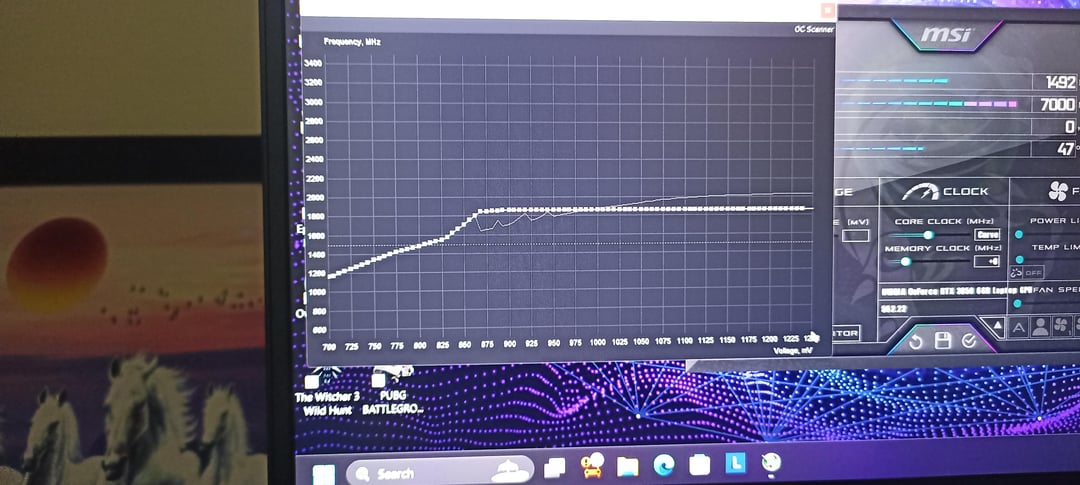
Both achieve the stable 1852mhz @ 0.875
But is there any advantage to using one curve over the other?
This is a 3050 6gb (mobile)

Both achieve the stable 1852mhz @ 0.875
But is there any advantage to using one curve over the other?
This is a 3050 6gb (mobile)
6 Comments
yes that one
look for gpu core clock effective clock under load in hw info 64
bad curves make effective clock way worse
First curve looks bad. Ideally it should be smooth.
You shouldn’t alter the shape of the default curve, just slide it up and down and eventually cut it, flattening after a certain point to limit maximum voltage or frequency.
Refer to this guide for more details: https://github.com/LunarPSD/NvidiaOverclocking/blob/main/Nvidia%20Overclocking.md
The one that engineers choose.
But i always see people online thinking they are better at it.
Second one is undervolt, firt one is underclock
2nd one. Something off about that wavy line in the first one. I’ve noticed less problems on my rig when my curve is smoother.