So I had to open chrome to post this, but it’s sitting at 32GB of RAM being “used” with literally nothing open. If I log out and back in, it drops to around 3%
Every app on my PC is EXTREMELY laggy until I log out or restart, eg discord lags villently while typing.
I have 64GB of DDR5 RAM installed in a 2x 32GB DIMM kit
Use RAMMap to check where the allocations are going.
Laggy input indicates that there may be a driver misbehaving and wasting resources
Get RAMMap, wait until it happens again, see what’s actually taking up space
Opira
Check details do you see everything that is only showing what your user context is running
Weidz_
Make sure Everything is not doing a scan in background
DogeTiger2021

lxnch50
The “Details” tab will have a more complete list of processes and services.
Ericgiant
high ram usuage is normal in windows since it preloads stuff into memory (usually around half of your ram), if your system is laggy then it means something else is going on. double check everything is working as normal (CPU/GPU), make sure nothing is overheating, and make sure u have no viruses so run some checkers to
rhamej
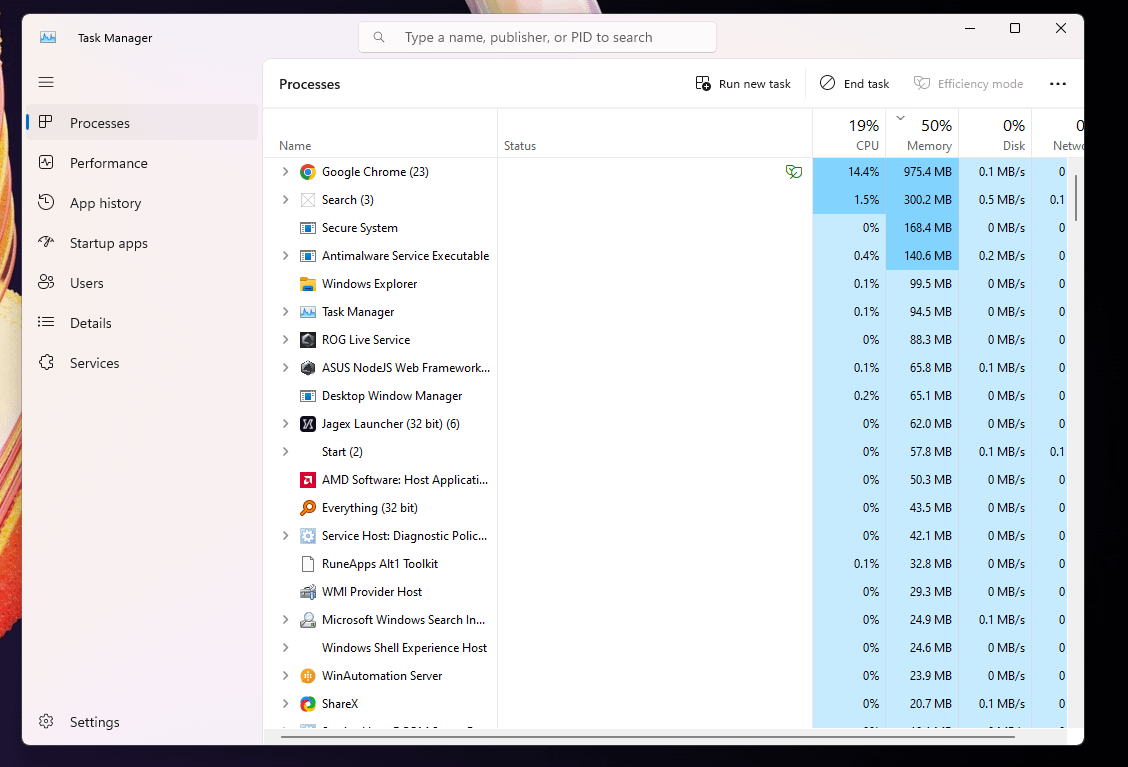
You have a crap load of background processes open, as shown in your screenshot. Close them.
Long_Independence870
Disable any unwanted startup processes.
mohgeroth
Services running in the background do not show up here under some conditions. I discovered this after hosting a space engineers server for about a month then stopped. Apparently it was still starting up anyways as a service for months until I finally broke down and spent the time to figure out why so much ram was being used.
I’m pretty sure I used sys internals “process monitor” to find this as the windows one is very dumbed down and unable to see this level of detail.
Try this to see everything eating up your memory and I feel like you may find something unexpected, service or not.
hasibrock
The reason I don’t use CHROME … though Firefox isn’t much optimised however it serves the purpose
GamerGypps
Isnt this common ? Windows just sits around 40-50% of Ram used no matter how much you have. Pop in 128GB and it will still use 64GB idle.
r4mbazamba
Windows is a broken OS
davidkslack
I’ve recently had an issue with my lapt being slow, temps rising, and cpu/mem spiking. After a little research, it turned out to be the Windows search indexer, and it looks like you might have the same issue.
If you do a quick search for “search indexer high cpu” you’ll find a scan and a fix to run.
After following this, my laptop is back to working correctly.
Good luck
bigboij
Unused ram does nothing it being in use isn’t a problem when you do something needing ram it adjusts what is used where
liaminwales
>Nothing open
Chrome is open, lots of apps are open. Also I cant see 32GB used?
27Purple
Normal. Windows uses as much as it can while it’s not needed. As soon as you fire up a game or program that needs more ram, it’s gonna reallocate it towards that instead.
You also seem to have a bunch of 3d party apps installed, like ROG/Asus software (these are known to be awful RAM eaters), some AMD software etc. Consider uninstalling some of these. You probably don’t need most anyway tbh, especially not the Asus stuff. It’s just bloatware. If you need drivers, go install them from their website.
iunoyou
That’s windows for you. Windows preloads as much random shit as it possibly can into your ram until it hits around 50% usage. That’s normally fine until it fucks up when you open a memory-intensive application and your whole system bogs down as it starts writing to the pagefile.
Sidenote: did you know linux is free?
halfanothersdozen
!ram
BryAlrighty
Wouldn’t stress about it. As long as ram becomes available when you need it, idle ram usage doesn’t really matter.
Ballaholic09
Honest question:
If you spent money towards 64GB of RAM, then why are you asking this question? You’d only get that much RAM if you had a purpose or intended use-case for it.
NotJustBibbit
Everything is open
CodeCraftedCanvas
It looks like you have allot of unneeded background apps, couple of recommendations to resolve this:
1. Stop using chrome, change to literally any other browser, I use brave but firefox is good, edge seems decent these days but chrome is a memory hog.
2. press windows start key and search for startup Apps and open, go through all the apps listed and tun off any aren’t needed, for instance when I installed photoshop and epic they both added themselves to start on pc turning on, I had to toggle them off. Turning these off will also help you pc boot faster.
3. click windows button and search Add or remove programmes look through the list and uninstall anything you never use, paying close attention to the apps listed in the task manager that are using memory delete them first.
Looking at the list shard there seems to be allot of games updates, sharing platforms and other stuff you just dont need e.g winautomation server, I’ve never seen before and when i looked it up my antivirus blocked the site, are you actually using that? again shareX is a screenshot app, My dude just press windows button + print screen or **Windows + Shift + S** for snip tool, do you need an app for that? turning them off in the startup list will stop them launching until you start whatever service uses it, but ask if you really need that stuff installed, if not uninstall the app entirely. doing these steps should get it cleaned up to more reasonable idle usage.
hoas-t
“nothing’ I’d uninstall and disable half the programs on that list….
CrashTest100
I had the same problem, all ram used without anything open, the pc was a stuttering mess and games were borderline umplayble, i found out it was Windows SuperFetch, maybe try to disable it; to disable it go to the search bar, search for “services” scroll down until you find “SysMain” right click and go to Startup type and select disable, reboot the pc.
randyscockmagic
Close the 23 tabs of porn. That may help
scarlet_igniz
20% of cpu as well, yup sounds like a virus to me
extrapower99
Task Manager doesn’t show everything, i would use System Informer, its much better, but will still not shown everything, that said, it could be a driver issue.
GoldNova12_1130
you are using chrome to be fair
firedrakes
Win super fetch or news service bug that eats all the ram
stilliffex
The more ram you have the more windows will cache.

31 Comments
So I had to open chrome to post this, but it’s sitting at 32GB of RAM being “used” with literally nothing open. If I log out and back in, it drops to around 3%
Every app on my PC is EXTREMELY laggy until I log out or restart, eg discord lags villently while typing.
I have 64GB of DDR5 RAM installed in a 2x 32GB DIMM kit
Performance Monitor: [https://i.imgur.com/2b8HDgt.png](https://i.imgur.com/2b8HDgt.png)
Resource Monitor: [https://i.imgur.com/Mk4k84f.png](https://i.imgur.com/Mk4k84f.png)
Use RAMMap to check where the allocations are going.
Laggy input indicates that there may be a driver misbehaving and wasting resources
Get RAMMap, wait until it happens again, see what’s actually taking up space
Check details do you see everything that is only showing what your user context is running
Make sure Everything is not doing a scan in background

The “Details” tab will have a more complete list of processes and services.
high ram usuage is normal in windows since it preloads stuff into memory (usually around half of your ram), if your system is laggy then it means something else is going on. double check everything is working as normal (CPU/GPU), make sure nothing is overheating, and make sure u have no viruses so run some checkers to
You have a crap load of background processes open, as shown in your screenshot. Close them.
Disable any unwanted startup processes.
Services running in the background do not show up here under some conditions. I discovered this after hosting a space engineers server for about a month then stopped. Apparently it was still starting up anyways as a service for months until I finally broke down and spent the time to figure out why so much ram was being used.
I’m pretty sure I used sys internals “process monitor” to find this as the windows one is very dumbed down and unable to see this level of detail.
Try this to see everything eating up your memory and I feel like you may find something unexpected, service or not.
The reason I don’t use CHROME … though Firefox isn’t much optimised however it serves the purpose
Isnt this common ? Windows just sits around 40-50% of Ram used no matter how much you have. Pop in 128GB and it will still use 64GB idle.
Windows is a broken OS
I’ve recently had an issue with my lapt being slow, temps rising, and cpu/mem spiking. After a little research, it turned out to be the Windows search indexer, and it looks like you might have the same issue.
If you do a quick search for “search indexer high cpu” you’ll find a scan and a fix to run.
After following this, my laptop is back to working correctly.
Good luck
Unused ram does nothing it being in use isn’t a problem when you do something needing ram it adjusts what is used where
>Nothing open
Chrome is open, lots of apps are open. Also I cant see 32GB used?
Normal. Windows uses as much as it can while it’s not needed. As soon as you fire up a game or program that needs more ram, it’s gonna reallocate it towards that instead.
You also seem to have a bunch of 3d party apps installed, like ROG/Asus software (these are known to be awful RAM eaters), some AMD software etc. Consider uninstalling some of these. You probably don’t need most anyway tbh, especially not the Asus stuff. It’s just bloatware. If you need drivers, go install them from their website.
That’s windows for you. Windows preloads as much random shit as it possibly can into your ram until it hits around 50% usage. That’s normally fine until it fucks up when you open a memory-intensive application and your whole system bogs down as it starts writing to the pagefile.
Sidenote: did you know linux is free?
!ram
Wouldn’t stress about it. As long as ram becomes available when you need it, idle ram usage doesn’t really matter.
Honest question:
If you spent money towards 64GB of RAM, then why are you asking this question? You’d only get that much RAM if you had a purpose or intended use-case for it.
Everything is open
It looks like you have allot of unneeded background apps, couple of recommendations to resolve this:
1. Stop using chrome, change to literally any other browser, I use brave but firefox is good, edge seems decent these days but chrome is a memory hog.
2. press windows start key and search for startup Apps and open, go through all the apps listed and tun off any aren’t needed, for instance when I installed photoshop and epic they both added themselves to start on pc turning on, I had to toggle them off. Turning these off will also help you pc boot faster.
3. click windows button and search Add or remove programmes look through the list and uninstall anything you never use, paying close attention to the apps listed in the task manager that are using memory delete them first.
Looking at the list shard there seems to be allot of games updates, sharing platforms and other stuff you just dont need e.g winautomation server, I’ve never seen before and when i looked it up my antivirus blocked the site, are you actually using that? again shareX is a screenshot app, My dude just press windows button + print screen or **Windows + Shift + S** for snip tool, do you need an app for that? turning them off in the startup list will stop them launching until you start whatever service uses it, but ask if you really need that stuff installed, if not uninstall the app entirely. doing these steps should get it cleaned up to more reasonable idle usage.
“nothing’ I’d uninstall and disable half the programs on that list….
I had the same problem, all ram used without anything open, the pc was a stuttering mess and games were borderline umplayble, i found out it was Windows SuperFetch, maybe try to disable it; to disable it go to the search bar, search for “services” scroll down until you find “SysMain” right click and go to Startup type and select disable, reboot the pc.
Close the 23 tabs of porn. That may help
20% of cpu as well, yup sounds like a virus to me
Task Manager doesn’t show everything, i would use System Informer, its much better, but will still not shown everything, that said, it could be a driver issue.
you are using chrome to be fair
Win super fetch or news service bug that eats all the ram
The more ram you have the more windows will cache.