
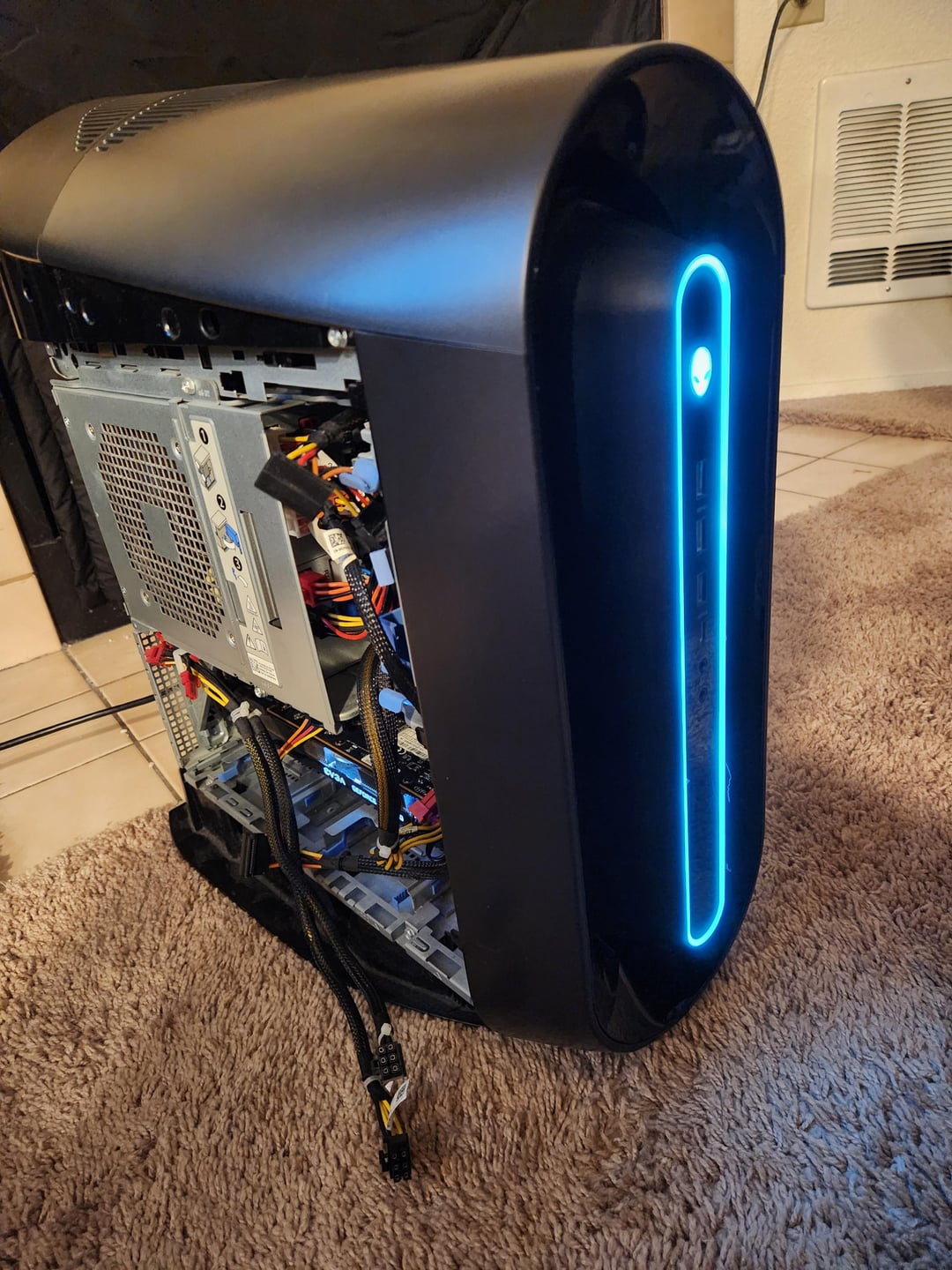
It powers on but no display! I reinstalled the cpu, cooler, and psu. Slapped my spare gtx 980 in the other PCIE 16X slot, some ram. Still no hard drive. It should at least boot into bios right? I know the components I installed work, the hdmi cable works. I've tried different ports on the gpu. The display itself works. Any ideas? Would be cool to have a budget build assembled at almost no cost to me!
21 Comments
Try reseating the ram or moving it to another slot
Not sure but maybe change the PSU
Got any LEDS lighting up ? You might need a beeper speaker to find if there’s an error.
Make sure that the pins on the mangled PCIe connector are not touching each other and causing any weirdness that way.
Weird idea, but I had issues with Nvidia before that before the first GPU boot I had to use Display Port cable instead of HDMI. If wouldn’t even beep with HDMI connected and I went through a whole lot of troubleshooting before switching to DP cable and posting just fine.
I would put it back in the dumpster.
I had an Alienware that looks like it had the same motherboard. It had display issues sometimes. To get it to work I had to plug the monitor into the motherboard hdmi port when I was booting and then switch the cable it over to the gpu and reboot. No idea why that worked… its worth a shot though
Good lord at least cut those pcie pins with flush cutters, that are most definitely shorting out
P.S. Psu is standard size atx.
So you really found an Alienware at its natural habitat?
GTX 980 with a 10700? 2014 GPU with a 2020 CPU? What a strange combination to even find anywhere.
Dude, you’re dumpster diving for a Dell.
The lights are on but nobody’s home. Try reseating the ram testing the slots and try booting on another ram stick . Also try using another GPU and another pcie x16 slot
Alienware pc heating is on the next level, I think this case achieves a perfect 0 in airflow
This is awesome PC. I have one exactly like this one.
The KF bit on the CPU means its (K) performance and (F) no built in video card. So Yeah you won’t get any display without a cheap (or expensive) GPU.
https://www.google.com/search?q=kf+suffix+intel&source=hp&client=firefox-b-m&sca_esv=74899351e738f79e&channel=ts&oq=kf+suffix+in&gs_l=mobile-heirloom-hp.1.0.0i22i30j0i512i546l3.1478.12014.0.13061.13.12.0.1.1.0.132.1293.2j10.12.0….0…1.1.34.mobile-heirloom-hp..0.13.1317.ULhoCOFYUY4
Is the CMOS battery working ?
Those are the ones with the lack of airflow which lead to constant overheating
Reseat the ram and remove the cmos battery
The first PCIe slots pins are shorted out against each other.
So I just had a really odd experience with my old Dell.
Swapped out the stock 1070 with a 3070. Before swap made sure to update to latest display driver.
Booted up, no picture at all. Had to switch HDMI to mobo display, hard install the latest Nvidia driver, then reboot. Video out to the card then worked.
I can’t explain it.
Why don’t you cut the top slot to make it x8? Much better than using the bottom slot (assuming it is only x4)