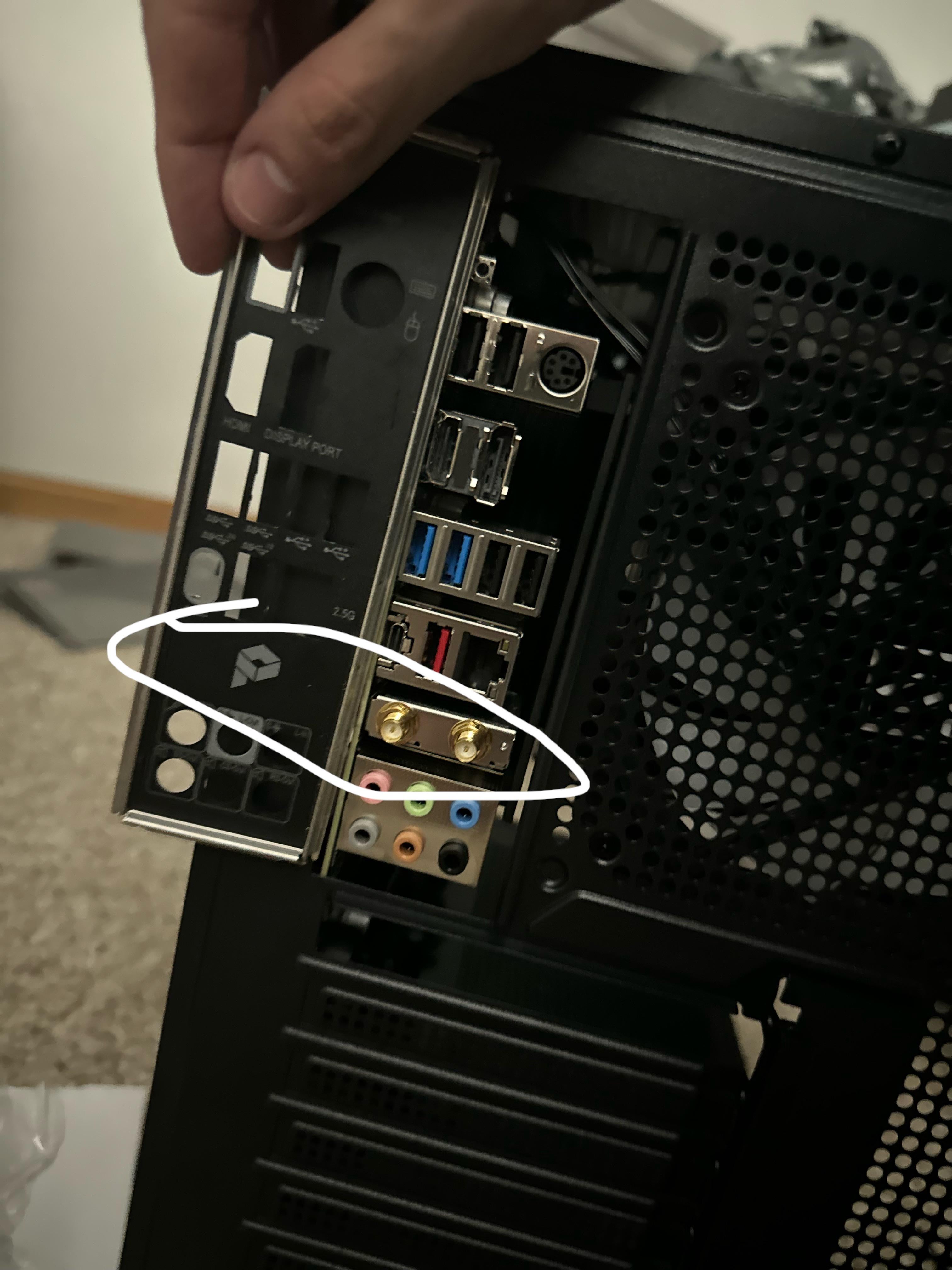
Maybe try messaging the motherboard manufacturer and request a proper IO Shield. You’ll have to provide them with the name of the motherboard, and maybe revision number (if it has one).
Hizzleguy
Dont you have to put the io panel first in place and then the mobo?
Deadeye_84
If it’s a new motherboard, ask for a replacement or maybe they just send you the right one.
Other then that, it’s not a life or death situation, you can use your pc without it.
Cinmarrs
Make your own holes.
No_Berry2976
Normally, the motherboard manufacturer / reseller will send you the right IO shield if you bought the the motherboard new. Otherwise, there is an easy solution: drill two holes in the shield. You don’t need the shield, even without the labels it’s easy to recognise each type of connection, but provided you have or have access to a drill, it’s maybe a minute work to make two holes.
frogmicky
A drill and a step down bit will be your best friend.
_hash_00000_MAN
Have you tried turning it off and on again?
Top-Conversation2882
I just can’t comprehend why people buy wifi mobos on such an expensive build like just run a cable it will be better
dobo99x2
Your manufacturer should send one, but you won’t really need it.
ClintE1956
I’ve purchased I/O shields from eBay for years. Takes a while but they’re cheap.
ShutterBun
Seems like you’ve already made up your mind, considering the mobo is installed.
PresentHot2598
Maybe I am wrong but according to me there are there to connect with WI-FI connector which comes with the motherboard. if this board is asus then in there official webpage they have shown a image connecting wifi dng with it.
Make sure to thoroughly test the motherboard before anything.
I will also contact amazon even if you are not planning on returning it. As the customer representative to send you an email documenting this; that you have been sent this motherboard with a shield that isn’t compatible with it.
You want the paper trail so if there is an issue you can use their warranty, but then again you’re drilling holes so … 🤷🏻♂️

14 Comments
[El Risitas – Funniest Laugh Ever!! (youtube.com)](https://www.youtube.com/watch?v=Fkk9DI-8el4&t=27s)
Maybe try messaging the motherboard manufacturer and request a proper IO Shield. You’ll have to provide them with the name of the motherboard, and maybe revision number (if it has one).
Dont you have to put the io panel first in place and then the mobo?
If it’s a new motherboard, ask for a replacement or maybe they just send you the right one.
Other then that, it’s not a life or death situation, you can use your pc without it.
Make your own holes.
Normally, the motherboard manufacturer / reseller will send you the right IO shield if you bought the the motherboard new. Otherwise, there is an easy solution: drill two holes in the shield. You don’t need the shield, even without the labels it’s easy to recognise each type of connection, but provided you have or have access to a drill, it’s maybe a minute work to make two holes.
A drill and a step down bit will be your best friend.
Have you tried turning it off and on again?
I just can’t comprehend why people buy wifi mobos on such an expensive build like just run a cable it will be better
Your manufacturer should send one, but you won’t really need it.
I’ve purchased I/O shields from eBay for years. Takes a while but they’re cheap.
Seems like you’ve already made up your mind, considering the mobo is installed.
Maybe I am wrong but according to me there are there to connect with WI-FI connector which comes with the motherboard. if this board is asus then in there official webpage they have shown a image connecting wifi dng with it.
* Something like this –
https://preview.redd.it/5umg1pbxulwc1.png?width=1544&format=png&auto=webp&s=589533de315d1da1547d6158adf6004af2419cab
Make sure to thoroughly test the motherboard before anything.
I will also contact amazon even if you are not planning on returning it. As the customer representative to send you an email documenting this; that you have been sent this motherboard with a shield that isn’t compatible with it.
You want the paper trail so if there is an issue you can use their warranty, but then again you’re drilling holes so … 🤷🏻♂️
At least thoroughly test the motherboard first
