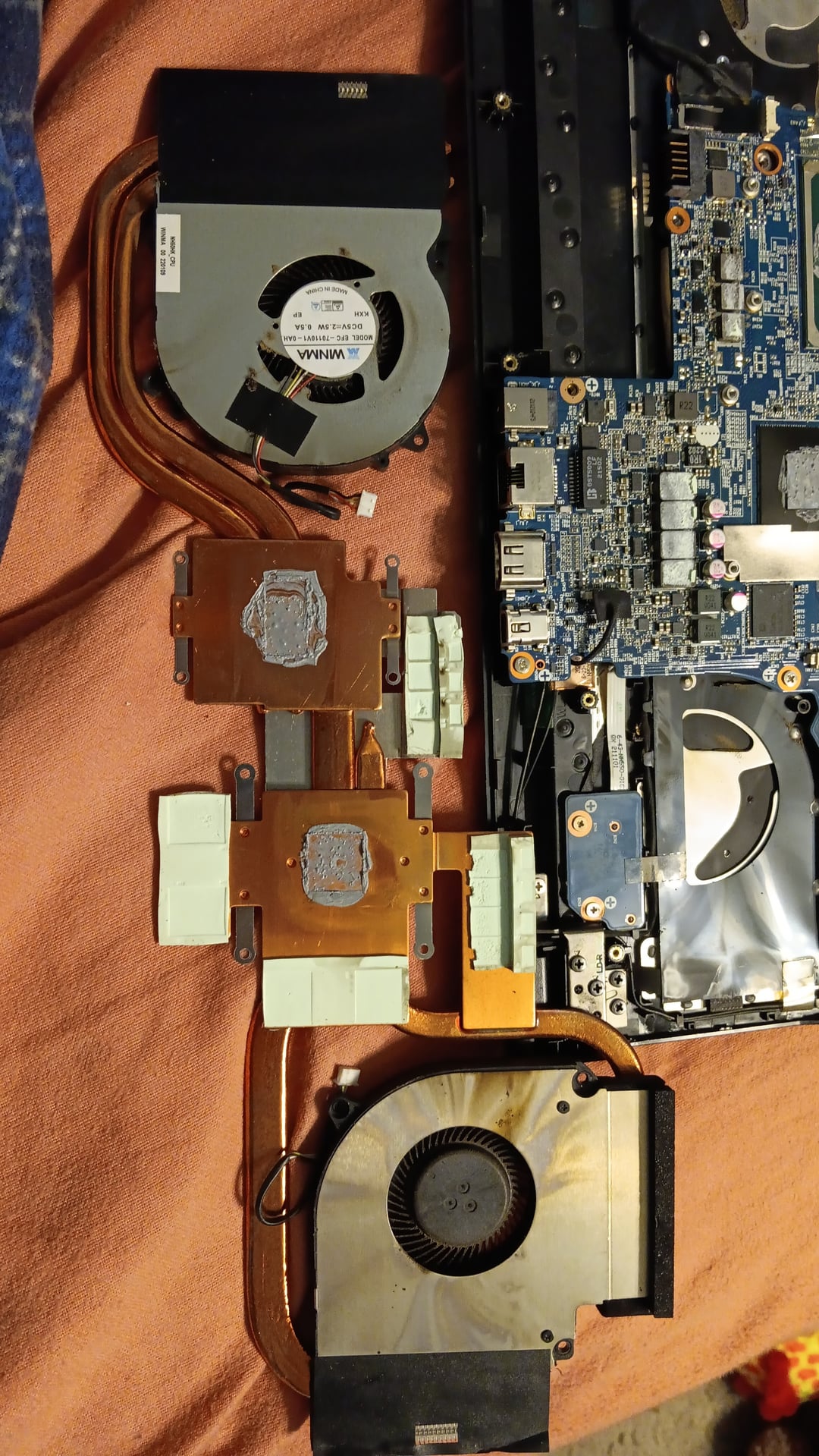
I bought a Gigabyte G5 MD for 250 and the weed smell is awful. I have never had a gaming laptop and don't know how to clean this without damaging the components. Please if anyone know give me some idea

I bought a Gigabyte G5 MD for 250 and the weed smell is awful. I have never had a gaming laptop and don't know how to clean this without damaging the components. Please if anyone know give me some idea
29 Comments
Q-tip, rubbing alchohol, time, patience.
Weed smoke dust you say?
NGL, I initially thought this was an aerial view of Mos Eisely at first
I’m guessing it’s just cigarettes, use isopropyl alcohol and a soft-tipped brush.
ear cotton for detailed work
Some of that looks like burn marks in the first layout.
Unplug the battery and get some isopropyl alcohol.
PROPER isopropyl alcohol, not 70% diluted or any of that, that’ll damage more than ist helps. And with that alcohol, get a soft brush, possibly a soft toothbrush, they work too, some q tips and some soft paper towels.
Also, while you’re at it, might wanna give it a full service and repaste+clean everything relevant.
its stoner bashin time
Get IPA 99.9% isopropyl alcohol and just douse the whole entire thing in it for 15 mins.
Then cotton buds and gently clean where you can.
Then hairdryer for a while to blow stuff out and dry it up.
Then leave somewhere warm for 3 days to fully dry out.
Resmoke the dust. You’re welcome.
Soak the whole thing in alcohol! /s I believe that will ruin the fans
Remove all the heatsinks/vents and scrub them clean, you can buy replacement fans for 20-30$ on eBay. New thermal paste, and possibly pads depending on the placement. Looks like the hardware separated pretty easily, depending on how much effort you want to put in, could possibly also wash the body.
Know a guy with an ultrasonic cleaner?
Isopropyl alcohol bath and something to agitate it away like an old toothbrush, pipe cleaner and things like that.
Those two fans can be disassembled. Find small screws and from the 1st pic I see on the fan at the bottom 2 screws that will enable you to clean them.
– disassemble, get the rotor and cover in sink and using a toothbrush, hand soap and some hot water clean it and let it dry
– stator or the housing, using the alcohol as higher as possible and some Q-tips clean it and let it dry
– find some 3D printer or ball bearing grease to lubricate the shaft of the rotor, DO NOT USE MACHINE OIL OR WD40
– reassemble and test
Before doing anything disconnect battery. Also you can find some shops that offer ultrasonic bath for the motherboard.
Edit: forgot to add, now that you removed the complete heatsink assembly you will need new thermal paste applied. Use alcohol again to clean it and apply a small amount and spread. To get you in the right direction regarding TIM on laptops see list below:
Laptops require higher viscosity thermal paste given that CPU/GPU reach 80C+ and stay there for some time, which in turn dries it out or some pastes bleed out due to expansion/constriction of heatsink.
Best Thermal Interface Material for CPU/GPU is Honeywell PTM7950 phase change sheet. Difficult to handle so freeze before removing protective plastic sheet and application.
Best thermal paste for CPU/GPU: SYY157, Gelid GC Extreme, Phobya NanoGrease Extreme, Thermalright TFX, Coolermaster Mastergel Maker, Thermagic ZF-EX.
Best thermal putty for VRM/VRAM: CX-H1300, UPSIREN U6 PRO, Zezzio ZT-PY6, Jeyi 8100, LK-PRO, EVGA Putty, Penchem TH949-1, Jeyi 8100, Penchem TH855-5, TG-PP10, Penchem TH930, KPT-8, MG860, K5Pro (use only if no other thermal putty is available).
Fans r cheap,why waste your time…
Call the DEA they probably know /s
Watch out with the IPA dipped Q-Tips! Did that once too harshly and ended up breaking one of the fans.
It seems horribly crusted on, did you try aliexpress? Found replacement fans for my gaming laptop there. You took it apart so I suppose changing them would not be a problem.
Make sure to use gloves when cleaning everything with 99% alcohol
give it the ol’ air compressor
To take a different approach from what everyone else is saying; Have you checked the price for replacement fans?
They might be a lot cheaper than you expect.
Just type in some of the numbers that are on the stickers on the fans, and you should be able to easily find somewhere online selling the same ones.
Roll and smoke it
Only 99% alcohol and a lot of time
TBH, I would just go try [ali-express](https://www.aliexpress.us/item/3256804156921388.html?gatewayAdapt=glo2usa4itemAdapt) or something and just buy a new fan instead of fucking around with that bullshit. This is probably a few hours of super nasty work that may or may not work.
The make electronic cleaner….not sure how well it will do on a full board,
Rubbing alcohol in a tooth
But ditch the fans get new ones it will stink of weed no matter what
Buy new fans and use rubbing alcohol on the heat sink
was the original owner using it as a bong. i smoke a lot of weed and my shit doesnt like that inside.
Second, neither weed or cigarette smoke leave “dust”. If you see dust, it did not came from smoke. Yes both cigs and weed produce dust. But unless you use your intake as an ashtray you have regular dust on top of smoke rests on you coolers.
Third. You blow out the dust and turn on. I am not even kidding. You think of deep cleaning the inside walls of your 250$ trash laptop? Spend that time making money for new laptop.
Last … No way this is your first time and you opened it up not knowing you will need at least thermal paste. I don’t buy it.
Scrape it off with a toothpick, put it in a bowl, light it up.