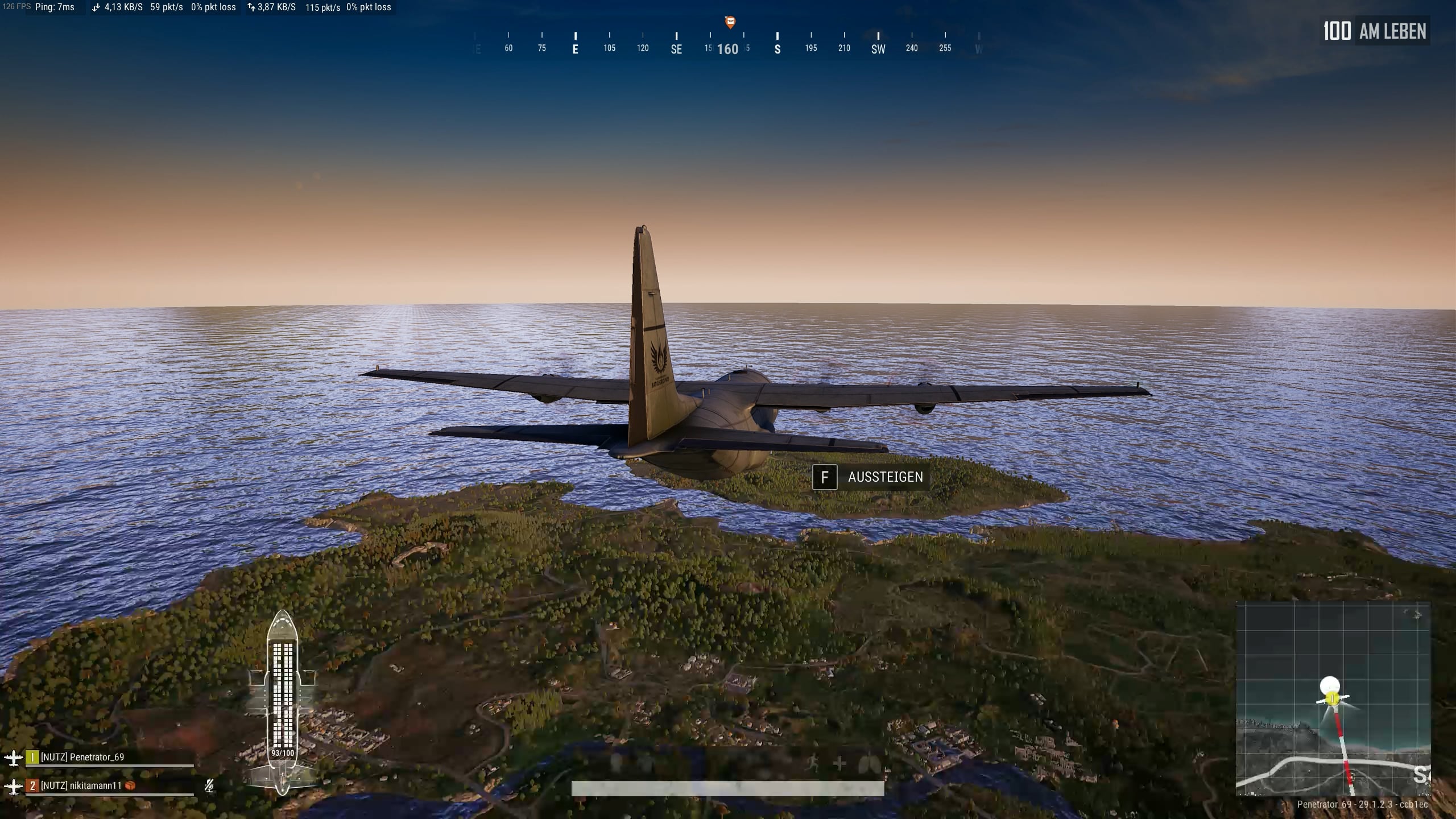
Asus Tuf 6800 XT, driver completely uninstalled and reinstalled, newest AMD adrenaline version (24.3.1).
This also happens in other games or benchmarks. Temps are between 50 and 82 degrees C.
Shockle
Looks like it.
I had something similar happen to me, and underclocking it made it last long enough for me to sort a replacement.
It still worked for like 10 months in a friend’s build too.
manolid
What game is this?
ddvorzhak
Looks like some temperature or overclock issue
BeerGogglesFTW
* DDU + Install lastest drivers
* DDU + Install old drivers
* Try a new monitor cable
* Try a new monitor
If its still an issue, it may be a lost cause. But you could try:
* Reinstalling Windows fresh.
* Re-paste GPU (Confirm thermal pad contact)
But most likely
* Replace GPU
* Undervolting may circumvent the issue temporarily while its being replaced.
Netrick-0
I hadlve theese in PUBG too, no other game has theese, it is only pubg issue for me. Same gpu since 3 years
Xilofonek
I had this problem to. I changed cable and switched hdmi slot on my GPU and it was all good.
Plutonium239Mixer
You can try reseating the gpu in its slot. If it’s on a riser cable, try plugging directly into the board. You can also try a different pcie slot on the motherboard.
survivorr123_
what cpu do you have? this is not a gpu issue, people had it in unreal engine 5 games and it also affected physics,
turns out its an issue occuring on ryzen 3000 series processors, sometimes
normal ue5 stuff
huh_phd
Either GPU dying, or the poorly optimized state of PUBG
Ssyynnxx
yessirrrr
NinJoo117
This honestly looks like an engine issue, but you say it’s happening in multiple games… Maybe try checking where your games shaders are cached and nuke those folders, then try loading up a couple games, also can’t hurt to do integrity checks on the games, if multiple games need repairing it may be the drive thats failing and leaving corrupt data, which would cause slow load times, bad pop in, and stuttering
Colinski282
You may try to decrease the load on the card to relieve the issue if its out of warranty. Download msi afterburner and you have a couple things you can try. Under the power curve chart, you can ctrl+L on the base clock speed on the chart so it doesnt increase voltage or clocks beyond that. This will prevent the increased clocks and voltage and reduce load on the card and the artifacts may disappear. Or you can reduce core clock and memory speeds on the slider and do it that way.
Artifacts like that are usually from the VRAM. Core clock issues usually just hard crash.
MPeters43
I think pubg is just horribly optimized tbh I’ve been running into hella issues with it even though my gaming rig is pretty high end with no reason to struggle or have issues.
Either that or epic games is the worst launcher to exist. Gl
Dr-False
If your lucky, it’s a driver. Otherwise, yeah…
BibabutzelmannDota
Ist this the animation for people exiting the plane? I would at least double check.
CMDRo7CMDR
Could be — but I would try another game first to see if you have similar effects. Pubg isn’t know for its stability and lack of glitches.
Aleblanco1987
Looks like it just happens on the water texture. does it happen in other games?
MrXoXoL
Looks like GPU memory overheating. Try lowering memory frequency. Also you can try removing GPU cooler and replacing thermalpads on the memory, if you are comfortable with the process.
Edit: undervolting memory makes it less stable BTW, you need to lower clock speeds without lowering the voltage.
UnrealSlim
Does it happen in other games or just PUBG
Life-Phase9272
Happened to me on an r9 270X a long time ago. I lowered the GPU frequency and memory frequency. Then after a while I modded a BIOS for it to be defaults. It worked a year or two on my friends PC since I needed a new GPU anyway. Those are the same artifacts you get when you overclock stuff too much. Lowering the clocks might help, but you have to do like at least 10%. Do know it will gradually get worse and you’ll have to underclock even more but it can last a long time.
yoyomaster230
Similar thing happened to me and the solution was updating the drivers through GeForce experience, but that may not work for you

24 Comments
Asus Tuf 6800 XT, driver completely uninstalled and reinstalled, newest AMD adrenaline version (24.3.1).
This also happens in other games or benchmarks. Temps are between 50 and 82 degrees C.
Looks like it.
I had something similar happen to me, and underclocking it made it last long enough for me to sort a replacement.
It still worked for like 10 months in a friend’s build too.
What game is this?
Looks like some temperature or overclock issue
* DDU + Install lastest drivers
* DDU + Install old drivers
* Try a new monitor cable
* Try a new monitor
If its still an issue, it may be a lost cause. But you could try:
* Reinstalling Windows fresh.
* Re-paste GPU (Confirm thermal pad contact)
But most likely
* Replace GPU
* Undervolting may circumvent the issue temporarily while its being replaced.
I hadlve theese in PUBG too, no other game has theese, it is only pubg issue for me. Same gpu since 3 years
I had this problem to. I changed cable and switched hdmi slot on my GPU and it was all good.
You can try reseating the gpu in its slot. If it’s on a riser cable, try plugging directly into the board. You can also try a different pcie slot on the motherboard.
what cpu do you have? this is not a gpu issue, people had it in unreal engine 5 games and it also affected physics,
turns out its an issue occuring on ryzen 3000 series processors, sometimes
normal ue5 stuff
Either GPU dying, or the poorly optimized state of PUBG
yessirrrr
This honestly looks like an engine issue, but you say it’s happening in multiple games… Maybe try checking where your games shaders are cached and nuke those folders, then try loading up a couple games, also can’t hurt to do integrity checks on the games, if multiple games need repairing it may be the drive thats failing and leaving corrupt data, which would cause slow load times, bad pop in, and stuttering
You may try to decrease the load on the card to relieve the issue if its out of warranty. Download msi afterburner and you have a couple things you can try. Under the power curve chart, you can ctrl+L on the base clock speed on the chart so it doesnt increase voltage or clocks beyond that. This will prevent the increased clocks and voltage and reduce load on the card and the artifacts may disappear. Or you can reduce core clock and memory speeds on the slider and do it that way.
Artifacts like that are usually from the VRAM. Core clock issues usually just hard crash.
I think pubg is just horribly optimized tbh I’ve been running into hella issues with it even though my gaming rig is pretty high end with no reason to struggle or have issues.
Either that or epic games is the worst launcher to exist. Gl
If your lucky, it’s a driver. Otherwise, yeah…
Ist this the animation for people exiting the plane? I would at least double check.
Could be — but I would try another game first to see if you have similar effects. Pubg isn’t know for its stability and lack of glitches.
Looks like it just happens on the water texture. does it happen in other games?
Looks like GPU memory overheating. Try lowering memory frequency. Also you can try removing GPU cooler and replacing thermalpads on the memory, if you are comfortable with the process.
Edit: undervolting memory makes it less stable BTW, you need to lower clock speeds without lowering the voltage.
Does it happen in other games or just PUBG
Happened to me on an r9 270X a long time ago. I lowered the GPU frequency and memory frequency. Then after a while I modded a BIOS for it to be defaults. It worked a year or two on my friends PC since I needed a new GPU anyway. Those are the same artifacts you get when you overclock stuff too much. Lowering the clocks might help, but you have to do like at least 10%. Do know it will gradually get worse and you’ll have to underclock even more but it can last a long time.
Similar thing happened to me and the solution was updating the drivers through GeForce experience, but that may not work for you
Yes, Your wallet is dying
it looks like your VRAM is going die
I had problems like that
maybe 50% its gpu