My computer wasn’t connecting to my monitor so I unplugged my gpu and plugged it back in and now it’s running way worse, I’m pretty sure I plugged everything in correctly but I would really appreciate some help before I call someone.

My computer wasn’t connecting to my monitor so I unplugged my gpu and plugged it back in and now it’s running way worse, I’m pretty sure I plugged everything in correctly but I would really appreciate some help before I call someone.
25 Comments
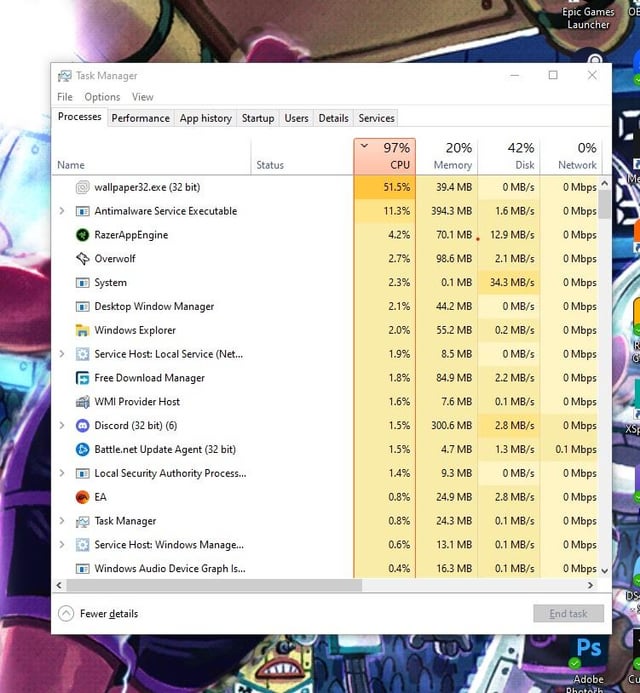
Did it change the default to using your CPU to render the wallpaper instead of the video card?
It’s moved the workload of the wallpaper engine to the CPU since there’s a problem with the GPU drivers not loading properly.
Reinstall the GPU drivers and restart your PC.
It’s hasn’t installed the drivers for the gpu hence the basic adaptor. May need to ddu and reinstall
Mining goes brrr (maybe)
Is wallpaper32.exe a crypto miner virus, by any chance?
The second pic shows the monitor is set to 1hz refresh rate, try and change it.
Is that refresh rate to supposed to be 1 or 1000 Hz? I think a first step is to adjust it to match the one from your monitor (165 Hz). In the meantime you could also close Wallpaper Engine, which is causing this high CPU usage.
1000 Hz Monitor??? lol, OP listen to u/n674
[webwallpaper32.exe uses extreme amounts of CPU even when no web backgrounds are playing :: Wallpaper Engine Problem Solving (steamcommunity.com)](https://steamcommunity.com/app/431960/discussions/1/1762482479178507659/)
Lots of causes and solutions to this
Kill the task, uninstall the program, and do your wallpapers manually from now on.
I did this back in 1997 on a Pentium II btw.
Free Download Manager??
Get rid of overwolf while you’re at it. That program is a resource hog for no reason.
You’re using the wrong discord and the wrong battle net . You need the 64 bit versions .
So if I see this correct you should
1. Kill wallpaper engine for the time working on the problem
2. Set your monitor to the according refresh rate (should be 165, but im not 100% sure)
3.look for a driver update for your gpu
4. restart wallpaper engine and check if it works as intended
I had the same problem, it was set to 1.000hz. I just updated the drivers and restarted
So much bloatware
Wallpaper files – are .bmp. These are also created when you hit F10 for a “Dumped Screenshot” in simulator games. There’s a lag pause whilst that file get saved, as .bmp files are rather longer than .jpg!
What happens if Wallpaper.bloat.exe is trying to flap a different wallpaper .bmp file 50-60 times a second as a refresh?
You won’t need the heating on this winter – just flap your wallpaper over and over with some badly-written bloatware… Don’t put your PC in the fridge neither, as it’ll melt the icecream, and turn your chicken into Waitrose quality….
Remove “Wallpaper Engine”.
Holy game launchers. Somebody help this poor pc.
While wallpaper engine is cool and all(I used to use it alot). Uninistalling it and using a static wallpaper will free up a lot of system resources.
Did you plug the monitor into the gpu or the motherboard?
Did you install your GPU driver?
Try reinstalling the drivers, use DDU for uninstall
So while you might have a GPU driver problem…you have a bigger problem. “Free download Manager” Why is this here? nothing but the introduction to viruses. You need to remove that and anything else along those lines.
wallpaper.exe
How did you get a 1,000 Hz refresh rate?