der8auer did some testing with various types, and at best, they’re slightly better than the integrated heatsinks on the motherboard.
At worst, they don’t offer any cooling at all.
NamelessDegen42
Beneficial? Maybe.
Necessary? Not at all.
Ragnaraz690
If you’re going to hammer a Gen 5 drive, yes, a proper cooling application is required. Gen 4 can get away without one.
With great speed comes great heat.
tankersss
Only if you are going to hammer Gen 5 drive. For Gen3 and probably Gen 4 not so much
Vaseth-30kRS-iron
depends on your case usage, for most gamers? no, you will see no benefit, as there is not an excess amount of read write going on, and the only time there is is downloading games from steam, in which case its your download speed thats capping things, and by such a margin the drive wont be heating up noticeably, if your overall system has proper cooling.
read write speed is good for gaming, but its generally just loading scenes kinda thing, that dont go on long enough to make things overheat
xelAppaR
Maybe for a gen 5 ssd?
TheLegendD4RK
Gen 3 SSD you can keep it without any heatsink.
For gen 4 and 5 you can use motherboard heatsink it will do the job unless you are doing excessive read/write on a gen 5 SSD then you will need something like this to keep the performance as high as possible for as long as possible.
lepobz
SSDs are designed to run hot. If they run *really* hot then it does shorten lifespan, so some cooling is a good thing. But some is enough. In most cases, none is enough. But high performance SSDs with a small heatsink, fine. There is utterly no point, beyond marketing and dickswinging, to have anything bigger.
BuchMaister
My primarily SSD Constantly runs at 58-63 degrees, under prolonged stress it can get even more this is either with the motherboard heatsink or the heat sink the ssd came with. I ordered heatsink two times, the first one which has a fan was too tall because of Asus STUPID decision to put the m.2 connector right under the aesthetic plastic cover of the IO area, I’m currently waiting for the second one. Maybe I’ll try to mod the plastic cover so I could mount the first heatsink – but for that I need to remove the motherboard, and I’ll do it when I get all parts for direct die cooling. In any case SSDs depending on your setup can get quite warm like mine, large heatsink with fans can help drastically to reduce the drive temperature.
korg64
High speed, large capacity M2 drives get very hot under heavy use. Gaming is not heavy use.
Heavy use is constant read, write and rewrites. Gaming it’s a single write then light reading.
PastaVeggies
As long as your case has proper airflow you are good.
DiAOM
I have the SN750 WD-black M.2 SSD that was some special edition and came with a heatsink, I have yet to notice it doing things that my other SSDs cant. Does look cool tho.
East-Needleworker550
If it helps I got a gen 4 nextorage SSD. Without a heatsink I could get the drive up to 70c. With a heatsink slapped on top it only goes up to high 40s. My heatsink is by the same brand listed in the post but it’s the one with an actual fan in it.
SpringerTheNerd
Not really but that didn’t stop me. If you can go cooler for little money why not?
GameCyborg
if you are reading from or writing to the drive all day then yes
Drakowicz
I’m using one from Cooler Master, it looks nice but i don’t know how beneficial it was. Got it for dirt cheap so i didn’t think too much about it. My SSD used to sit naked below the GPU, then i put it inside a heatsink, moved it to the top slot, upgraded my front fans. Got considerably cooler temperatures right afterwards, but not sure what helped the most. M2 NVMEs are designed to run hot anyway.
What1does
I have (x2) Crucial T700 installed on my Asus X670E-A using the motherboards passive heatsyncs, My main drive never tops 50c, my secondary never tops 48c.
So even with PCIe 5 speeds, probably a waste to get as a gamer.
RevTurk
They are great at increasing the scrap value of your PC. Was better when hey were copper though, I know a fella who’ll pay for copper.
right_in_the_kisser
Those screenshotted carousel indicators are fooling me every damn time
usinusin
I think it’s ~~therm~~alright
MonkeyCartridge
If they do anything good, it’s cooling the controller.
But it could also over-cool the flash dies, which slows down their access rates and write speeds if I recall. I believe writing is the main difference, because the extra “fuzziness” increases the likelihood of electrons being energetic enough to tunnel through the floating gate.
But if I’m wrong, I want to know so that I can be right in the future.
In fact, the stickers on NVMe drives are usually metallic, and aren’t there just to sink heat away from the controller, but also to move that heat TO the flash chips. So large heatsinks are generally worse, and the best is probably just a straight piece of copper with minimal or no fins.
Tollowarn
I got one cos I thought it looked good. They are so cheap.
korg64
Work loads such as video editing, 3D rendering, deep thinking tasks. Whatever tasks that require heavy file transfers or edits.
xRebel95
I jury rigged one on top of my VRMs. Shoved off 20 celsius.
AnnihilationBoom123
It’s needed when your ssd needs it, the gen 5 nvme drives seems like where this heatsink going to be a mandatory if they can’t make the controller bit cooler
yonameisunavailable
Only beneficial for heavy workloads such as video editing, 3d rendering, etc. But is really overkill for anything else.
Suspect most of us don’t have these silly 15+GB/s transfer speeds, think mine is 7 according to the benchmark software I recently ran, and is fine with the motherboard heatsink.
Dylan_Is_Gay_lol
I just use the one that was included with my MB. No issues here.
A_PCMR_member
Do you have gen 5 drives under serious load ?
Or any prolonged load
They may be, while nand likes warmth, the storage controller ….. does not
PhilOakey
I bought a Thermalright one, not that one though. It dropped my Crucial P5 Plus 2TB from 74c max to 64c max running CrystalDiskMark. My drive came without a heatsink, and my motherboard doesn’t have one either.
I’m happy with it.
Zanzaclese
If an NVME gets hot it runs slower. Dissipating heat will keep speeds optimal. For a gen 3 this is silly and overkill, for a Gen 4 it might help, maybe. For a Gen 5 yes, use this.
toastervolant
I got two of these and they do help with models that run hot, in my case two sn850x. I get around 8-10 degrees less under load than with the motherboard heatsinks. That’s a best case scenario with a hot ssd part and lots of airflow.
Inevitable-East2663
I can see people use this for a POS (Proof of storage) crypto mining.. where SSD’s are heavily solicited… most likely with liquid thermal paste and with a couple of small case fans through them on the board…
Anything else.. throuwing money out the window.. you only use your ssd a lot when you install things..
Top-Conversation2882
Might give slight difference on gen 5 ssds
JoshZK
As a hypothetical stockholder of Thermaltake. I say absolutely. Tell your friends too.
Recipe-Jaded
no
for most home applications you can get away with not even having a heatsink. if you’re running it hard, the flat heatsinks are good enough. this has very few use cases
alepponzi
Them ain’t crucial, but therm alright
Guvnah-Wyze
I’ve got this one. It’s positioned under my GPU so always drawing cool air through the fins. Have never seen my drive go above 25c.
nycplayboy78
They provide a miniscule benefit but take up alot of space on your mobo….
Fluffycripples
They keep the heat down so they are beneficial. However, the gain is minimal compared to normal operating temperatures
Upbeat-Banana-5530
It would be beneficial for some professional applications, but not for consumers.
mrheosuper
If your MB does not have m2 heatsink, yes it will be beneficial.
Jetfuelisdelicious
I think LTT tested some water cooling block for ssd and concluded that, yes it makes it cooler and can run faster, BUT if you use your ssd at the level where that type of cooling is necessary you will wear it down within a year or so it doesnt really make sense to do any additional cooling than maybe a factory heatsink since you wont be using it hard enough to actually need it. Unless of course you have no limit on budget then you can go for it for flex points
fuckyouwatchme
I rawdog my SSDs. I figure if they can handle the heat of a gaming laptop, they’ll do fine in my very open case
Honest_Relation4095
No.
The_Ruhmanizer
It depends a lot on the drive and the case. For me, because I have an O11D Evo, which has no front intake fans, and a big GPU that block the flow from hitting the SSD, it reduced my SSD idle temperature by 10 C but it’s more a case of I don’t want to run my fans at a high speed with the motherboard heatsink to get the same effect, because it will be too loud.
PinkScorch_Prime
i now have the idea to put a D15 on an ssd
CounterSYNK
Having some kind of heatsink on your nvme SSD is a good idea but the heat pipe is overkill.
alasdairvfr
Beneficial? No. In my limited experience, SSDs dont consume so much energy that a bigger heatsink is needed. Some get a little warmer, but usually the motherboard plate is all thats needed. And rarely have I seen a system with enough room for this huge thing.
If it fits, then temps will almost certainly be lower. Do the temps NEED to be lower? I’ve never used a heatsink on an SSD( besides the motherboard plate) and rarely have SSDs get hotter than 50, 60C maybe under max sustained writes.
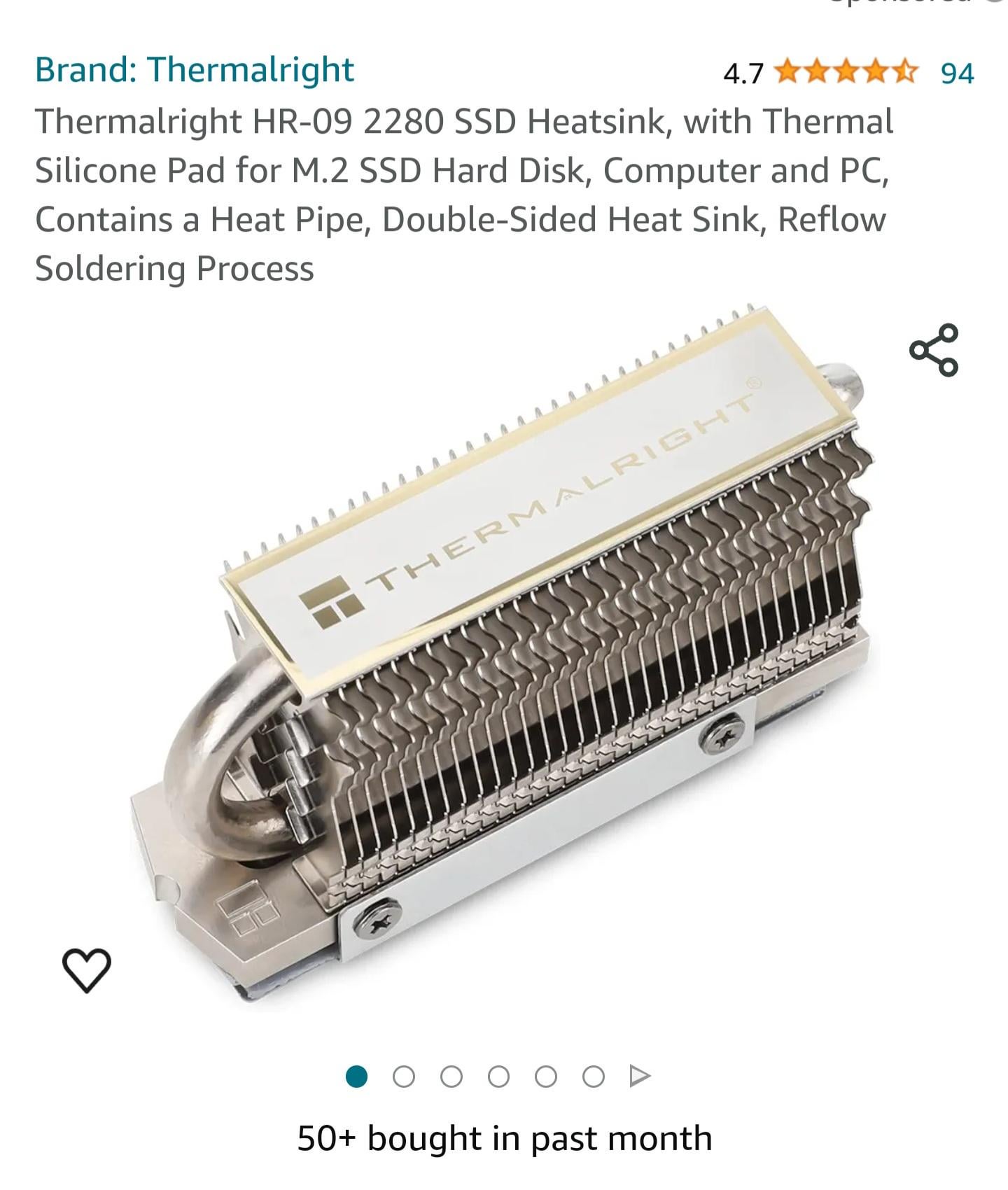

49 Comments
der8auer did some testing with various types, and at best, they’re slightly better than the integrated heatsinks on the motherboard.
At worst, they don’t offer any cooling at all.
Beneficial? Maybe.
Necessary? Not at all.
If you’re going to hammer a Gen 5 drive, yes, a proper cooling application is required. Gen 4 can get away without one.
With great speed comes great heat.
Only if you are going to hammer Gen 5 drive. For Gen3 and probably Gen 4 not so much
depends on your case usage, for most gamers? no, you will see no benefit, as there is not an excess amount of read write going on, and the only time there is is downloading games from steam, in which case its your download speed thats capping things, and by such a margin the drive wont be heating up noticeably, if your overall system has proper cooling.
read write speed is good for gaming, but its generally just loading scenes kinda thing, that dont go on long enough to make things overheat
Maybe for a gen 5 ssd?
Gen 3 SSD you can keep it without any heatsink.
For gen 4 and 5 you can use motherboard heatsink it will do the job unless you are doing excessive read/write on a gen 5 SSD then you will need something like this to keep the performance as high as possible for as long as possible.
SSDs are designed to run hot. If they run *really* hot then it does shorten lifespan, so some cooling is a good thing. But some is enough. In most cases, none is enough. But high performance SSDs with a small heatsink, fine. There is utterly no point, beyond marketing and dickswinging, to have anything bigger.
My primarily SSD Constantly runs at 58-63 degrees, under prolonged stress it can get even more this is either with the motherboard heatsink or the heat sink the ssd came with. I ordered heatsink two times, the first one which has a fan was too tall because of Asus STUPID decision to put the m.2 connector right under the aesthetic plastic cover of the IO area, I’m currently waiting for the second one. Maybe I’ll try to mod the plastic cover so I could mount the first heatsink – but for that I need to remove the motherboard, and I’ll do it when I get all parts for direct die cooling. In any case SSDs depending on your setup can get quite warm like mine, large heatsink with fans can help drastically to reduce the drive temperature.
High speed, large capacity M2 drives get very hot under heavy use. Gaming is not heavy use.
Heavy use is constant read, write and rewrites. Gaming it’s a single write then light reading.
As long as your case has proper airflow you are good.
I have the SN750 WD-black M.2 SSD that was some special edition and came with a heatsink, I have yet to notice it doing things that my other SSDs cant. Does look cool tho.
If it helps I got a gen 4 nextorage SSD. Without a heatsink I could get the drive up to 70c. With a heatsink slapped on top it only goes up to high 40s. My heatsink is by the same brand listed in the post but it’s the one with an actual fan in it.
Not really but that didn’t stop me. If you can go cooler for little money why not?
if you are reading from or writing to the drive all day then yes
I’m using one from Cooler Master, it looks nice but i don’t know how beneficial it was. Got it for dirt cheap so i didn’t think too much about it. My SSD used to sit naked below the GPU, then i put it inside a heatsink, moved it to the top slot, upgraded my front fans. Got considerably cooler temperatures right afterwards, but not sure what helped the most. M2 NVMEs are designed to run hot anyway.
I have (x2) Crucial T700 installed on my Asus X670E-A using the motherboards passive heatsyncs, My main drive never tops 50c, my secondary never tops 48c.
So even with PCIe 5 speeds, probably a waste to get as a gamer.
They are great at increasing the scrap value of your PC. Was better when hey were copper though, I know a fella who’ll pay for copper.
Those screenshotted carousel indicators are fooling me every damn time
I think it’s ~~therm~~alright
If they do anything good, it’s cooling the controller.
But it could also over-cool the flash dies, which slows down their access rates and write speeds if I recall. I believe writing is the main difference, because the extra “fuzziness” increases the likelihood of electrons being energetic enough to tunnel through the floating gate.
But if I’m wrong, I want to know so that I can be right in the future.
In fact, the stickers on NVMe drives are usually metallic, and aren’t there just to sink heat away from the controller, but also to move that heat TO the flash chips. So large heatsinks are generally worse, and the best is probably just a straight piece of copper with minimal or no fins.
I got one cos I thought it looked good. They are so cheap.
Work loads such as video editing, 3D rendering, deep thinking tasks. Whatever tasks that require heavy file transfers or edits.
I jury rigged one on top of my VRMs. Shoved off 20 celsius.
It’s needed when your ssd needs it, the gen 5 nvme drives seems like where this heatsink going to be a mandatory if they can’t make the controller bit cooler
Only beneficial for heavy workloads such as video editing, 3d rendering, etc. But is really overkill for anything else.
https://preview.redd.it/ffs8e5yy6vuc1.jpeg?width=800&format=pjpg&auto=webp&s=fec00ba99ab384438f67dc4f691a8a285f994649
Suspect most of us don’t have these silly 15+GB/s transfer speeds, think mine is 7 according to the benchmark software I recently ran, and is fine with the motherboard heatsink.
I just use the one that was included with my MB. No issues here.
Do you have gen 5 drives under serious load ?
Or any prolonged load
They may be, while nand likes warmth, the storage controller ….. does not
I bought a Thermalright one, not that one though. It dropped my Crucial P5 Plus 2TB from 74c max to 64c max running CrystalDiskMark. My drive came without a heatsink, and my motherboard doesn’t have one either.
I’m happy with it.
If an NVME gets hot it runs slower. Dissipating heat will keep speeds optimal. For a gen 3 this is silly and overkill, for a Gen 4 it might help, maybe. For a Gen 5 yes, use this.
I got two of these and they do help with models that run hot, in my case two sn850x. I get around 8-10 degrees less under load than with the motherboard heatsinks. That’s a best case scenario with a hot ssd part and lots of airflow.
I can see people use this for a POS (Proof of storage) crypto mining.. where SSD’s are heavily solicited… most likely with liquid thermal paste and with a couple of small case fans through them on the board…
Anything else.. throuwing money out the window.. you only use your ssd a lot when you install things..
Might give slight difference on gen 5 ssds
As a hypothetical stockholder of Thermaltake. I say absolutely. Tell your friends too.
no
for most home applications you can get away with not even having a heatsink. if you’re running it hard, the flat heatsinks are good enough. this has very few use cases
Them ain’t crucial, but therm alright
I’ve got this one. It’s positioned under my GPU so always drawing cool air through the fins. Have never seen my drive go above 25c.
They provide a miniscule benefit but take up alot of space on your mobo….
They keep the heat down so they are beneficial. However, the gain is minimal compared to normal operating temperatures
It would be beneficial for some professional applications, but not for consumers.
If your MB does not have m2 heatsink, yes it will be beneficial.
I think LTT tested some water cooling block for ssd and concluded that, yes it makes it cooler and can run faster, BUT if you use your ssd at the level where that type of cooling is necessary you will wear it down within a year or so it doesnt really make sense to do any additional cooling than maybe a factory heatsink since you wont be using it hard enough to actually need it. Unless of course you have no limit on budget then you can go for it for flex points
I rawdog my SSDs. I figure if they can handle the heat of a gaming laptop, they’ll do fine in my very open case
No.
It depends a lot on the drive and the case. For me, because I have an O11D Evo, which has no front intake fans, and a big GPU that block the flow from hitting the SSD, it reduced my SSD idle temperature by 10 C but it’s more a case of I don’t want to run my fans at a high speed with the motherboard heatsink to get the same effect, because it will be too loud.
i now have the idea to put a D15 on an ssd
Having some kind of heatsink on your nvme SSD is a good idea but the heat pipe is overkill.
Beneficial? No. In my limited experience, SSDs dont consume so much energy that a bigger heatsink is needed. Some get a little warmer, but usually the motherboard plate is all thats needed. And rarely have I seen a system with enough room for this huge thing.
If it fits, then temps will almost certainly be lower. Do the temps NEED to be lower? I’ve never used a heatsink on an SSD( besides the motherboard plate) and rarely have SSDs get hotter than 50, 60C maybe under max sustained writes.