
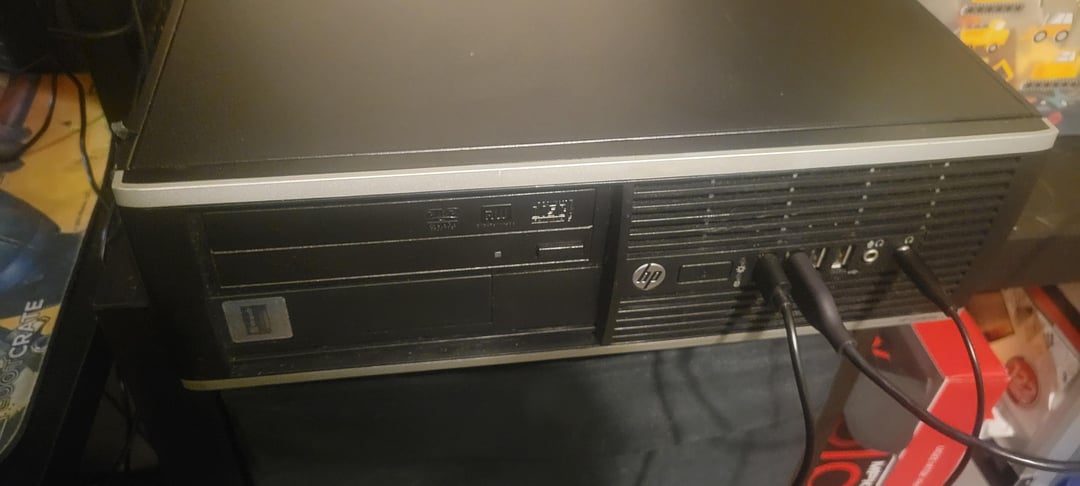
Sorry, I'm really new to this.
So for Christmas, I finally got my hands on my own PC, a retro-ish looking refurbished outfit with good hardware, and a graphics card separately. However I still haven't installed it yet, mostly because it looks too big and I'm afraid to break something.
I looked online for help and every video also showed that I gotta plug the graphics card into the power supply, but it totally didn't come with any cables and all the cables the computer does have are built in to the power supply. Not that I'd be able to fit any more in there anyway.
I really don't like asking questions but I'm tired of only being able to work with 128 Mb of vram (which I didn't even know was different from normal ram? What?) and I don't know where else to go. What do I do next? Are there options for similarly performing cards out there that would fit or do I need a new computer entirely?
44 Comments
Sell the PC. It’s so proprietary I wouldn’t bother upgrading it.
well that does look like old hardware, would you mind sharing the specifications?
The GFX card may not even be compatible.

That HDD in the 2nd photo is a 2012 model. I’m guessing that the machine is of similar age and this is a Sandy Bridge (iX-2XXX) or Ivy Bridge (iX-3XXX) CPU system. Which will still work for light web browsing and for 10-15+ year old games.
Due to a lack of power connectors, and the half height case/full sized video card, you will not be able to fit that card to that case/power supply.
There are half height cards which don’t require any power connectors. While they will fit the system, they are very low performance. If you were planning on using this as a media player some of those cards would be good but they are nowhere near the performance of the card you bought.
I’d return the video card, and save your money for a better 2nd hand system
Whoo boy. Welcome to the world of PC building and proprietary shit.
Don’t touch anything with a Dell, HP, Acer (etc) name on it if you ever want to upgrade anything. You’ve got an Intel a320? Buy a new case, power supply and motherboard. Make sure the MoBo works with your CPU. You can salvage everything else from this heap of e-waste. $150-200 more and you’ll have something of a budget build
Did you steal that pc in middle school or high school?
idk how you’ll use this, the PSU wont be sble to take it either
Go spend exactly the same amount of money on a refurbished system. You need something with resizableBAR to take advantage of that..
You could take a dremel to the case, but that gpu is a nice way to make a fire cracker out out of that pos proprietary PSU. I am afraid you cannot combine both.
Lmao I had one of those HP machines years ago and I found some tiny low profile sapphire card that fit, I played the shit out of all sorts of games that poor machine could barely run, never got to try Crysis though.
If you absolutely want to upgrade this PC you could return/sell the card and try and find a low profile GPU that would actually fit in that case.
Is this a troll post?
This looks like an HP Compaq DC7xxx series unit
Bruh this is the same pc my school used to have in 2006, you ain’t gonna be able to do shit with it, and most definitely not slotting that card anywhere.
Even if it would fit in the case, isn’t that an AGP slot? (instead of PCI-e). That would mean your graphics card won’t be compatible.
Right, I get it now. This pc was clearly a waste of time. Case Closed, thanks yall.
google Riser PCI-e
I think you need a new PC. Even it was to fit Intel Arc cards require resizable bar to give decent performance.
Buy a $100 case from microcenter, buy a CPU/MOBO/DDR5 RAM for about 300 and make yourself a beast PC and throw that away
Get a new pc even if you can get it working I bet this pc doesn’t even have rebar so that won’t be a great experience with Arc
That pc is from dinosaur ages.. no offence
Cut a rectangular hole in your chassis and the side panel, dimensions should be parallel to the dimensions of the GPU
Who told you that you can buy an aftermarket gfx card and install it in a proprietary SFF case?
Do you even have a suitable power connector? Those corporate machines usually have proprietary connectors for everything.
This is a so called ‘prebuilt’ office pc. The only graphics cards that will fit are shorter ones called ‘low profile gpu’. If you still have a return policy on the GPU, return it and get a low profile card.
Even better is to just get a new pc, but I understand you might not have the money for that.
bro trim you’re fucking fingernails what the fuck
Find piece of wood, detach motherboard from case.
Mount motherboard to piece of wood and boom problem solved
Angle grinder
Either sell it as is or buy a new power supply and case and rebuild it into that
I don’t know much about the computer, but what’s the power supply output on that Power Supply?
Intel says the power draw in the ARC A750 is 225W
https://www.intel.com/content/www/us/en/products/sku/227954/intel-arc-a750-graphics/specifications.html
Does that PSU eve have that much power to spare? 🤨
But like people said those proprietary computers are a pain in the ass
We got tons of HP microtowers where I work and those PSUs only work on HP computers, so I got tons of PSUs from dead computers that are only useful for the ones that are dying 🙄 (and we wish they all would so we could finally get rid of that junk)
Sell it again or build a new pc
you’ve done more than one mistake,the arc graphics you bought will be much slower,there is a bottleneck on the gpu(thin client,probably 3/4/5/6/7th gen,too slow) and no rebar support.
You should have bought an amd or nvdia card,now you need to buy at least an 11th gen build/ diy.
The graphics card it’s too big,buy a new case and check if compatible with your mobo format.
solution 1 : new case
solution 2 : gpu WILL fit in the case
U can cut a hole in the frame, i did so with mine
Bruh I daily drive this same PC. It’s a HP Compaq 8200 or 8300 from like 2011 – 2012. I fit in a 1650 LP and runs good enough for my needs.
Don’t listen to these haters. You can absolutely use oem Dell and hp computers for gaming and upgrades.
That being said, this system is very old. I would not waste my time with it. It looks like you would need a new power supply and case. You MIGHT be able to use the processor in a new motherboard but it all depends on the model. Dm me if you have any questions I have built out several oem dells and they work excellent.
Pc modding is your friends.. watch some japanese small pc mod like fujitsu because they have similar case.
Cut a section of the case out to make it fit
💀 my first desktop was one of these, I threw a gt 1030 and an ssd in it
Get a new rig. It is time.
is this a HP Elite 8300 sff? at my workplace we have a room full of old pcs and i think we have a PC that looks identical like this PC
Is this a shit post?
That’s not a gaming PC, and it was never designed to be one.