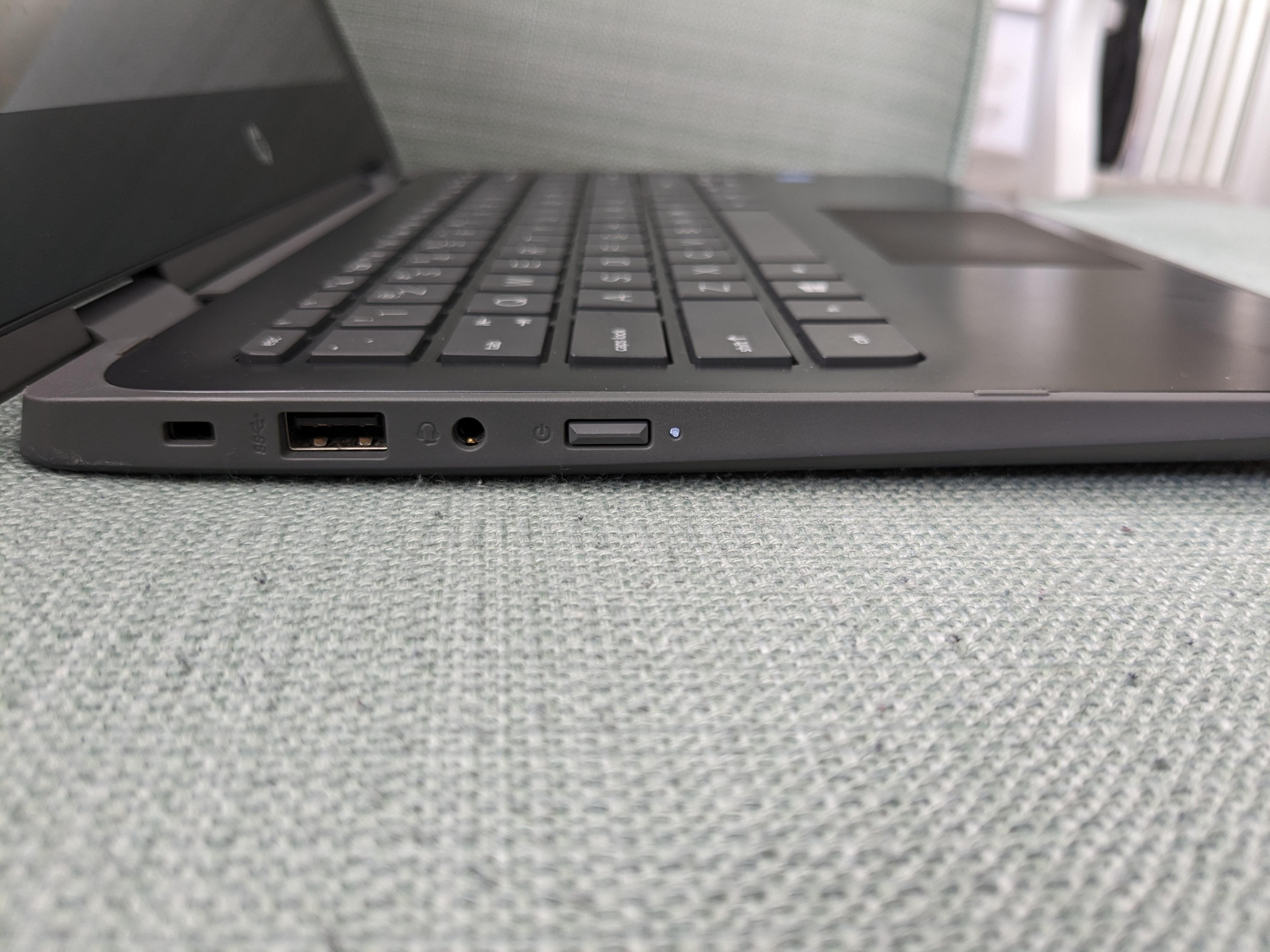
what’s the problem? the powerbutton next to the jack and usb?
lxnch50
That’s better than the power button next to the backspace key.
Obvious_Main_3655
USB A ftw
DONT-PM-ME-BOOBS-PLS
Never buy HP
Different_Profit_267
Idk why people are hating on HP. I have a 5 year old gaming laptop from HP and it’s doing just fine. Maybe I’ve been lucky
Key-County6645
If u connect to external monitor no need always to open the laptop and the hinges are not worn out.
palthor33
What the heck, it is a power button, push it and move on.
HP is HP, taint nothing we can do about it except don’t buy it.
This-Requirement6918
Back in the 90s manufactures were required to put a cover on the power button to ensure a portable would not accidentally power on if it was in checked luggage on a plane.
DeathByKangaroo
Still better than the Cisco switch that had a reset button above a port that could be pushed by plugging in a cable
l3ex
thinkpad Maybe?
Elon-Vietch
Fun Fact; You can go into setting to change the behavior of the power button!
Zarowka123
It’s better than having power button next to keyboard. Most of the times I use my laptop with external monitor, mouse and keyboard plugged in, and I have to open the laptop to reach the power button. If I had the power button on the side of the laptop, I could just left the laptop closed
Disastrous-Rips
How is this an issue?
ZhangtheGreat
It’s HP. They don’t think
CharAznableLoNZ
Two in ones don’t have much choice on where to put the button to keep it easy access. I have an inspiron I use for reading that has the power button next to the volume rocker on the side of the laptop. I set it to just sleep the machine.
No idea what I’ll get after it dies, I’ve replaced the battery twice, the display cable once and the msata ssd once after it wore out.
Mister_Shrimp_The2nd
You believe they actually were thinking to begin with?
Wouldn’t it also be hilarious if they replaced the right ctrl key with a barely functional fingerprint scanner?
Choice-Definition-80
Well it’s actually good if you often use external monitor. no need to open the screen and press the power button and then turn it off again lol.
Alternative_Set_8379
That’s way better than having the power button inline with other buttons, like backspace or delete
deadmanslouching
I believe that’s standard placement for 2-in-1 laptops.
MHWGamer
I don’t why they all have such a hard time figuring out the best keyboard layout when it is literally so obvious: just standard layout with the powerbutton and fingerprint sensorin one button, preferable on the top right..
did dell patented this layout or what? at least my dell has a good layout aka the most obvious one imaginable
Gentoli
Looks like a 360 device. The button on the side allows you to turn it on when the keyboard is flipped to the back.
the_ebastler
Powerbutton accessible with lid closed is a game changer for anyone using docking stations and not wanting to fork over big money for a OG manufacturer docking station (as power buttons on docking stations do not work across manufacturers).
Tekkamanblade_2
The last laptop I owned was a Toshiba Satellite back in 2009. Soon after I went with PC and decided never to buy a laptop ever again.

26 Comments
What were you thinking buying HP?
what’s the problem? the powerbutton next to the jack and usb?
That’s better than the power button next to the backspace key.
USB A ftw
Never buy HP
Idk why people are hating on HP. I have a 5 year old gaming laptop from HP and it’s doing just fine. Maybe I’ve been lucky
If u connect to external monitor no need always to open the laptop and the hinges are not worn out.
What the heck, it is a power button, push it and move on.
HP is HP, taint nothing we can do about it except don’t buy it.
Back in the 90s manufactures were required to put a cover on the power button to ensure a portable would not accidentally power on if it was in checked luggage on a plane.
Still better than the Cisco switch that had a reset button above a port that could be pushed by plugging in a cable
thinkpad Maybe?
Fun Fact; You can go into setting to change the behavior of the power button!
It’s better than having power button next to keyboard. Most of the times I use my laptop with external monitor, mouse and keyboard plugged in, and I have to open the laptop to reach the power button. If I had the power button on the side of the laptop, I could just left the laptop closed
How is this an issue?
It’s HP. They don’t think
Two in ones don’t have much choice on where to put the button to keep it easy access. I have an inspiron I use for reading that has the power button next to the volume rocker on the side of the laptop. I set it to just sleep the machine.
No idea what I’ll get after it dies, I’ve replaced the battery twice, the display cable once and the msata ssd once after it wore out.
You believe they actually were thinking to begin with?
https://preview.redd.it/05ezz4t9fluc1.png?width=1080&format=pjpg&auto=webp&s=4c9cbcfcf8cc1bdb43432a4fcc0735b5eab27d14
Still better than this
Wouldn’t it also be hilarious if they replaced the right ctrl key with a barely functional fingerprint scanner?
Well it’s actually good if you often use external monitor. no need to open the screen and press the power button and then turn it off again lol.
That’s way better than having the power button inline with other buttons, like backspace or delete
I believe that’s standard placement for 2-in-1 laptops.
I don’t why they all have such a hard time figuring out the best keyboard layout when it is literally so obvious: just standard layout with the powerbutton and fingerprint sensorin one button, preferable on the top right..
did dell patented this layout or what? at least my dell has a good layout aka the most obvious one imaginable
Looks like a 360 device. The button on the side allows you to turn it on when the keyboard is flipped to the back.
Powerbutton accessible with lid closed is a game changer for anyone using docking stations and not wanting to fork over big money for a OG manufacturer docking station (as power buttons on docking stations do not work across manufacturers).
The last laptop I owned was a Toshiba Satellite back in 2009. Soon after I went with PC and decided never to buy a laptop ever again.