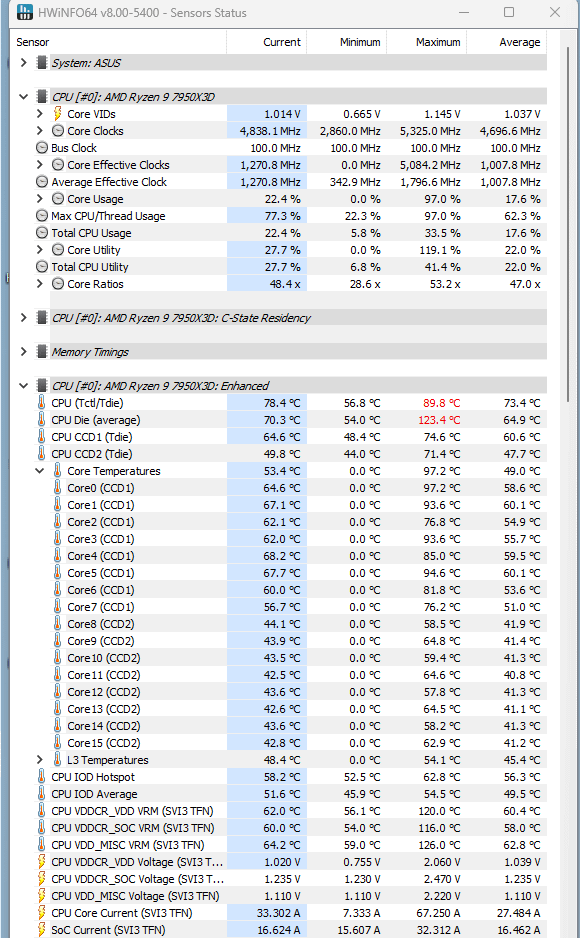
I posted before using HWmonitor and got bashed on. Now using HWinfo and it spikes really high. I didnt check how long it stayed there. Only overclock I have is tighter timings on the ram and 6000>6200. PBO enabled, core +150, and -15 on all cores. Any help?
DZCreeper
I am actually leaning towards a faulty CPU, because there is no way your VDDCR_SOC voltage peaked at 2.47 volts. That would instantly fry your CPU.
The VDD temp sensors being 116-126 tells you what pins in the socket are responsible for the supposed hot spot.
Meaning if your chip actually is running hot it is because of poor CPU cooler contact in that region.
lampardrobi
Remount your cooler. The delta between the cores suggest it’s not sitting good on the CPU.
N3onzz
Check you’ve removed the plastic film on the bottom of your heatsync and replace thermal paste also make sure you tightened the cooler down enough in the first place and make sure you do it in a pattern if you have more than 2 then I’d suggest opposite corners so say front left back right tension evenly couple turns each until fully tight
yevelnad
That heat is really alarming for an x3d. You need a beafy aio and an air-conditioned room to tame that beast.

6 Comments
I posted before using HWmonitor and got bashed on. Now using HWinfo and it spikes really high. I didnt check how long it stayed there. Only overclock I have is tighter timings on the ram and 6000>6200. PBO enabled, core +150, and -15 on all cores. Any help?
I am actually leaning towards a faulty CPU, because there is no way your VDDCR_SOC voltage peaked at 2.47 volts. That would instantly fry your CPU.
The VDD temp sensors being 116-126 tells you what pins in the socket are responsible for the supposed hot spot.
https://en.wikichip.org/wiki/amd/packages/socket_am5
VDDCR_SOC pins are row L to P, column 8 to 18.
VDD_MISC pins are row AN to AT, column 7 to 17.
Meaning if your chip actually is running hot it is because of poor CPU cooler contact in that region.
Remount your cooler. The delta between the cores suggest it’s not sitting good on the CPU.
Check you’ve removed the plastic film on the bottom of your heatsync and replace thermal paste also make sure you tightened the cooler down enough in the first place and make sure you do it in a pattern if you have more than 2 then I’d suggest opposite corners so say front left back right tension evenly couple turns each until fully tight
That heat is really alarming for an x3d. You need a beafy aio and an air-conditioned room to tame that beast.
Update your BIOS or force VDDCR limits. Seems like you’re affected by this. sauce: [TPU article](https://www.techpowerup.com/307703/amd-ryzen-7000x3d-processors-prone-to-physical-damage-with-voltage-assisted-overclocking-motherboard-vendors-rush-bios-updates-with-voltage-limiters?cp=4)