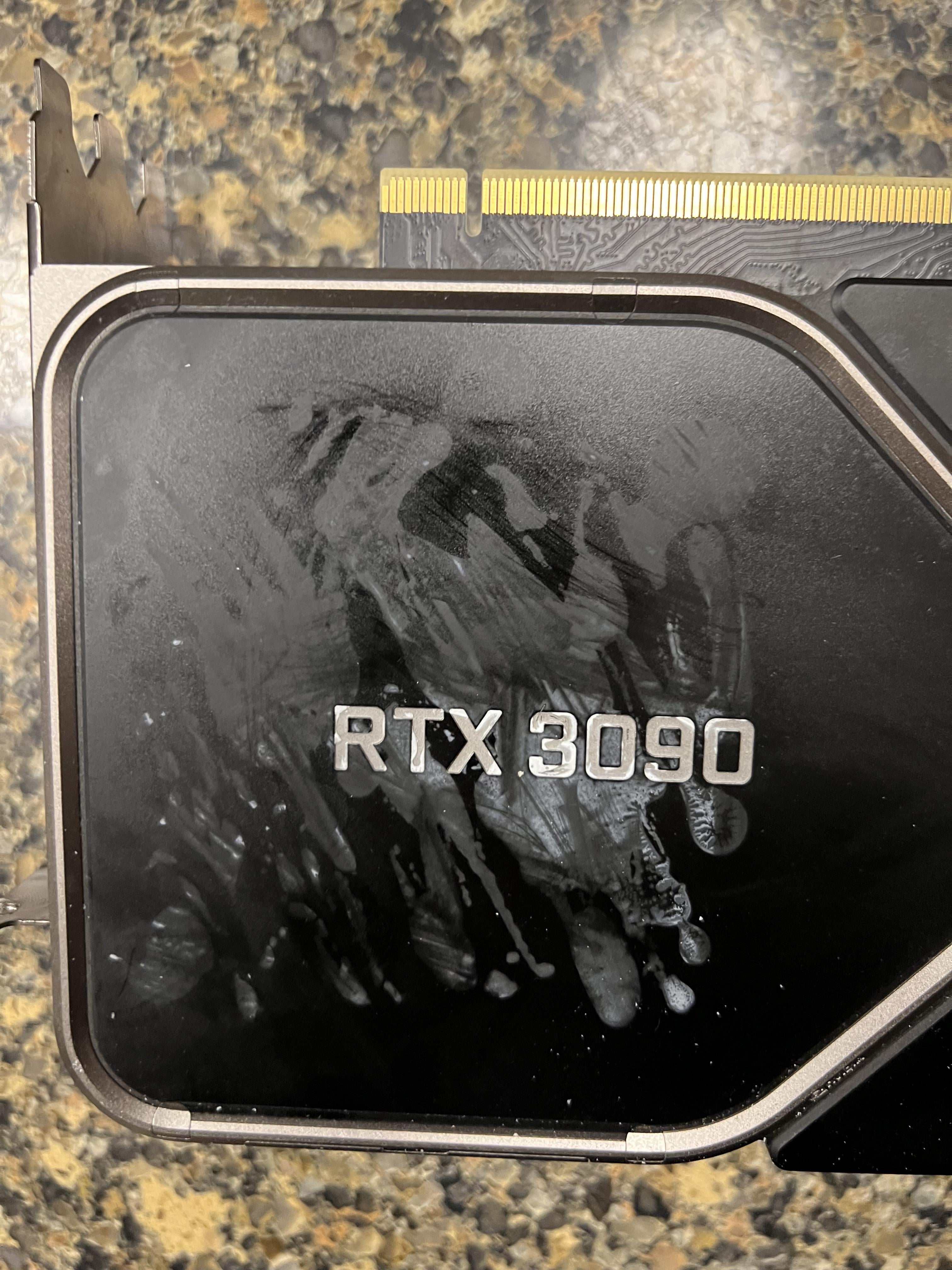
Previous owner had extra heat sinks on this card, this is how it looks after removal, cant get it any better. Any advice?

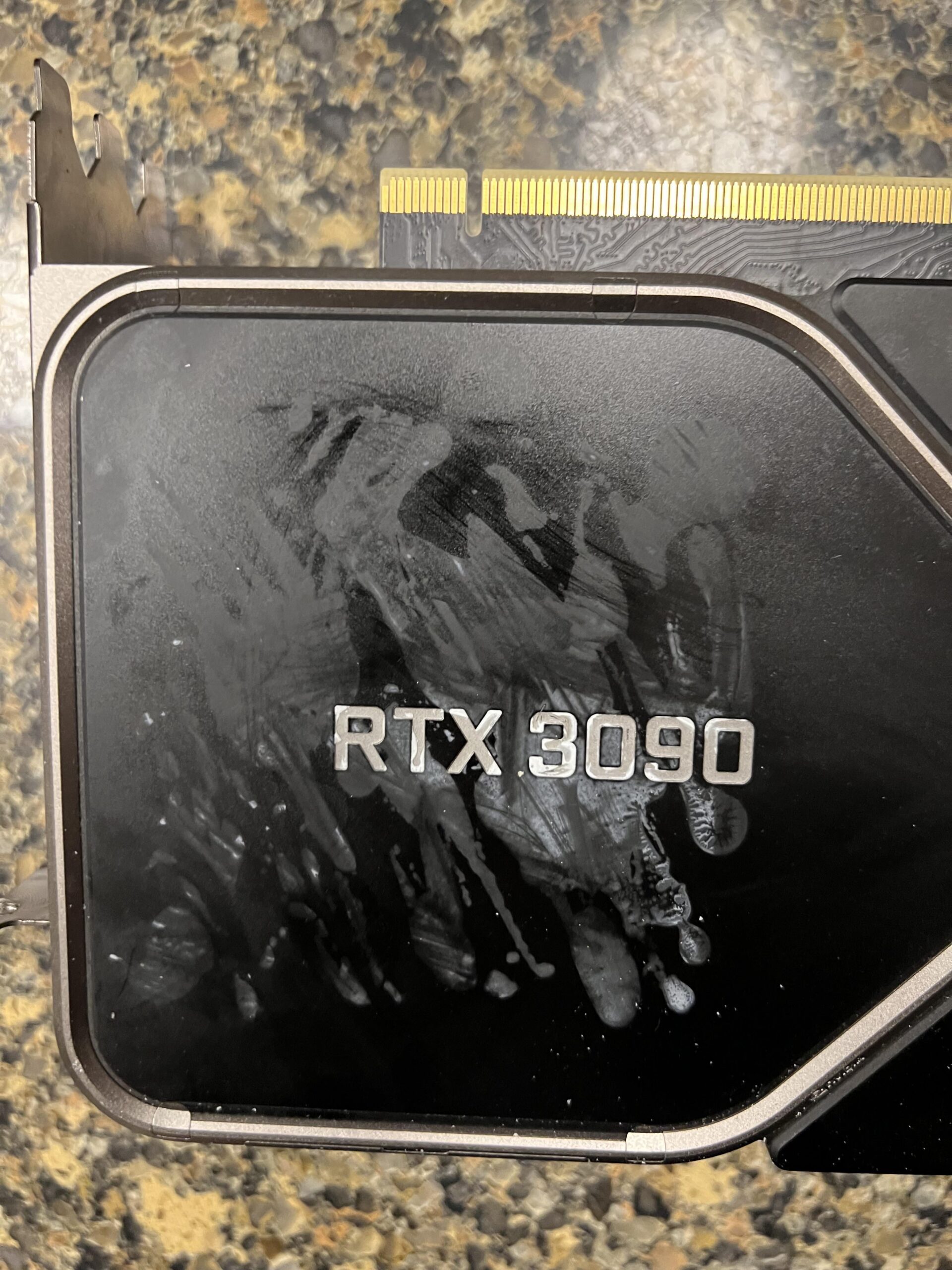
Previous owner had extra heat sinks on this card, this is how it looks after removal, cant get it any better. Any advice?
32 Comments
it would help to know what you have tried so far
Isopropyl alcohol?
That man nutted on the card, and immediately regretted his decision. Couldn’t look at it anymore and sold it to you…
It looks like it’s eaten into the surface it’s not gonna come off easily, only thing I can think off is to seperate that faceplate and sand blast it followed by powdercoat to get a uniform finish.
Slap another heatsink over it lol
Orange essential oil, removes ANYTHING.
This may be a really fucking bad idea but have you tried brake clean? Dont spray on the card, spray on microfiber cloth and rub. I have no idea if brake clean dissolves plastic tho. Do this only as a last resort and be careful.
Thermal adhesive is usually epoxy so an isopropyl alcohol soak should remove all of it. Acetone may have worked it deeper into the plastic because thats what acetone loves to do…
Just stick it in the PC and don’t look at it
Plug it in and care less about what it looks like?
If you have any high % running alcohol like 95-99% you could also try cleaning it with that if you haven’t already.
If you put it in your pc and get it up to temp you will notice that you never actually look at the top of your graphics card so you can just forget about it.
hope you get good discount
So is that thermal paste? I bet mothers in some household subreddits would know immidiatly what to use . they have all the tricks
Put a sticker over it.
Buy a “magic rub eraser” white eraser block and scrub, I’ve pulled many things out of matte/satin surfaces with that
Otherwise, this is chemically damaged plastic that began frosting out.
alcohol and a thick brush 🧹
I hope you called the seller a retard
Try a magic eraser doused in alcohol. If that does5 work you could wet sand with some very high grit sandpaper. 5000+ grit. You could then repaint with an airbrush, but that may not be necessary.
Try a bit of WD40 on a rag and give it a light scrub then use a different rag to wipe the residue off before it dries.
Use the same “two rag/wipe on dry off” method with 60-70% isopropyl alcohol if that doesn’t help.
The two rag method ensures the dirt etc that gets lifted/floated in the alcohol and then removed with the second rag before the alcohol has a chance to evaporate and leave the dirt and shit behind, dried to the surface and making it look stained and smeared around (exactly how yours looks right now)
That will clean the remaining gunk off of it but if they had cheap thermal pads on there then it’s probably stained from absorbing that silicon grease shit that comes out of them and unfortunately there is only so much you can do to remove those from plastic, short of pulling it apart and painting it haha
Just buy broken reference 3090 and get the heat sink from it or buy just heat from some who water cool their card.
Add extra heat sinks to cover the damage and help with cooling.
At this point, I would just slap some sticker over it or something and call it a day.
Get some TIM cleaner like the akasa stuff.
https://akasa.co.uk/update.php?tpl=product/product.detail.tpl&model=AK-TC
I use it on thermal paste all the time and it works very well. Smells nice too.
Skin safe surfactant?
Damn, i dunno…is that plastic panel removable? Like if you can disassemble the card and get that plastic seperated, you could just sand it down roughly, then start fine sanding until its sort of in a natural state. ofc it will never be the same as the original, and the text is a bummer to protect but…better to try that than let your gpu look like someone jacked off on it. Or paint it? Sand it down, then paint the whole top plastic part black? I dont think those pieces are much thermaly conductive, you should still look into it.
Zippo lighter fluid
At this point I’d put a sticker on it 🤷♂️
The heatkiller FE-Waterblocks look pretty dope. Would be a good excuse to watercool you pc, lol.
Sandpaper and paint
I dont know exactly what material is made that superfix but maybe White Spirit is what you are looking for. I think this is the name, in italian it’s Acquaragia
Having had an early 3090, if he put heatsinks there, it’s because the vram isn’t properly cooled in the top of the board. Besides worrying about the mess, I’d be sure to do the thermal pad fix, or that card is going to be obscenely loud.
If you know what you are doing you can disassemble the card and soak it in warm/hot water with some soap and then try remove it with your fingers. Because i think that’s just a cover plate without any electronics on it but make sure there is really no electric component on it and dry it for at least 24h before reassembling. And while you do that you can also change the thermal paste/ thermal pads.
But only do this if you are sure you can do it!
Pls correct me if I’m wrong 🙂
Edit: Please keep in mind that opening your GPU might end the warranty so inform yourself before doing so.
Could probably find a replacement cover on ebay or somewhere and take it apart and replace it.