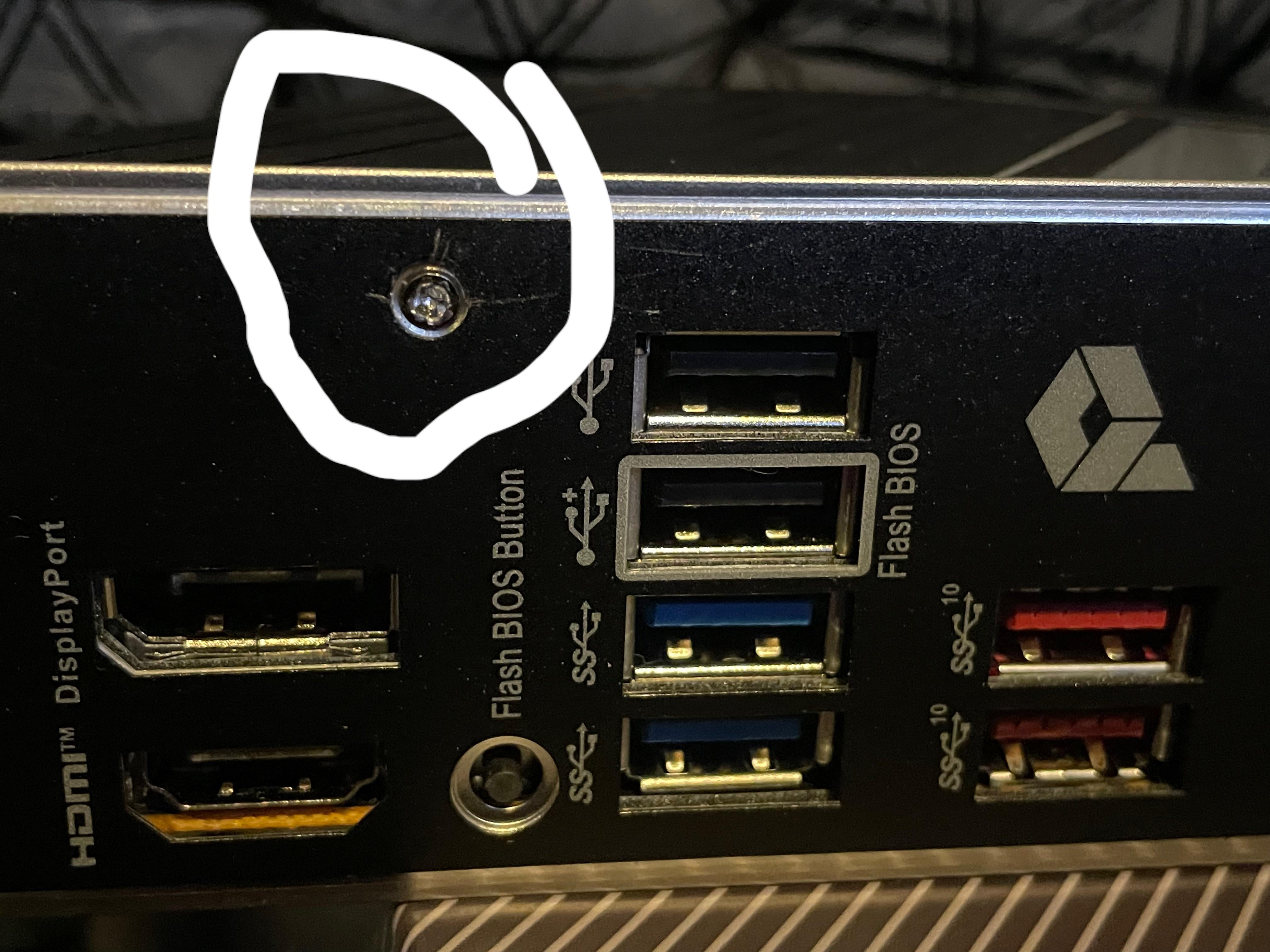
This is my first time building and crazy how a screw makes me want to give up. The motherboard is a MSI z790-A.
Any recommendations will be appreciated.

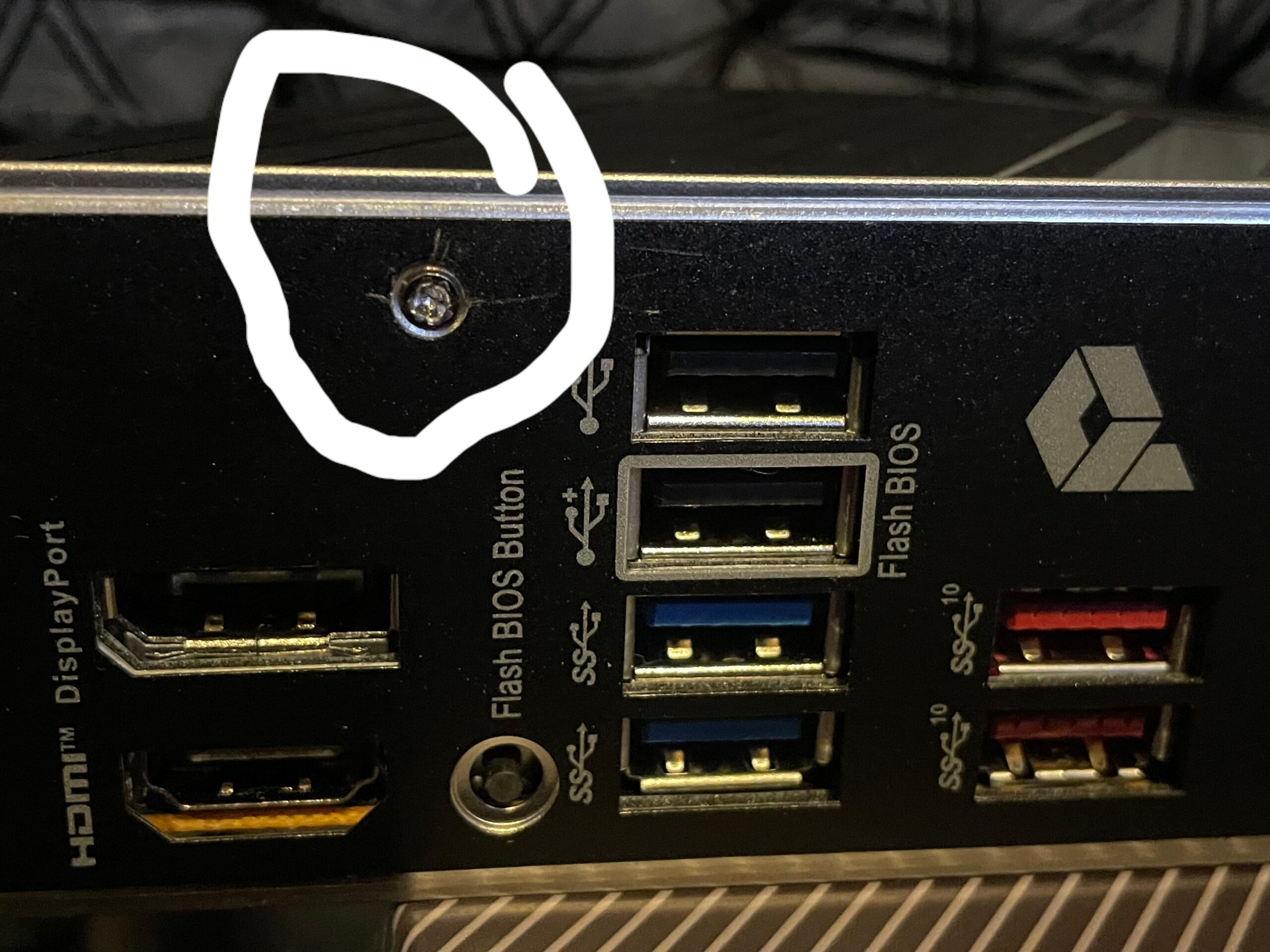
This is my first time building and crazy how a screw makes me want to give up. The motherboard is a MSI z790-A.
Any recommendations will be appreciated.
29 Comments
ive done this before use a rubberbad as a base and then spin it out. [https://www.youtube.com/watch?v=SEZyUzt8xys](https://www.youtube.com/watch?v=SEZyUzt8xys)
Sometimes you can get lucky and put a rubber band on top of the screw and then try to unscrew it. If you can get your driver to catch it might work- if it’s too mangled, you may have to ,very carefully, drill it out.
This looks to be an integrated IO shield that should stay on the motherboard and never be removed. These just snugly press into the IO shield hole in the case as you install the motherboard; they do NOT snap or click into place. I recommend you stop messing with that screw and just install the motherboard into your case.
In my years of building, I don’t think I’ve ever seen an IO shield that snaps into place and is then screwed onto the motherboard.
EDIT: Your motherboard appears to be an MSI Z790-A PRO (WIFI), or at least a neighboring model. Here is a picture of the IO shield of the board from MSI’s site: https://asset.msi.com/resize/image/global/product/product_1664270650946cf15651f3479993f69cbe3cf822e6.png62405b38c58fe0f07fcef2367d8a9ba1/1024.png
Looks like a direct match to the picture you posted.
One of the features of this board is listed as “Pre-installed IO Shield”: https://www.msi.com/Motherboard/PRO-Z790-A-WIFI
TL;DR just install the board with shield attached!
Why are you removing the screw? It’s an integrated io shield that doesn’t require removal normally.
why are you trying to remove that screw? no reason to
Dude, you don’t need to take it off. It’s designed to just be inserted. You may need to force it a little. Unless you bought a super cheap case that isn’t up to standard, you do NOT need to remove that io plate
Alright. Forget sleep, for now, I’ll try to chuck it in.
Give your self an uppercut.
Jokes aside. What are you trying to do?
You dont need to remove that panel and you are clearly not qualified. Just stop before you void the warranty.
If you are having trouble installing your motherboard just ask on here with some clear pictures.
People will help.
But why?
You’re trying to solve the wrong problem. Never seen an I/O shield that should be removed.
If anything needs removing its the fan on the inside of the case. That could come out if you’re having difficulties, then you insert the mobo I/O shield-first and lower the risers into their holes after.
OP: I need that shield out
Rest of the world: It should be installed together into the case without screwing around with the mobo
OP: Yeah so I still need to unscrew the shield
Cmon just ship me the mobo so I can show you how it works in my upcoming 100TB NAS build
Have you tried enabling the screw in the BIOS?
Dude, fucking listen to what everyone is telling you. DONT REMOVE THE BLOCK. Anyway, good luck removing the screw and further fucking around with your mobo, keep us posted!
OP, your wallet is fat, but are your eyes open?
Put the board in the case already.
10 hours? You sure about that?? You suuure about that???
OP is just mislead by MSI outdated video in their manual guide on “installing the motherboard”. Don’t be too harsh on OP, it’s his first time building after all.
Link of the video in the manual [https://youtu.be/wWI6Qt51Wnc?si=3yGJevJKKm3Kfpj_&t=98](https://youtu.be/wWI6Qt51Wnc?si=3yGJevJKKm3Kfpj_&t=98) This is why he think he needs to remove the IO shield and install it separately. OP PM me if you need any help with the build. Have fun and good luck.
T’was my first time, please be gentle. And my eyesight is garbage right now unfortunately.
That aside, I really do think I got it. I just hope I didn’t mess anything on the board up while doing what I was doing.
I want to both apologize and thank you all for the advice and help.
You never need to remove this screw Unless you want to actively try to fix any of those ports for some reason.
This is ragebait, right?
Do you wanna have it shieldless?
You don’t need to remove it to install into the case, so you don’t need to remove it unless you have a really specific reason for it
There is plenty on meat left on that screw if you insist on removing it even though you do not need to. Stop messing it up with the wrong bit and use one that fits that should be enough, use rubber band trick or superglue a bit seated in the screw if you have fubar it. In future use the correct bit.
Rubbermaid over screw push in and viola
What would I do? Leave it
Is there any realistic way you’re going to get it out now? Probably not. It would require a Dremel to turn that into a straight slot and then remove it with a straight screwdriver.
There’s no reason to remove that screw…but, if you insist then all you need to do is get a drill bit that’s half the diameter of the head and drill it out.
my recommendation would be to not spend 10 hours stripping a screw on your integrated IO shield I guess
That’s the neat part, you don’t.
Seriously, there’s no reason to do it, or is there?

Well now you need a dremel and a flathead. That or a drill, drill bit, and a reverse drillbit(cant remember the name).