
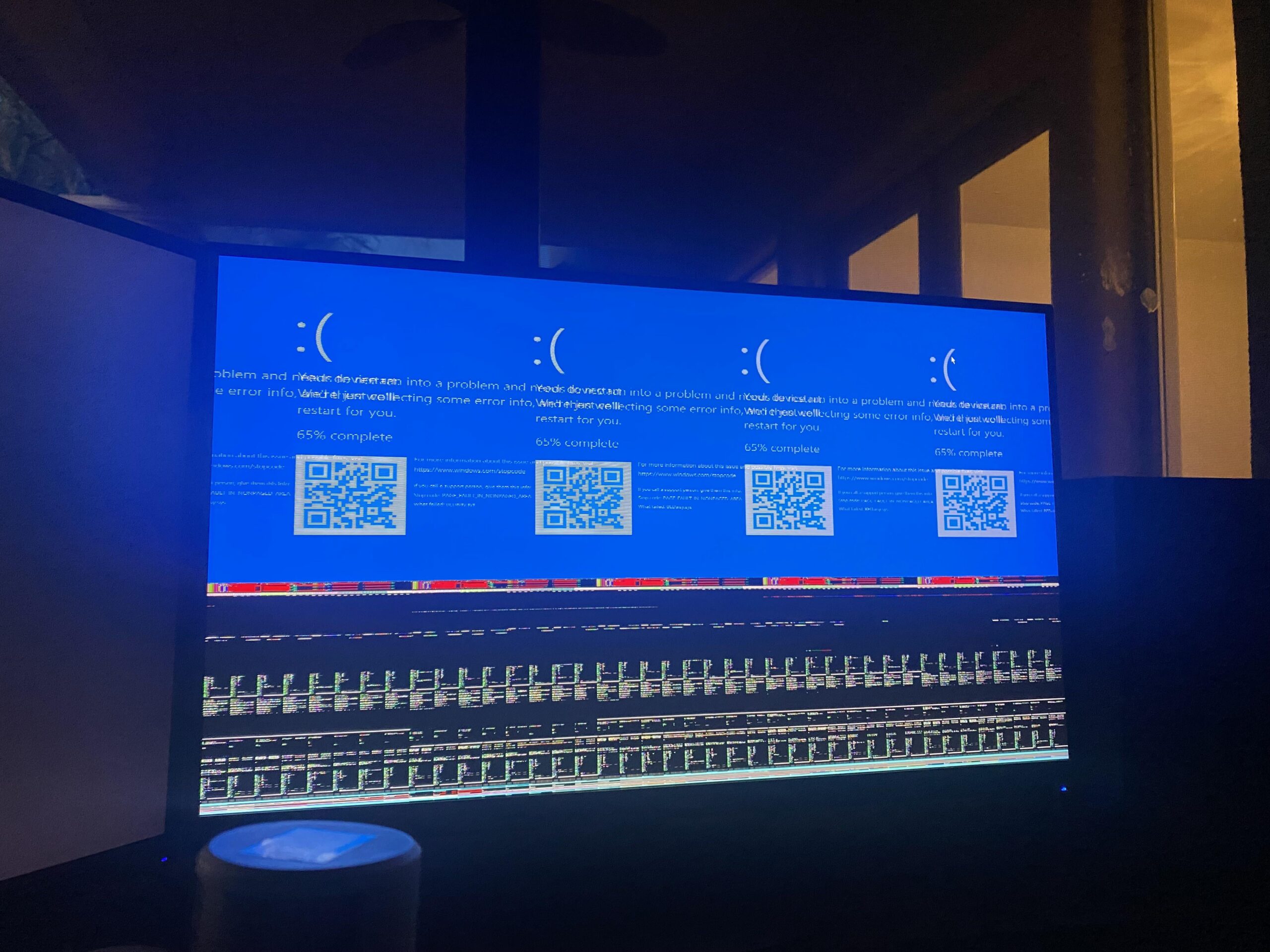
Fortnite keeps crashing into this BSOD.
I’ve tried everything to get it to work. I’m not sure what to do at this point. Fortnite will crash going into a game, during a game, and starting up. It doesn’t happen with any other game that I’ve played. I have updated all of my drivers. I’m on windows 11.
I have also tested my RAM (it is fine) and I used a DDU. I even disabled XMP. I’m still having the same issue.
Could a failing hard drive cause this?
PC Info
i7 13700 kf
32gb ddr4 (XMP disabled)
Rx 6800xt
850 watt psu
22 Comments
looks like a failing GPU to me.
Could be you need to just update the bios, might fix itself right on up. Could be the VRAM in your GPU that’s failing as well. Do you have any tweaks to the CPU as far as voltage is concerned? Fortnite might not be agreeing with it. I’d update bios, first and see if that helps. If it doesn’t fix it I’d try to get a hold of another GPU.
Bro got the quadruple bluescreen 💀
Also had a split bsod, turns out it was my RAM. Put in a new set and haven’t seen a BSOD in 2 years knock on wood.
That is not a failing HDD.
I’d give you RAM, PSU, or GPU. And in that order.
Break out OCCT and do some tests.
The error is bugcheck 0x50, PAGE_FAULT_IN_NONPAGED_AREA. Among the many possible causes for it is a corrupted NTFS volume, yes.
It’s possible that part of your Fortnite installation is written to a bad sector, and that’s why it only happens when you run it. Bring up a command window and run chkdsk /f /r to find and repair disk problems. (I assume you’re actually talking about an HDD here. If it’s an SSD, chkdsk isn’t so useful.)
It can also be from bad device drivers, bad a bad system service, failing hardware, or antivirus software. You might be able to find more of a clue in the Event Viewer. The state of the display automatically makes me think of the graphics card even though that’s not necessarily the problem. What are your temps like?
This is probably a CPU or GPU issue rather than a hard drive. How long have you had the GPU/CPU on that computer
I had a bsod similar to this but with different error of CRITICAL PROCESS DIED. Issue was that the aftermarket psu extension cables I ordered burned themselves out. I switched out the cables and directly plugged the factory original cables and I have had no issues afterwards.
Yikes, 1 sad face is bad enough, but Windows literally gave you 4 sad faces 😭
if u have an igpu try it with that (unplug graphics card)
[removed]
A few updates and you’ll be back on the road my laptop did this and it only has a melted 1660 super.
The only BSOD I’ve had that looked like this was from my cpu. If your cpu is only 2 months old it will be under warranty
It tells you what the problem is if you actually read the error code on the screen
Uninstall and reinstall fortnite
Seems gpu/cable and your monitor dying quadrupply 😁😆 when you load in, you can see info why the crash.
Update:
It just kept getting worse and worse. Constant BSODs with many different errors. I fully reset the PC and wiped the drives, still nothing. It can’t even download the epic games store or steam without crashing. The screen will also randomly turn on and off. I’ll be testing out a new gpu and/or ssd, so hopefully that’ll fix it.
Failing vram or ram, likely your gpu
I had the same exact issue, what solved it was switching the os from hdd to ssd, are you having slow boot problems
https://preview.redd.it/nwgyervbrtsc1.jpeg?width=4032&format=pjpg&auto=webp&s=b4a9ba460ba1733b244be066f1b4423461372f17
You’re on the same level as me!
It looks like your pc is sad.
AMD DOCP used to caused several Blue Screens whenever I was trying to Game something. DOCP is basically XMP but for RAM processors. Please check your RAM Timings and clock speed and make sure you have RAM CLK at the specified speed of the manufacturer. Also, set your FCLK (which is your RAM Microcontroller) to exactly half of your RAM Speed –> if your RAM usually runs at 3200 MHz, set FCLK to 1600. This solved all my issues, you still might want to reinstall Windows on a fresh drive/partition since some files might be corruptet. Also, disable your Overclocking profile and make sure all Voltages for RAM and CPU are set to “Auto”. If nothing works, try clearing your CMOS and run your PC again, see if that works.
If everything fails it might be a hardware problem, maybe PSU is not supplying enough juice to components, I don’t think it is your GPU since it rarely causes Bluescreens, it just starts to show weird artifacts on your screen or no image at all.