Sure, it’s pretty bad, but what is it that you do not understand? Ethernet is better than WiFi, some regions have faster internet than others, and there usually are better internet packages available for purchase for those who want them. Further, given that the difference between your reported download speeds and the actual download speed in the second screenshot is so large, it’s more likely than not that the server you are downloading that file from is slow itself
Classytagz
You people dont know how good you have it 💀
Archangel_Azrae1
Your internet is only half of the equation. Yes those are low speeds but whoever you’re downloading from clearly has their speeds set slower.
special-fed
That’s actually very good. Lots of friends in the USA with worse internet
Key_Nice
It depends on what server you download the files not only your wifi
xBetaRayJimx
You’re being limited by whatever site you’re downloading from.
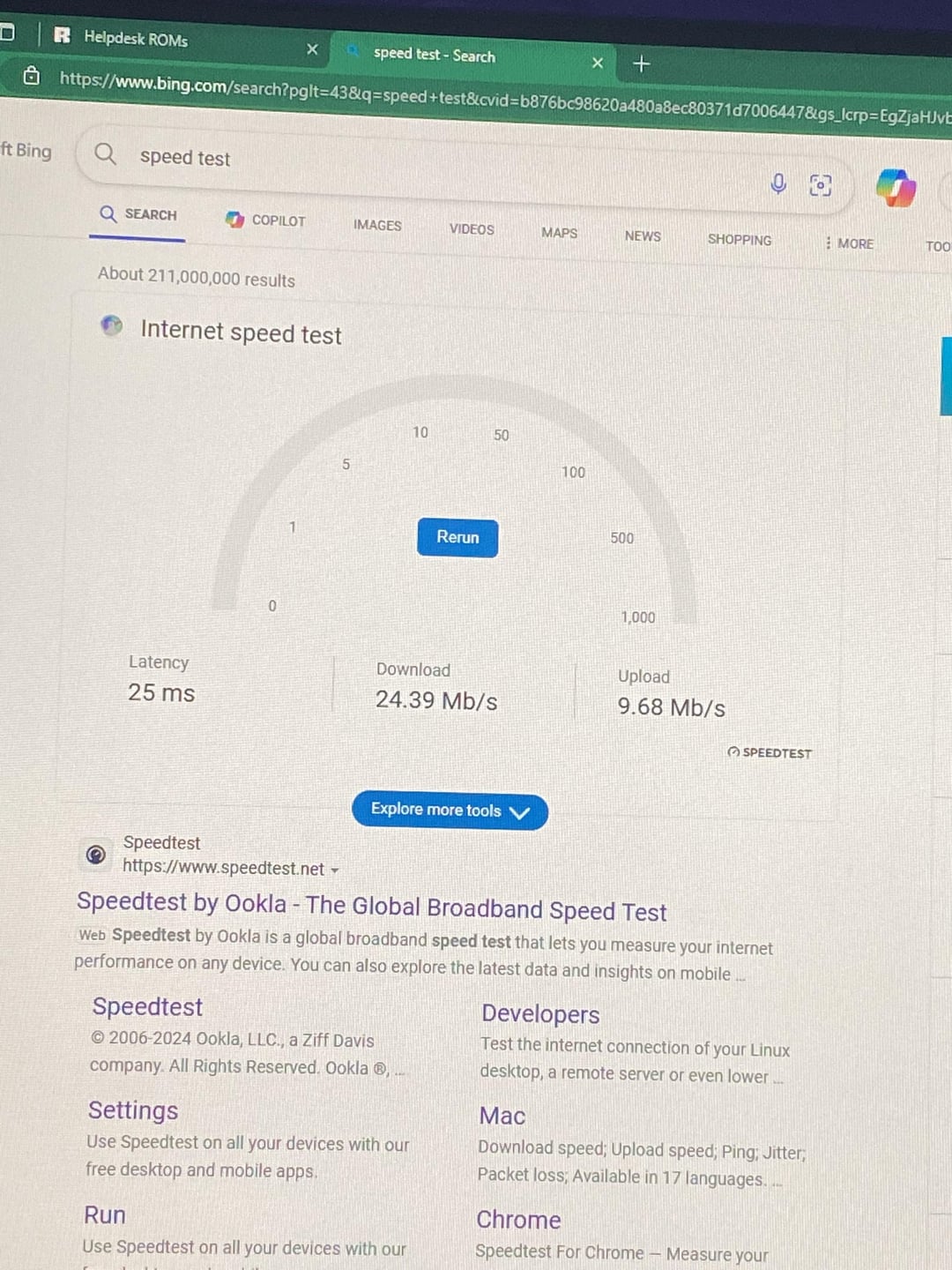
The Speedtest from the first image shows what speeds your connection is capable of.
BJYeti
So happy Fibre finally came to my area, got to drop Comcast and double internet speeds for half the price
ninja-rdin
wait youre on BING not on [speedtest.net](https://speedtest.net) ??? maybe start by doing the real test??
redstern
Your actual Internet speed is completely dependent on the servers you are connecting to. Speed test is a best case scenario test. The server is close by, with high available bandwidth. So as long as everything is good on your side, you will get the fastest transfer that your ISP allows.
That has no bearing on whatever download you are trying to to do. The server you are downloading from is slow. That’s your problem. If the site has an option to use a torrent instead of a direct download, that will probably be faster.
WeddingPretend9431
Bro using bing
Stonx1911
It’s not your internet’s fault. It’s the server from where you are downloading from. They set a speed limit wich is that low. Download something from steam or epic or so and you will see that it’s not your internet.
Luzi_fer
Do your test with :
Computer plugged to your ADSL box with an ethernet cable
Check that both side works on max speed, let’s say 1Gbps network.
Do your speed test on a server near you.
Do your speed test on a server that is not over saturated.
BYTES and bit are different unit ( B not equal to b )
1 Byte = 8 bit
Speed test result :
3MB/s = 24Mb/s
In a perfect world with perfect condition, yes you can dowload at this speed.
Now I know you want to download this 100MB of Waifu Pictures…
This 100MB are hosted on a shit computer in the cave of my house.
I put a limit of 10Kb/s on upload per user connected.
You can download at 3MB/s or 24Mb/s
You will download at 10Kb/s… because max speed is 10Kb/s on the server side.
But if you upvote this comment, I will unlock the upload speed limit and you will be able to download at your max speed ( if you are not on the other side of earth ), please PCMasterace user… don’t kill my Optiplex 😀 😀 I know your daily Dose of Waifu.
Jeremiax96
Besides what everyone already said, one thing I don’t see being mentioned is that the speed test is measured in MegaBITS, while the download is in KiloBYTES. With 25 Megabits per second you should have 3,125 Megabytes per second in downloads (25 divided by 8, 1 byte = 8 bits)
nitronik_exe
Why did you screenshot a photo of a screen
Broad_Rabbit1764
Become a better pirate and download from better sources.
Humboldteffect
Bruh im over here on 9mbps down and 90kbps up
Amogus_Simulator
The download server is limiting your download speed. Anyway, the unit used in the Speedtest is mega BITS per second and the download speed of the file is showed in kilo BYTES which are two different things, to get your true download speed, divide your mega bits value by 8
SoraFloatyKitty
Dang, I had 2Mbps down .5Mbps up awhile back
CoolMan-GCHQ-
It doesn’t matter if you are on 10 Meg, 100Meg or 2000GB fiber if the site you are downloading from sucks.
YouR0ckCancelThat
Using Bing is the real joke here
Thatkidjamie
I had out of date wifi adapter drivers and it was capping my wifi speed to 50mbps when on a speed test i was getting 150mbps updated them and its been perfect since
KiNgPiN8T3
A speed test is just the measure of the connection between you and the generally the closest ISP/an ISP/datacentre. But the game you want to download may be on a server that will be many more hops further away… I.e. you might have to connect via a few ISP’s/datacentres to get to the location of your download. And any one or even all of these could be limiting your bandwidth in some way. So you won’t get that same speed that you got from the speed test. Taking the wide area network out of the equation for a moment you could also have issues on your local area network. I.e. are you using cable, wireless, power over Ethernet, what are speeds of these devices etc etc. TLDR there are many factors that can affect the actual speed of your downloads which you may or may not be able to rectify.
iksoria
Do not use that speed test it does not work. The ONLY Speedtest that you should be using is Ookla, any of the others are just incorrect.
zelmazam1
You took a photo of your computer screen, edited it to crop down, Then instead of saving the cropped image you screenshot it and uploaded the editing image.
You’re downloading a 10gb file from a website. Outside of like Microsoft and ummm, paid specialist interest sites, nobody reputable offers files that size at respectable speeds.
I’m guessing you’re downloading something big from a free shit source that doesn’t provide any more bandwidth than this. This is absolutely normal behaviour, regardless of your internet connection.
If you want fast downloads, you need to download from reputable, paid for websites, generally.
CXXXS
If you’re on wifi, is the antenna from your PC obstructed?
Total_Decision123
Limited by whatever site you’re downloading from PLUS the read/write speed of your storage. I’d venture to say you’re probably downloading onto a HDD
SunoPics
You can only download as fast as the file is being shared.

30 Comments
Ethernet cable is your friend.
Sure, it’s pretty bad, but what is it that you do not understand? Ethernet is better than WiFi, some regions have faster internet than others, and there usually are better internet packages available for purchase for those who want them. Further, given that the difference between your reported download speeds and the actual download speed in the second screenshot is so large, it’s more likely than not that the server you are downloading that file from is slow itself
You people dont know how good you have it 💀
Your internet is only half of the equation. Yes those are low speeds but whoever you’re downloading from clearly has their speeds set slower.
That’s actually very good. Lots of friends in the USA with worse internet
It depends on what server you download the files not only your wifi
You’re being limited by whatever site you’re downloading from.
The Speedtest from the first image shows what speeds your connection is capable of.
So happy Fibre finally came to my area, got to drop Comcast and double internet speeds for half the price
wait youre on BING not on [speedtest.net](https://speedtest.net) ??? maybe start by doing the real test??
Your actual Internet speed is completely dependent on the servers you are connecting to. Speed test is a best case scenario test. The server is close by, with high available bandwidth. So as long as everything is good on your side, you will get the fastest transfer that your ISP allows.
That has no bearing on whatever download you are trying to to do. The server you are downloading from is slow. That’s your problem. If the site has an option to use a torrent instead of a direct download, that will probably be faster.
Bro using bing
It’s not your internet’s fault. It’s the server from where you are downloading from. They set a speed limit wich is that low. Download something from steam or epic or so and you will see that it’s not your internet.
Do your test with :
Computer plugged to your ADSL box with an ethernet cable
Check that both side works on max speed, let’s say 1Gbps network.
Do your speed test on a server near you.
Do your speed test on a server that is not over saturated.
BYTES and bit are different unit ( B not equal to b )
1 Byte = 8 bit
Speed test result :
3MB/s = 24Mb/s
In a perfect world with perfect condition, yes you can dowload at this speed.
Now I know you want to download this 100MB of Waifu Pictures…
This 100MB are hosted on a shit computer in the cave of my house.
I put a limit of 10Kb/s on upload per user connected.
You can download at 3MB/s or 24Mb/s
You will download at 10Kb/s… because max speed is 10Kb/s on the server side.
But if you upvote this comment, I will unlock the upload speed limit and you will be able to download at your max speed ( if you are not on the other side of earth ), please PCMasterace user… don’t kill my Optiplex 😀 😀 I know your daily Dose of Waifu.
Besides what everyone already said, one thing I don’t see being mentioned is that the speed test is measured in MegaBITS, while the download is in KiloBYTES. With 25 Megabits per second you should have 3,125 Megabytes per second in downloads (25 divided by 8, 1 byte = 8 bits)
Why did you screenshot a photo of a screen
Become a better pirate and download from better sources.
Bruh im over here on 9mbps down and 90kbps up
The download server is limiting your download speed. Anyway, the unit used in the Speedtest is mega BITS per second and the download speed of the file is showed in kilo BYTES which are two different things, to get your true download speed, divide your mega bits value by 8
Dang, I had 2Mbps down .5Mbps up awhile back
It doesn’t matter if you are on 10 Meg, 100Meg or 2000GB fiber if the site you are downloading from sucks.
Using Bing is the real joke here
I had out of date wifi adapter drivers and it was capping my wifi speed to 50mbps when on a speed test i was getting 150mbps updated them and its been perfect since
A speed test is just the measure of the connection between you and the generally the closest ISP/an ISP/datacentre. But the game you want to download may be on a server that will be many more hops further away… I.e. you might have to connect via a few ISP’s/datacentres to get to the location of your download. And any one or even all of these could be limiting your bandwidth in some way. So you won’t get that same speed that you got from the speed test. Taking the wide area network out of the equation for a moment you could also have issues on your local area network. I.e. are you using cable, wireless, power over Ethernet, what are speeds of these devices etc etc. TLDR there are many factors that can affect the actual speed of your downloads which you may or may not be able to rectify.
Do not use that speed test it does not work. The ONLY Speedtest that you should be using is Ookla, any of the others are just incorrect.
You took a photo of your computer screen, edited it to crop down, Then instead of saving the cropped image you screenshot it and uploaded the editing image.
The Internet speed matches your brain speed.
https://preview.redd.it/ballnyo18yrc1.jpeg?width=1242&format=pjpg&auto=webp&s=39e0945f3edacc2242df28bb2ea1c5f7bc109c26
idk think i win this one
You’re downloading a 10gb file from a website. Outside of like Microsoft and ummm, paid specialist interest sites, nobody reputable offers files that size at respectable speeds.
I’m guessing you’re downloading something big from a free shit source that doesn’t provide any more bandwidth than this. This is absolutely normal behaviour, regardless of your internet connection.
If you want fast downloads, you need to download from reputable, paid for websites, generally.
If you’re on wifi, is the antenna from your PC obstructed?
Limited by whatever site you’re downloading from PLUS the read/write speed of your storage. I’d venture to say you’re probably downloading onto a HDD
You can only download as fast as the file is being shared.