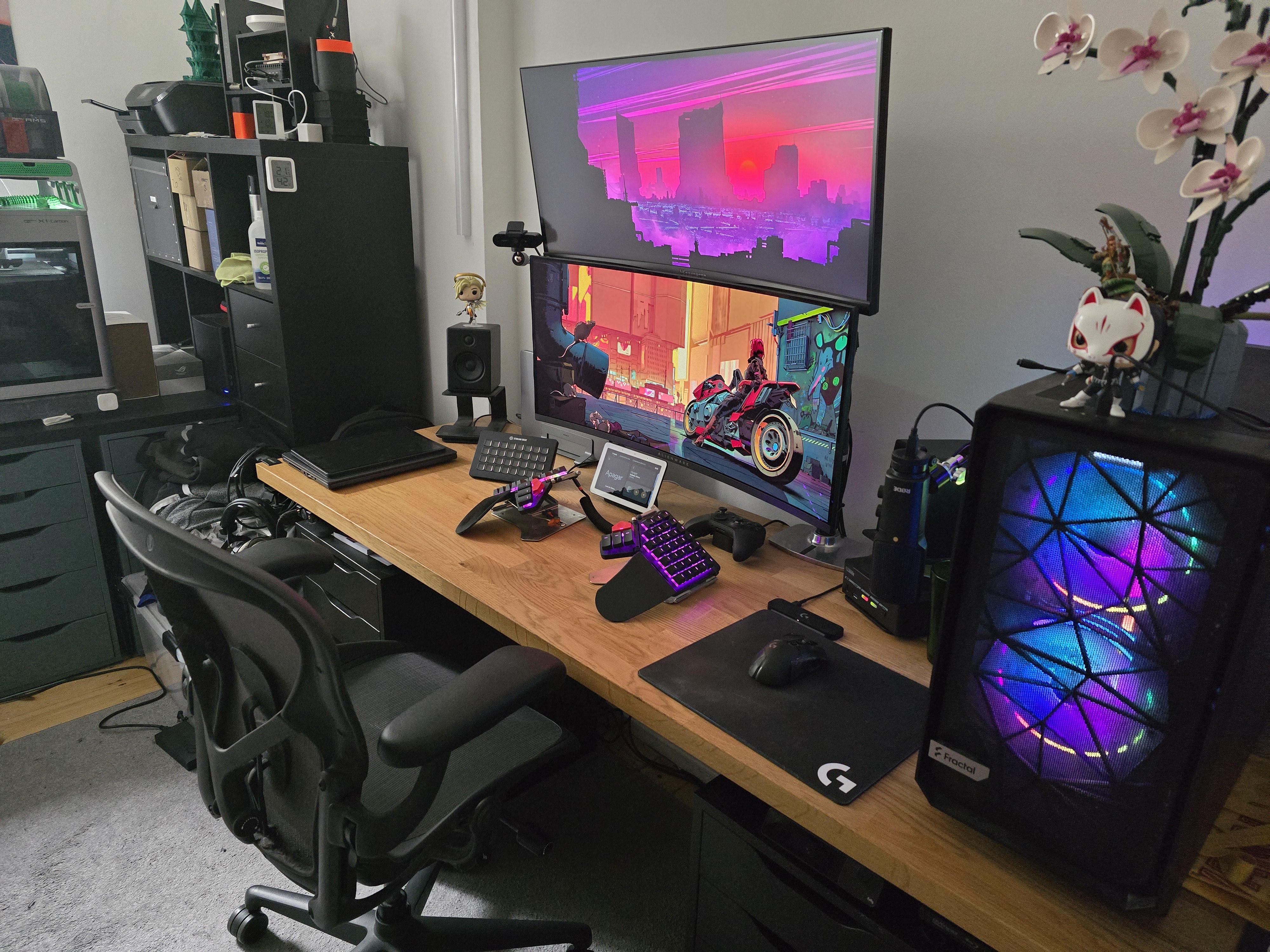
Spend a lot of time here between remote work, regular German classes and also some play time.
The main desk is the standard IKEA table top. Used to be set on top of the 2 Alex drawers but then I added the Jarvis frame to make it into a sit/stand desk so the whole thing moves up and down.
The main ‘feature’ of the setup is the Level1Techs KVM that while on the rather expensive side allows me to switch every single peripheral and screen between my desktop computer and my work macbook. Tried some cheaper stuff before but they all gave me a _lot_ of trouble trying to handle 2 3440×1440 screens when accounting for G-Sync on both, 120hz on one and 175hz on the other and HDR on the main screen (Alienware QD OLED). Their KVM on the other hand just worked right out of the box.
Got a bunch of smart plugs, Raspberry Pis and ESP microcontrollers all over the place so most of the desk is in one way or another connected to Home Assistant. It does thing like automatically switching inputs to my work laptop and turning it on before work days only if I’m not going to the office, records how much I spend standing/sitting, automatically sets some lights when it’s time for my classes if the current light level is too low… and wahtever other useless automation I tend to come up with XD.
moisdefinate
Frickin sweet though 💯👍🏽
lemi69
What’s the little monitor/tablet? Whats the use case for it?
rejzug
Neat! What is that keyboard?
Selector6712
Are you satisfied with the moonlander platform? Is that its max tenting angle?
MobiusTech
Nice!
TheTom4DS
What’s the the thing between the ams and 3d printer?

7 Comments
Spend a lot of time here between remote work, regular German classes and also some play time.
The main desk is the standard IKEA table top. Used to be set on top of the 2 Alex drawers but then I added the Jarvis frame to make it into a sit/stand desk so the whole thing moves up and down.
The main ‘feature’ of the setup is the Level1Techs KVM that while on the rather expensive side allows me to switch every single peripheral and screen between my desktop computer and my work macbook. Tried some cheaper stuff before but they all gave me a _lot_ of trouble trying to handle 2 3440×1440 screens when accounting for G-Sync on both, 120hz on one and 175hz on the other and HDR on the main screen (Alienware QD OLED). Their KVM on the other hand just worked right out of the box.
Got a bunch of smart plugs, Raspberry Pis and ESP microcontrollers all over the place so most of the desk is in one way or another connected to Home Assistant. It does thing like automatically switching inputs to my work laptop and turning it on before work days only if I’m not going to the office, records how much I spend standing/sitting, automatically sets some lights when it’s time for my classes if the current light level is too low… and wahtever other useless automation I tend to come up with XD.
Frickin sweet though 💯👍🏽
What’s the little monitor/tablet? Whats the use case for it?
Neat! What is that keyboard?
Are you satisfied with the moonlander platform? Is that its max tenting angle?
Nice!
What’s the the thing between the ams and 3d printer?