
SWIPE>>
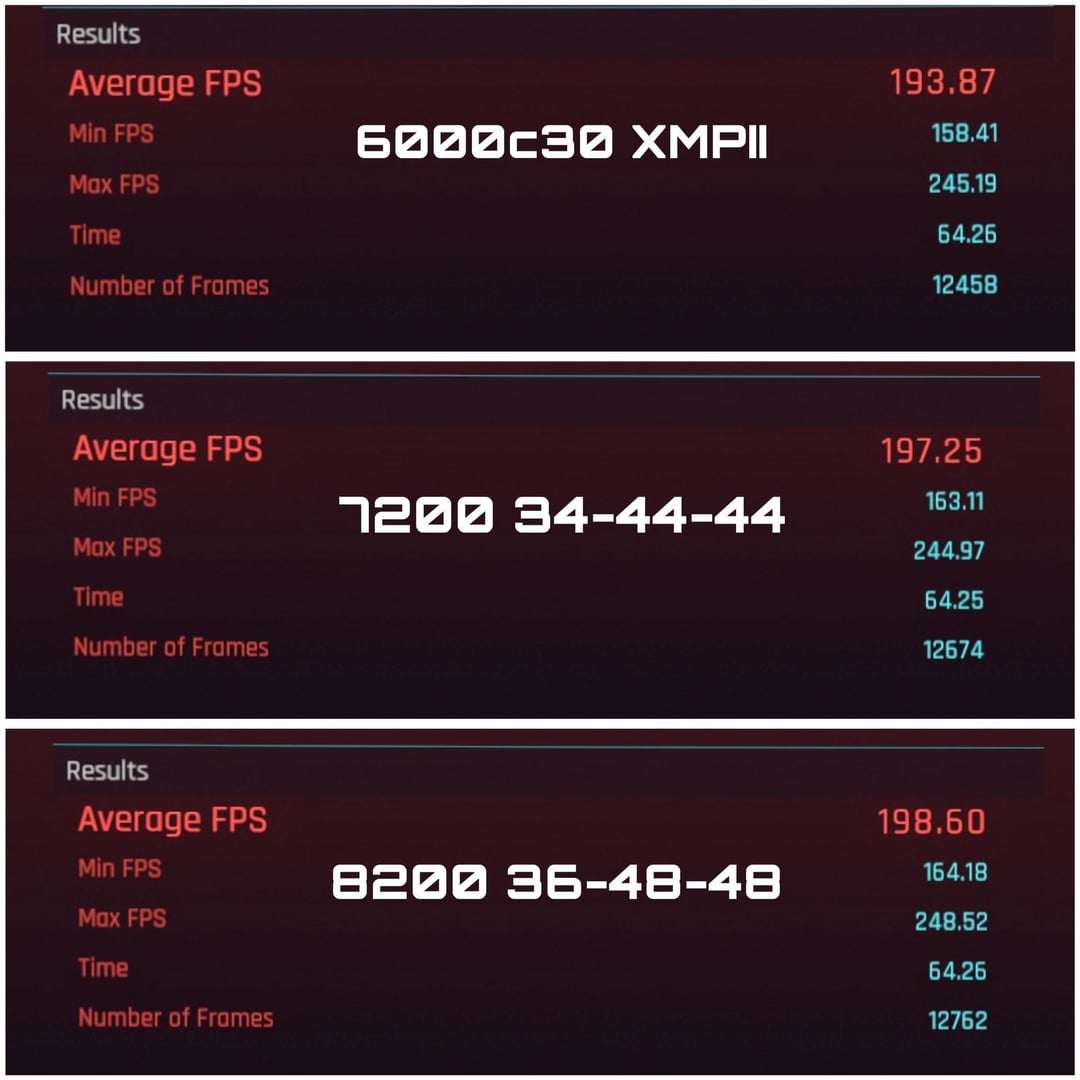
The difference is most certainly minimal. core clocks were fixed at 5.8/4.5 and I chose a GPU intensive game as well as R6 which is very CPU bound. I think the affect of so called "Ram OC" is very minimal here. Spec: 4080/14900KF
Test settings:
cyberpunk – 1080P ultra native, RT off
R6 – 1080P low preset (CPU bound scenario)
I'll gladly test more games upon your recommendations!
37 Comments
here’s another good example from HUB if anyone would rather hear it from a different well known review channel:
https://www.youtube.com/watch?v=RTmbYak_8gE
Rust or Tarkov. Not having tuned ram in those games makes the game awful.
And JayzTwoCents is a moron, I will stand by that. His audience is catered to the average Joe. And the mild misinformation he spreads is actively harmful
Anybody with a shred of pc knowledge avoids him and finds his videos funny. I only ever seem him mentioned on reddit as this is the “normie’ forum.
yeah, good luck having 8200 post and be stable in 90% of DDR5 systems.
The larger the jump the more it matters with diminishing returns at the highest it would seem. I can’t speak that much for DDR5, but on DDR4 enabling XMP actually had a noticeable performance uplift. This is obvious to most, but because of videos like the one mentioned, people seem to think it doesn’t matter.
I haven’t watched this exact video, but I do watch a lot of Jay’s videos. I think the problem is that he is often disconnected from real world prices and forgets to check what staff actually costs nowadays.
7200-7400MHz kits are around 120-130$.
You can get 6800MHz for 100$ as well.
Is about 20$ waste of the money?
Now do one at stock to prove the point.
and when you realise that getting RAM in larger size is almost always a good investment, up to like 24GB, getting faster RAM makes no sense unless you’re already at the size that you know for sure you won’t exceed too often.
larger > faster with RAM, all day
Once you learn what you are actually doing you shouldn’t be watching jayz2cents
Min fps improving by 5 is the only thing that matters here
So you’ve basically just proven his point here.
Fuck me for noy buying and Apex motherboard and having this trash z790 aprus master
Fast RAM with tuned timings is great for brute-forcing poorly optimized games and running emulators.
Min FPS 800+?! God damn
It’s a great test.
Only thing I want to note is that I remember hearing (from some AHOC video) that ddr5 performance is very sensitive to some secondary/ternary timings rather than just CL.
I haven’t even seen 8200 ram while browsing around
Post this in r/overclocking, it’ll fit right in.
So…a 1-2% improvement on a good day.
I have to ask, when the frame rate is that high do 5 extra frames a second actually matter?? I haven’t seen the vid OP is referring to, just a question on my part.
Now, this seems to be made on 1 run. The difference is well in run2run variance
That’s why, in games, DDR4 vs DDR5 difference is negligible.
I can see some sense into this only if dealing with slow ass sticks for some reason. I used to have 2×8 GB 2666 Mhz CL22 RAM in my laptop, upgraded to 2×16 3200 Mhz CL20 RAM and I got a noticeable boost in low 1% FPS and average FPS as well.
Was it worth it for performance alone? Not really, it might be a 5-10% boost or so at most. But I needed the extra RAM anyway.
yeah I just found it offensive he used a different stick for the 6000 test which made 4hw results useless
Can’t even run 6000 on my MSI PRO Z790-A
So, it does not matter that much…
Wow
so your test showed exactly what his tests in the video showed, so whats the criticism?
Well you seem to have .. found the results he did.
More faster, more better
many of you are missing the important point of STABILITY which the average user who just wants to game casually, doesn’t want to mess with. Assemble the pc, install Os and games, and be done with it for years. That’s the spirit among 95% of pc users.
Sure we can show some CPU overclock and GPU overclock, the games will run way better on them. Would you suggest to the average joe to just oc them? If you do, well, you are stupid. Same applies to ram sticks. As long as they work perfectly fine at 6000 with no surprises, you have zero reasons to go for 7200 just so you pay extra and risk your system’s stability, for laughable 5% fps gains or so.
Does it matter?
Pc guy who likes to see benchmarks and numbers: Yes
Someone who just plays: no
7200 can cost the same as 6000 sometimes or close to. At least when I bought a lexar kit.
Maybe it’s just me but, 5fps is nothing to scoff at.
Yup, that’s why people tend to recommend 6000CL30 for Intel systems as well, it’s a still affordable DDR5 memory and it’s better than 5200 in a memory heavy titles.
I remember when I built my PC and set XMP, I had so many problems and quirks and random crashes that took me weeks to pinpoint to XMP, turned it off and didn’t look back.
Overclocking is useless.
Isnt the whole thing about over 6000 being useless mainly about AMD builds? As far as stability I thought they suffered the most.
Id appreciate if you can also test Starfield, Dragon Dogma 2 and Cities: Skylines 2, if possible. Since they are more cpu intensive I believe the difference can be more noticable.
Can you also include more common speeds such as 3600cl17?
Thanks in advance.
I didn’t do my research and bought 4 sticks of 16gb 6000mhz for my 7800x3d.
It blue screens on anything over 5200mhz. I did a bunch of testing between 32gb 6000mhz and 64gh 5200mhz.
Literally 5 fps difference on every single game. It’s basically negligible
Dosent better ram effect more the response time of different shit like how fast minecraft will load 1000 nodded items in the items menu and shit like that.
Ik that more ram won’t increase fps but just let you load in way more chunks at the same time untill something else bottlenecks. Also is required for massive textures.
6000MHz CL30 is 10ns and 8200 CL36 is 8.7804878ns. The difference in latency between the first and the third “config” is 12.987%. I won’t bore anyone with the second one. Bandwidth for the first config is (assuming dual channel) ~96GB/s and the third is ~131.2GB/s. A nice 30.9859% improvement. As per usual, clocks offset high latencies. Allow ~1-2% rounding errors. The first 6000CL30 kit I found is 135.51 EUR, and the 8200CL36 kit is 256.03 EUR local pricing. Both are 2x16GB kits. The difference in cost is 61.562%. Already doesn’t sound good.
Take the Cyberpunk benchmark:
* The average FPS difference between first and third config is 2.41038%
* For the 64.26s benchmark duration, the third config generated 2.41079% more frames than the first config.
* And for the min FPS, the difference is 3.5773%.
**13% faster config, 3.5% at best improvement.**
Now to take the R6 benchmark:
* The third config generated 2.74208% more frames than the first. Does not specify time duration.
* Now for the min FPS, actually it takes advantage of half the expected improvement – 8200CL36 gives 6.2645% improvement over 6000CL30.
* Max FPS is improved by 2.68987%
**13% faster config, 6.3% improvement.**
Yeah, I think Jayz is correct. No need to waste money on expensive RAM. Better try your luck with OC. In both cases you get 200+FPS. Too expensive for what it puts on the table. You may not even be able to take advantage of your expensive kit. It’s a skill issue if 3% less frames is why you keep dying. Deal with it.
Again, speed offsets latency. But 10ns and 8.8ns are both eternity for 5.8GHz CPU (cycle time: 0.172ns). So that’s why you see marginal improvements – RAM is too sluggish, no matter what.