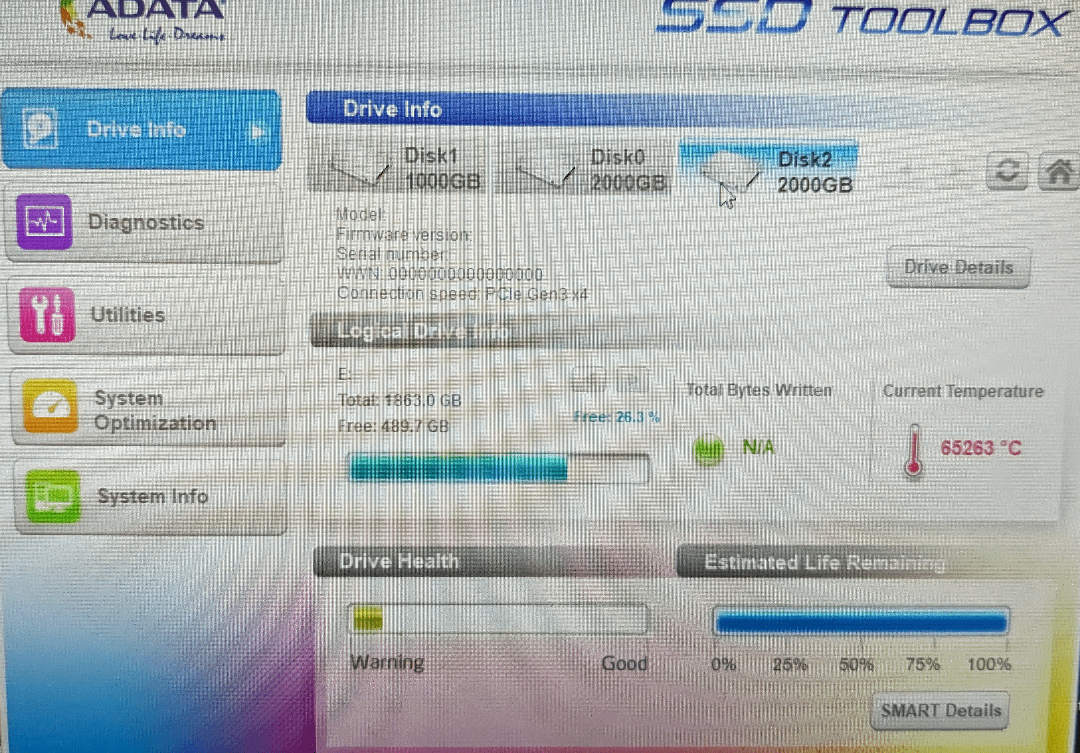
but 100% life remaining, so that’s good. Maybe just enjoy the fusion reactor while it runs
swordofbling23
It’s been very slow lately to load and move files, and task manager says it’s 100% in use at all time even at 0 read and write, is there something wrong with it that I can claim warranty or can I fix it
TheTrenchMonkey
Not great, not terrible.
WraithUSA
Do you see any molten metal flowing out of your computer? Perhaps flames? Toxic metallic smoke perchance?
NG_Tagger
Can’t speak for why it’s showing you that; but I can say that you shouldn’t be using a NV2 for anything other than random storage and that you should think about switching to something way more reliable.
It’s an overall shitty drive. I had my troubles with ’em in the past – never again.
You’re ok. Just remove your PC from the surface of the Sun and put it on your desk. That should help with the temps.
Xeran
Fun fact:
Programs store whole numbers as bits. Whole numbers are regularly stored as 16bit integer data types.
a 16-bit (unsigned) integer can store any whole-number value between 0-65535. (unsigned, aka, negative numbers not included)
It’s probably internally reading degrees Kelvin and then converting to celcius (which differs by 273.15 degrees)
If the chips temperature sensor is reporting 0 degrees kelvin, due to technical errors, that would be -273 degrees C (rounded for whole numbers)
Since the 16bit unsigned integer range is bound between 0 and 65535. If you subtract 1 from 0, you end up at 65535 (underflow). If you subtract 272 more from 65535 you end up at 65263.
bran808
Are you having any issues with the drive? I have the same drive and have been having issues with mine. I’ve had mine for a bit longer than you (over a year). The drive health on mine is fine, but the drive usage will sometimes spike to 100% and lock up my PC. Seems to happen more the closer to full it gets. Already took everything important off of it and am thinking of replacing it if it gets worse. I should have bought another drive before the price increases :/
doctapeppa
We have found the cause of global warming.
StrikerX1360
Your first mistake was buying the NV2 to begin with
dDuleReddit
I see Sauron has finally found an entrance to our universe.
l3gen0
Temp looks fine for me kinda a bit low tbh 😕
Registeryouraccount
Never buy kingston storage
agouraki
this program screams 2000s
WayDownUnder91
sensor is borked or misread since its adata software for a kingston drive

20 Comments
but 100% life remaining, so that’s good. Maybe just enjoy the fusion reactor while it runs
It’s been very slow lately to load and move files, and task manager says it’s 100% in use at all time even at 0 read and write, is there something wrong with it that I can claim warranty or can I fix it
Not great, not terrible.
Do you see any molten metal flowing out of your computer? Perhaps flames? Toxic metallic smoke perchance?
Can’t speak for why it’s showing you that; but I can say that you shouldn’t be using a NV2 for anything other than random storage and that you should think about switching to something way more reliable.
It’s an overall shitty drive. I had my troubles with ’em in the past – never again.
A bit of reading: [https://www.tomshardware.com/reviews/kingston-nv2-ssd](https://www.tomshardware.com/reviews/kingston-nv2-ssd)
Ah yes, because AData’s own tool is what you should use with a Kingston SSD.
Use Crystal Disk Info64, not this AData crap!
that will tell you the real info 🙂
https://crystalmark.info/en/software/crystaldiskinfo/
You’re ok. Just remove your PC from the surface of the Sun and put it on your desk. That should help with the temps.
Fun fact:
Programs store whole numbers as bits. Whole numbers are regularly stored as 16bit integer data types.
a 16-bit (unsigned) integer can store any whole-number value between 0-65535. (unsigned, aka, negative numbers not included)
It’s probably internally reading degrees Kelvin and then converting to celcius (which differs by 273.15 degrees)
If the chips temperature sensor is reporting 0 degrees kelvin, due to technical errors, that would be -273 degrees C (rounded for whole numbers)
Since the 16bit unsigned integer range is bound between 0 and 65535. If you subtract 1 from 0, you end up at 65535 (underflow). If you subtract 272 more from 65535 you end up at 65263.
Are you having any issues with the drive? I have the same drive and have been having issues with mine. I’ve had mine for a bit longer than you (over a year). The drive health on mine is fine, but the drive usage will sometimes spike to 100% and lock up my PC. Seems to happen more the closer to full it gets. Already took everything important off of it and am thinking of replacing it if it gets worse. I should have bought another drive before the price increases :/
We have found the cause of global warming.
Your first mistake was buying the NV2 to begin with
I see Sauron has finally found an entrance to our universe.
Temp looks fine for me kinda a bit low tbh 😕
Never buy kingston storage
this program screams 2000s
sensor is borked or misread since its adata software for a kingston drive
https://preview.redd.it/vpm1w6pmjrpc1.jpeg?width=476&format=pjpg&auto=webp&s=3a7f1277d75a246144f0e698b71b6e37ee9eb411
please look into crystaldiskinfo (and mark, if you want it) its open-source. trustworthy. extremely light.
it reads the drives s.m.a.r.t health stats and presents them in a much leaner..less telemetry based manner.
also more readable imho
look at health%
and lifetime written/read
also errors. raw #s
i think this is an error anyway. the temp is causing it, but this is obviously not actual temp or you would be aflame with excitement (and fire)
The power of the sun in the palm of my hand.