
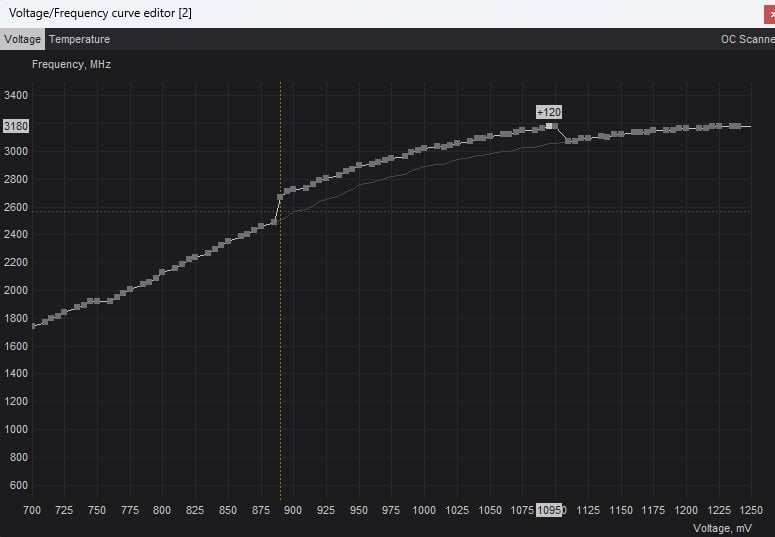
Hi guys, I've recently been trying to tune my TUF OC 4090 for better performance. For some reason, despite increasing core clock by +240 and memory by +1500 (voltage +100, PL/Temp max), it only boosts to 2.505 GHz (https://www.3dmark.com/3dm/109173763), which is lower than the stock boost clock and nowhere near what most results are at (around 2.8+ GHz at stock).
Any ideas as to what might be causing this? My GPU temps stayed under 70C and load was almost always at 100%. Also surprised that my CPU score seems to be a lot higher than usual…
Edit: Ran it stock https://www.3dmark.com/3dm/109176155 Much better results. Time to just run a more conservative OC?
Here's the OC curve in Afterburner if it's of any use: https://imgur.com/a/qmrVzVO
2 Comments
I doubt that’s stable and probably instantly going into “safe mode” when you apply the clock offsets. Reset everything to defaults and see if it boosts normally.
My 4080 FE tops out at +120Mhz core & +1000 memory… Even pushing +150Mhz on the core will get game crashes as that pushes the boost clocks beyond 3000Mhz.
I think it’s that goofy curve. It’s stopping at that first big jump from what I can tell from your screenshot.
Reset the curve and just apply an offset in AB (use the slider).