
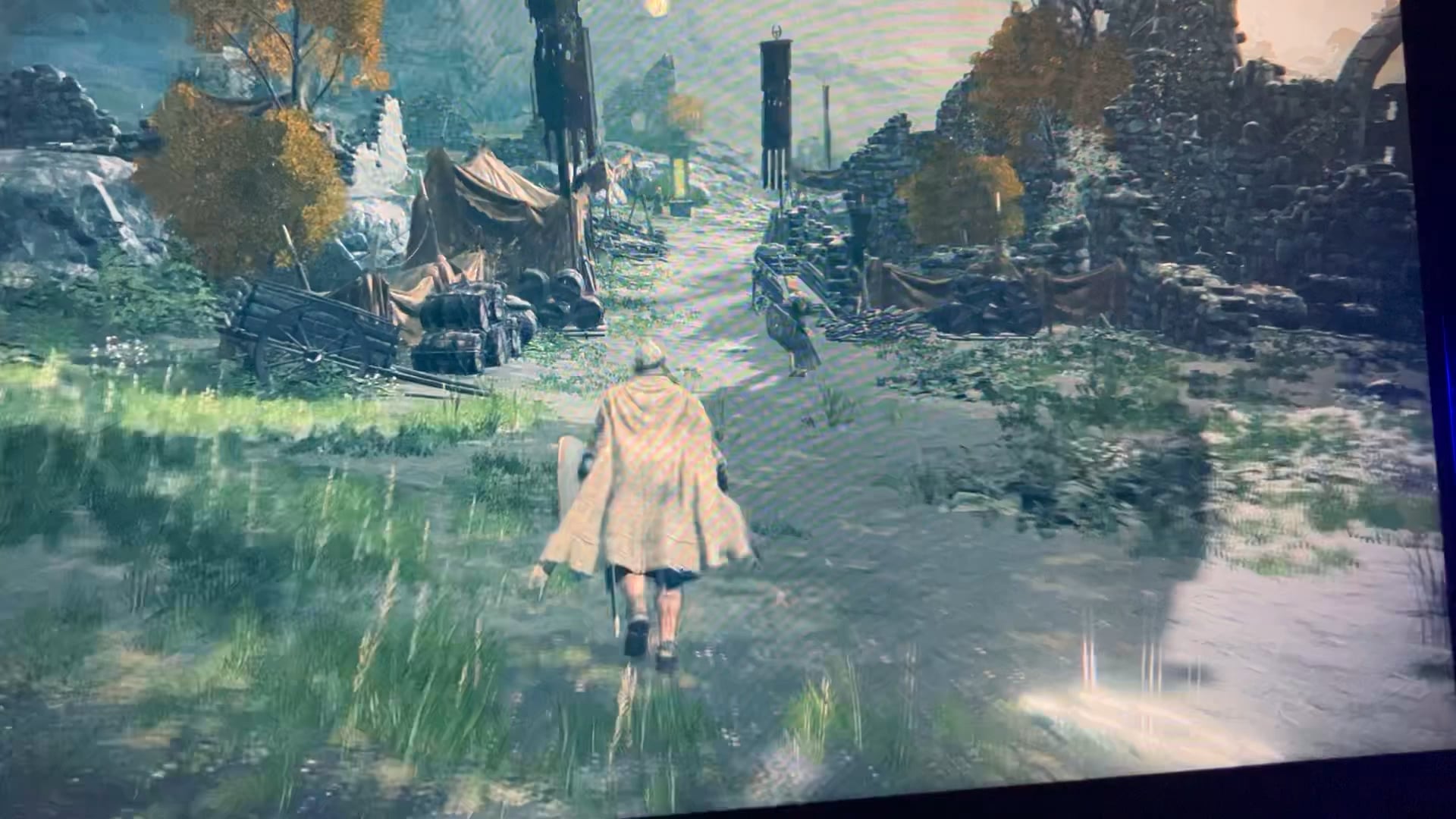
Hey everyone, I’ve come across this rather peculiar issue while using my gaming pc. It affects all games and apps. When ever I play a game things seem to flicker from one side of the screen to the other. In game enemy as well as my own character seem to be turn for fully towards a certain direction things and enemy are also teleporting. Certain parts of my character model become warped and also flicker. Also even while using apps such as steam images seem to be distorted. I’m really stumped. Any help would be very much appreciated. I’ve already reinstalled my drivers but have had no luck… I’ve individually tested my ram sticks and slots. I even went ahead and purchased a second hand RTX 2070 super and installed it and the issue remains.
Here are all my specs….
MSI VENTUS 3X GeForce RTX 4070 Ti 12 GB Video Card
Replaced with a
EVGA GeForce RTX 2070 Super FTW3 Ultra
MSI MPG B550 GAMING PLUS ATX AM4 Motherboard
Cooler Master MASTERLIQUID ML240L RGB V2 65.59 CFM Liquid CPU Cooler
AMD Ryzen 7 3700X 3.6 GHz 8-Core Processor
Corsair Vengeance RGB Pro 32 GB (2 x 16 GB) DDR4-3600 CL18 Memory
Sabrent Rocket Q 1 TB M.2-2280 PCIe 3.0 X4 NVME Solid State Drive
Corsair RM750e (2023) 750 W 80+ Gold Certified Fully Modular ATX Power Supply
39 Comments
I would have said that the GPU might be dying, but being you tested another and it’s doing the same thing, it has to be some other factor.
My first inclination is to try a new displayport/HDMI cable and see if the issue continues.
This is by far one of the weirdest problems I’ve seen on here, especially because it’s in multiple games, you did DDU, tested RAM, and it persists on another GPU… I doubt it’s your CPU because typically they either work or don’t. Maybe try a fresh install of Windows at this point?
It can’t be your monitor or HDMI/DP cable either because it’s the actual models in the game glitching, not the frame data itself.
Would say dx went mental but its definitely something other than that. If win reinstall dosnt help then start with hardware elimination. Also test that nvme
Your Elden Ring looks it’s loading, unloading, and reloading models repeatedly. Definitely start with a clean Windows install. If it still happens, my first thought would be SSD , then maybe RAM.
Maybe try to reset BIOS settings and try with defaults?
Cursed ring, VSHnite
Have you tried changing PCIe port?
You’re not overclocking the gpu right? I’ve had some effects like this when going too far
Sometimes it’s just Windows being irreparably buggy. Reinstall your OS.
Might be your cpu? I am assuming that because of how your elden ring character’s cape ia behaving, each time the bug happens the cape moves like it is miss calculation from the cpu, same with peely’s head. I am no expert but that is my assumption
this is some kind of a renderer issue (directx/vulkan) if you cant pinpoint it, a clean windows install might solve this
I had an identical problem, it was related to the vram, try reducing vram overclock, if that didn’t help, your gpu needs some repair
I know you have said you’ve reinstalled drivers, but before you did that did you uninstall them by going into device manager or use a software like DDU? Sometimes you have to fully uninstall drivers and not just reinstall them from something like GeForce experience. Something else you could try is using studio drivers instead of game ready ones. I’ve had game ready drivers do some weird stuff to me. Even caused a few BSODs that scared the crud out of me.
this might just be the weirdest shit I have ever seen
this Is probably not going to fix it but it’s worth trying. reseat the cpu, doing a fresh install of windows, using a different monitor, swapping cables and lastly try a different pcie slot? or using the igpu instead if you only have the 1 pcie
Temperature?
Pretty sure you have a tilted cartridge!
Maybe this will help?
https://www.nvidia.com/en-us/geforce/forums/gaming-pcs/8/250636/all-games-to-flickershimmer-when-moving/
Damnnnnnnnn rip your eyeballs =/
Wow, Elden Ring by Bethesda
Do you have any weird electrical interference from a device nearby? I would keep swapping components until you find the culprit. Try another screen and cable even though its unlikely that’s the problem.
maidenless behavior
It’s most likely a drivers or api issue. Download an offline installer for your drivers, Go offline, Use DDU multiple times, removing Nvidia, AMD and Intel drivers before installing the new drivers. Only then go back online.
I had an issue a few years back from Windows update with it installing drivers for Intel when I had no Intel hardware, I didn’t have all the same display issues but the flickering in game is familiar.
If it’s directX then it’s only going to be fixed by a clean Windows install. Makes me wish for the old days when it had its own installer.
Have you tried doing the whole safe mode driver uninstall? Then swapping to another GPU.
It’s bizarre… GPU would be main culprit, but it’s persistent, so I’d make extra sure drivers are uninstalled before testing another one. RAM can do weird things, so if you have extra sticks I’d try them, but I doubt it’d do this.
It could be software? If you’re stumped am OS reinstall is often a good idea.
You have unlocked ultra instinct
plug the cable to motherboard and see if its fix. if problem solved then ur graphics card dying(lower the vram speed via msi afterburner). if isnt that means ur graphics card okay but not the pc;)
Like others said this is weird because you tried on a different graphics card. The only time I have had anything similar happen was on a card with overclocked VRAM of GDDR6 and it was auto correcting and causing some weird jumpy graphics but not as intense as that.
Is this a new build? Like has it always done this? I’m wondering if there’s a bent pins or issue with the mobo even the expansion slot causing errors in the pcie bus.
I would try fresh windows install first. Then look to other factors.
[deleted]
My guess is your gpu is dying. By GPU, I mean the chip itself.
this is indeed interesting
Normally, I would say your GPU is cooked. This exact same thing happened to me years ago. But you say you replaced the GPU and the issue persists? If this is the case, I would first fresh install Win11 and if the problem persists, get a new motherboard.
I had a similar issue on an old PC, graphical errors like you have in Epic store would happen in windows and games were straight up unplayable. The weirdest part is that errors like melted text in windows would even appear in screenshots. They did go away when I switched to integrated graphics, though I’m pretty sure they should go away with OS reinstall, very weird issue
I’m gunna say you have a GPU issue. Either with the GPU core or some weird vram issues. This is really strange.
I would wipe everything. Format your hard drive and do clean installs to make sure it isn’t software related. If you still have the issue you can swap parts to narrow it down.
I had a friend with a bad stick of ram that was giving him very strange issues. So it could be something simple or really obscure. Best of luck.
Try building an entire new computer with new drives and a new OS.
Reading through comments and seeing you’ve ruled out most of your more hefty components, I’d be willing to bet it’s either cpu or motherboard. Hope you find the solution friend:/
Do you have any weird display management software installed?
Did you switch motherboard/cpu and didnt reinstall windows?.
If it’s following cards and you ruled out RAM then you probably damaged the PCIE slot at some point. Likely installed the graphics card wrong or something, but I imagine it’s the motherboard at this point. It won’t be HDMI or DP, it won’t be the CPU, and your PSU should be sufficient. I’d say RAM, but sounds like you’ve tested each one already. If you have another mobo, or can get a friend to test out the GPU on their machine then that will tell you the problem is on your end and I’d say it’s the motherboard.
Try uninstalling directX redist and install it again.
Kind of reminds me of 1 user having something like this in the finals, it was because the game was using the wrong cpu threads bassicly bug with he’s cpu, he turned of one ccd and bug went away i think anyway ended up being cpu related, it was big thread as well, think he had the same bug on an NVIDIA gpu as well cos he had an AMD gpu.