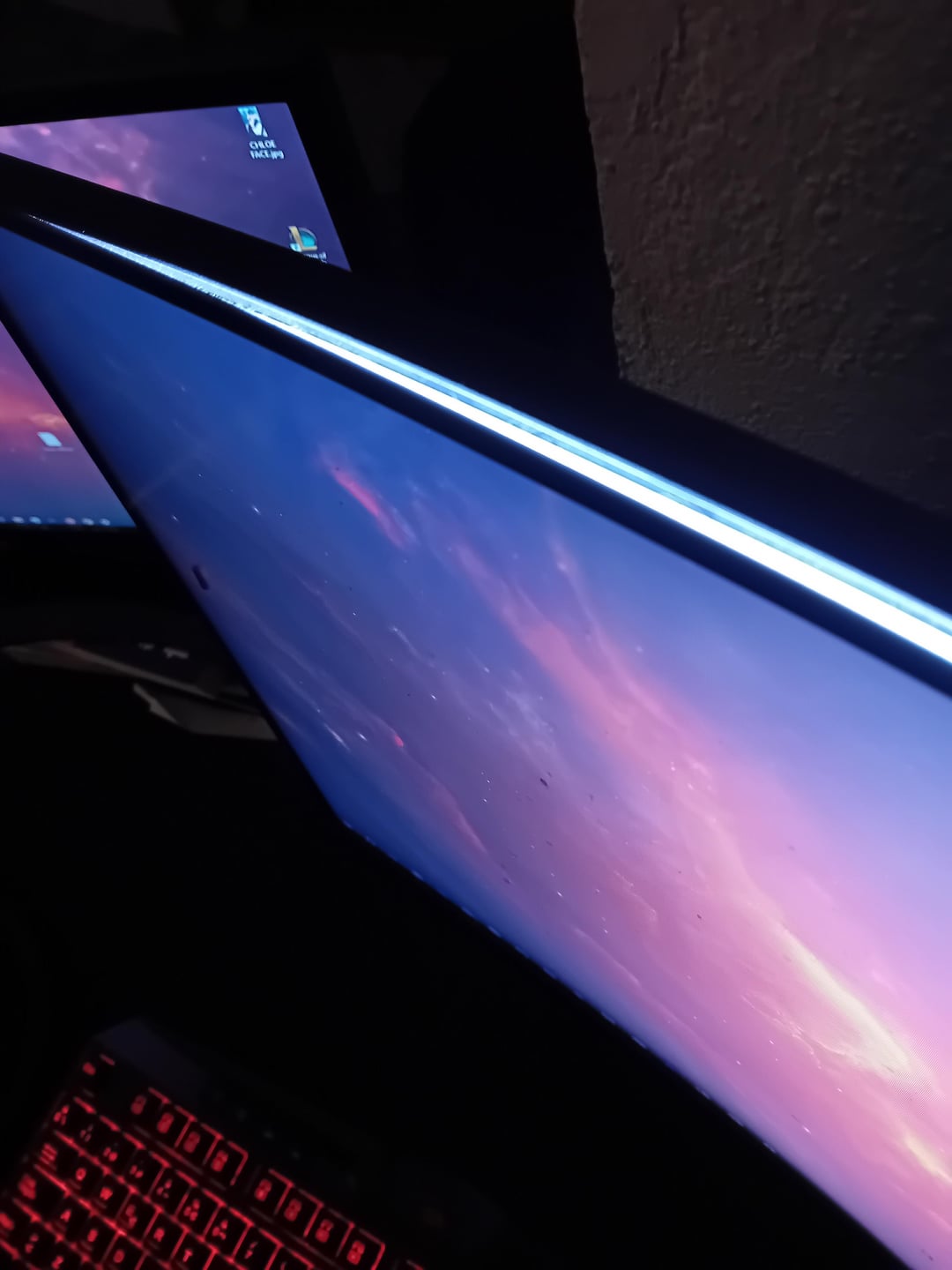
Somehow, the top part of my monitor became unglued, and an annoying fly managed to get inside. I’m never buying curved monitors again. Any ideas to get it out from there without damaging the screen?

Somehow, the top part of my monitor became unglued, and an annoying fly managed to get inside. I’m never buying curved monitors again. Any ideas to get it out from there without damaging the screen?
35 Comments
Compressed air? Vacuum?
A moth!
Bet that it’s super cozy in there.
You could try a straw. Or a folded sheet of paper.
“I’m never buying curved monitors again.” While I’m not a big fan of curved displays myself, in this case the issue may not be caused by the curvature of your monitor. At my workplace, we have over 20 Lenovo flat monitors that have the same manufacturing problem.
IMHO vacuuming it should work.
Has nothing to do with curved monitors. The same thing happened to me on a non curved monitor. The insects are attracted to the light of the monitor. They’ll crawl in between the frame. I’ve had to throw away a 500€ early gen 165Hz 1440p acer predator (non curved) because of that. Some tiny bug crawled in and died in the middle of the screen. Looked like 50 dead pixels in the middle of the screen.
Get a straw and suck it to your lungs
Turn screen off and put phone light at top of hole maybe. Also when finished maybe tape up the top
Seriously no one made a joke about the monitor having a bug?
How was this a curved monitor thing?
Does it have warranty? If so just return it and get your money back. I don’t think it’s worth the trouble.
I would take the monitor apart, clean the affected layers and use some kind of glue or whatever method works best to fix the gap (maybe no glue is needed at all and the layers just pop back in) and reassemble. I’ve had a similar problem with fruit flies inside my cheapo lcd samsung monitor and I had to take it completely apart. It works fine for now.
LMAO, definitely a bug. Send it back to the manufacturer as a defect. State: monitor has bug in it. When their product isn’t able to function in the environment it was designed for without failure, they’ve failed to meet reasonable standards.
Not a curved monitor issue – it’s a glue issue.
Whats the monitor brand?? Tell us so we dont buy it in the future 😁
Got a curved monitor as well, and some bottom part of it has come unglued. Never had the issue with regular monitors. As for the fly, that’s just sad.
turn it off and shine a torch at the hole it will find its own way out lol
Try turning it upside down and blowing some compressed air in there to remove the insect. Then carefully cover the gap up with some electrical tape as a quick semi-permanent fix.
Slide a piece of paper through it and that should help, or turn it upside down and tappy tap. If it’s a moth and still alive turn the monitor off and put a flashlight at the top
If it’s not in warranty anymore and you dont mind trying to fix it. That looks like the polarizing layer to the monitor. If behind the later that is peeling is just bright white light to your bare eyes and no picture, that is what it is. You can try using a credit card around the outside to pull it the rest of the way off. Then use double sided tape around the edge where it wont touch the screen itself and tape it back on along the edges. If still under warranty, dont try to fix it. Send it in.
It’s not a big with curved monitors, it’s a feature
Do you have warranty?
Your pc is bugged
Just gotta buy a better monitor. Which brand was this?
Add more flies to keep it company.
Try reseting your router.
Put a strong light on top of your monitor when you sleep at night . The fly should follow the light and comeout.
I thought a fly suddenly appeared on my device
It’s attracted to light. Turn your monitor off for a few minutes, turn on another light and go outside for a bit.
Put a spider in there to deal with it.
Aerosol spray cans are nice to have in general
That was unexpected.
Maybe (super carefully) try some VERY thin gage jewel crafting wire. Or a very long, thin pipe cleaner that you curve into a little hook to yoink the thing out?
Maybe, unplug it , turn it upside down, „pry“ the panel open slightly more and bump the top carefully and look if the fly falls out.
Or get long pliers or anything similar and try to get it out carefully, if you scrape on the screen or panel it might destroy the polarizer.
fabricate an adapter from your vacuum to the approximate size of the gap in your tv and hoover it out.
I’ve never seen this. Don’t blame curved monitors for this one
give it to some developer and tell him to debug it xD